

Multi-Tabling Online Poker: How Many Tables Should You Play in 2026?
Multi-tabling means playing more than one poker table at the same time. It is the single biggest volume lever available to online players: more tables means more hands per hour, more rake generated, and (if done correctly) more money earned per session.
But every table you add comes with a cost. Your thinking time shrinks, your reads get thinner, and your per-table win rate drops.
Here is what this guide covers:
- Format-by-format table counts for beginners through high-volume regulars
- Current 2026 table caps by poker room with HUD policy
- The diminishing returns math: why more tables does not always mean more money
- How HUD access changes your ceiling and the 25% rule
- When to add or remove a table mid-session and how to set up your layout
Most online grinders perform best at 4 to 6 regular-speed cash tables. Beginners should start with 1 to 2. The sections below walk through every variable so you can find the number that fits your game right now.
Recommended Table Count by Format
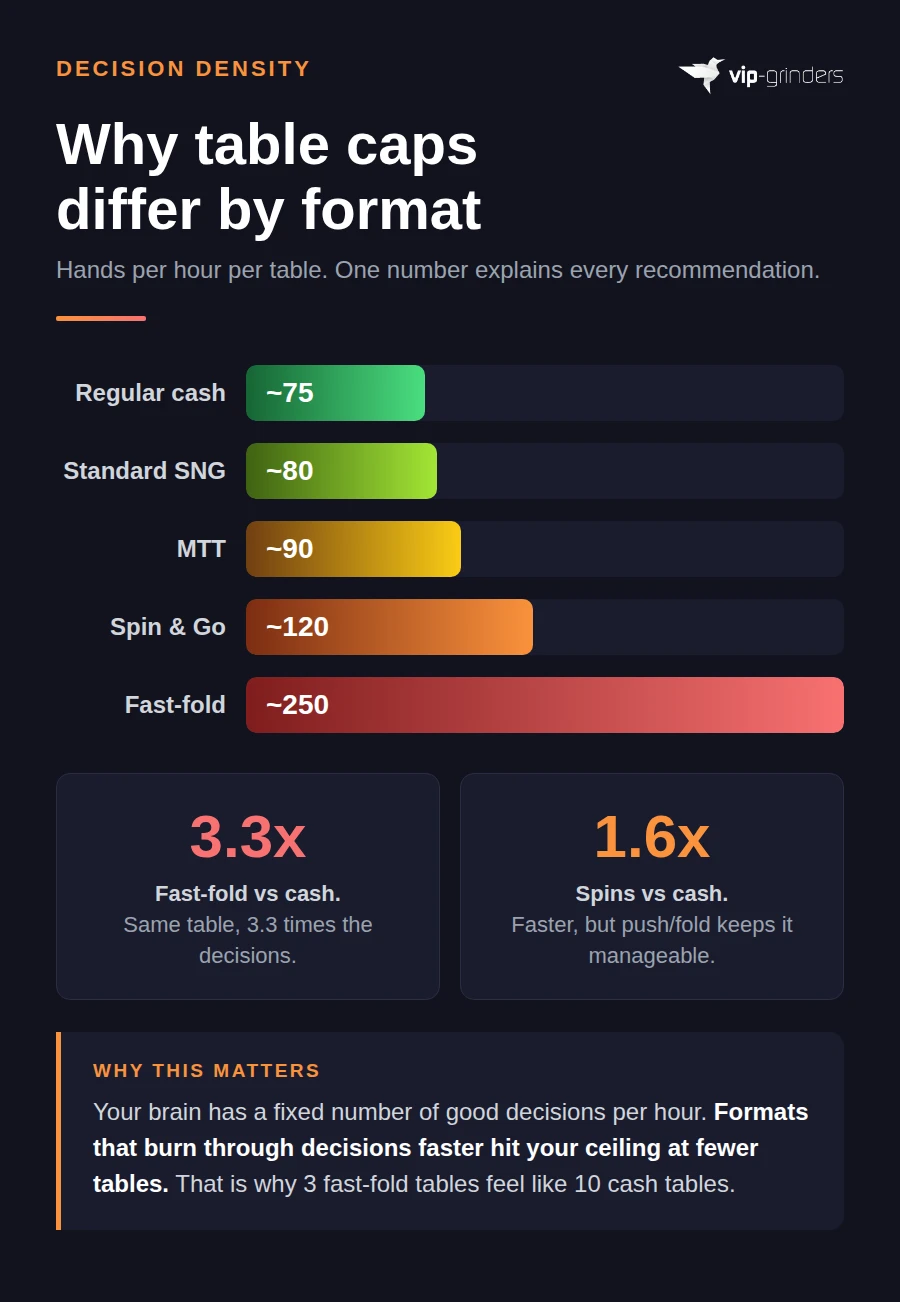
The right number of tables depends heavily on which format you play. Each format has a different decision density, meaning how many hands you see per hour per table. A format that deals more hands per hour gives your brain less recovery time between decisions, which lowers the number of tables you can handle before quality drops.
The table below breaks it down by three skill tiers across every major online poker format.
| Format | Beginner (first 6 months) | Intermediate (beating your stake) | High-volume regular |
|---|---|---|---|
| Regular cash (6-max: 6 players per table, or full ring: 9 players per table) | 1 to 2 | 4 | 6 to 9 |
| Fast-fold (Zoom / Rush & Cash / Snap) | 1 | 2 | 3 |
| Spin & Go (jackpot SNG) | 2 | 4 | 6 to 8 |
| Standard SNG (Sit & Go) | 2 | 4 | 8 to 12 |
| MTT (Multi-Table Tournament) | 2 | 4 to 6 | 8 to 14 early, scale down to 1 to 2 at final tables |
Why Fast-Fold Caps Are So Much Lower
A single regular-speed cash table deals roughly 75 hands per hour. A single fast-fold table deals 200 to 300 hands per hour because you are moved to a new table the instant you fold.
Three fast-fold tables generate the same hand volume as 8 to 12 regular tables. That is why even experienced grinders rarely play more than 3 fast-fold tables at once.
Format-Specific Notes
- Spin & Go: these are 3-player jackpot tournaments with short stacks and heavy push/fold decisions. Because most decisions are binary (shove or fold), you can handle more tables than in a deep-stacked cash game.
- Standard SNG (Sit & Go): a Sit & Go is a single-table tournament that starts as soon as all seats fill. Decision density is low in the early phase and spikes near the SNG bubble (the point just before prize money pays out), so high-volume players stagger their registrations to avoid multiple bubbles at once.
- MTT (Multi-Table Tournament): an MTT is a tournament with dozens or hundreds of players across multiple tables. Grinders typically register many events early and stop adding new ones as they go deeper. Once you reach a final table, every decision carries significant money implications, so you want no more than 1 to 2 tables running.
Table Caps by Poker Room in 2026
Every poker room sets a hard limit on how many tables you can open at once. These caps changed significantly in 2025 when PokerStars raised its limit from 6 to 8 and partypoker migrated to the iPoker network. Most older guides still show outdated numbers, so this table reflects the current 2026 reality.
| Room | Cash Cap | Fast-fold Cap | MTT / SNG Cap | HUD Allowed? |
|---|---|---|---|---|
| PokerStars (.com) | 8 | 8 (Zoom counts toward total) | 24+ | Yes (with restrictions) |
| GGPoker | 9 per blind level | 4 Rush & Cash per blind level | No published limit | No (Smart HUD only) |
| 888poker | 6 | 6 (Snap counts in same pool) | 8 | Yes |
| WPT Global | 3 (Windows) / 2 (Mac) | 1 Pace | 7 (Windows) / 4 (Mac) | No |
| ACR / WPN | 24 | 24 | No cap | Yes |
| iPoker (incl. partypoker skins) | 16 | 16 | 16+ | Yes |
| Chico (BetOnline) | 8 | 8 | No cap | Yes |
| BCPoker | ~4 | n/a | Standard | No (BC Shield) |
GGPoker’s “Per Blind Level” Rule Explained
GGPoker’s cap works differently from other rooms. You can open up to 9 cash tables at each blind level. That means 9 tables of $0.25/$0.50, plus another 9 tables of $0.50/$1, and so on.
In practice, most grinders play a single stake, so the effective cap for a typical session is 9 tables.
Mobile Caps
If you play on a phone or tablet, your cap drops regardless of the room’s desktop limit. Most mobile apps allow 3 to 5 tables at best. iOS and Android screen size makes tiling impossible, so you are limited to stacking (tables overlap and pop to front when it is your turn to act).
For formats with fewer decisions per hand like Spins or hyper-turbo SNGs (tournaments with very fast blind levels that increase every 2 to 3 minutes), mobile multi-tabling at 3 to 4 tables is realistic. For regular cash, 1 to 2 tables is the practical ceiling on mobile.
Why More Tables Does Not Always Mean More Money
Every table you add increases your total hands per hour, but it also reduces the quality of your decisions on each table. Your win rate (measured in bb/100, which stands for big blinds won per 100 hands played) drops as you split your attention across more screens. At some point, the extra volume stops compensating for the lost edge, and your total income flattens or drops.
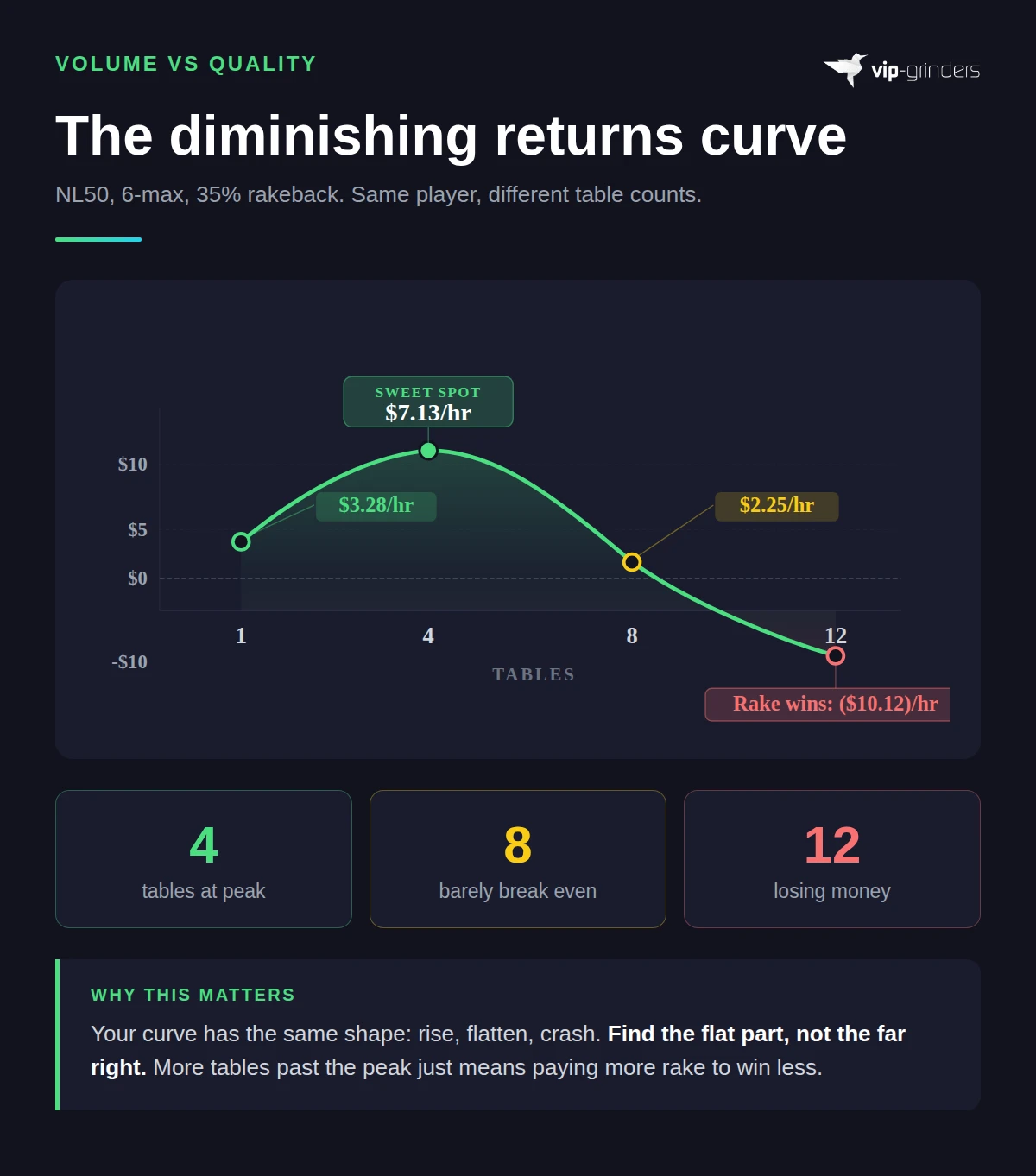
The table below shows how this plays out for a hypothetical NL50 (blinds $0.25/$0.50) 6-max grinder with a 35% rakeback deal. The numbers are illustrative, but the shape of the curve is the same for every player.
| Tables | Win Rate (bb/100) | Hands/hr | Gross $/hr | Rake Paid/hr | Rakeback/hr | Net $/hr |
|---|---|---|---|---|---|---|
| 1 | 6.0 | 75 | $4.50 | $1.88 | $0.66 | $3.28 |
| 4 | 4.0 | 300 | $12.00 | $7.50 | $2.63 | $7.13 |
| 8 | 2.0 | 600 | $12.00 | $15.00 | $5.25 | $2.25 |
| 12 | 0.5 | 900 | $4.50 | $22.50 | $7.88 | ($10.12) |
In this example, 4 tables is the sweet spot. Gross income peaks at 4 to 8 tables, but rake eats more of the edge as volume climbs.
At 8 tables the player barely breaks even after rake, and at 12 tables the win rate has collapsed so far that rakeback cannot cover the gap. The player is now losing money despite playing 900 hands per hour.
Your personal curve will look different depending on your skill, your stake, and your rakeback deal. But the shape is always the same: income rises, flattens, then falls. The goal is to find the flat part of your curve, not the far right.
For the full $/hr calculation including how to find your own numbers, see our hourly rate guide.
- Why rake matters so much: rake is a fixed cost per hand. When your win rate is high, rake is a small slice of your earnings. When your win rate drops toward zero, rake becomes the dominant factor and can push you into negative territory.
- Why rakeback shifts the curve: a strong rakeback deal (30% to 50%) gives back a portion of that rake, which pushes your sweet spot slightly higher. Without rakeback, the curve flattens and drops even earlier. See our guide on how your rakeback deal changes optimal table count for the full breakdown.
How HUD Access Changes Your Table Ceiling
A HUD (Heads-Up Display) overlays statistics on each opponent directly on your poker table. Common stats include how often a player folds to a continuation bet (a follow-up bet after raising preflop), how often they 3-bet (re-raise) preflop, and how aggressively they play postflop. With a HUD running, you do not need to remember any of this because the software tracks it for you across thousands of hands.
Without a HUD, every read comes from your own memory and note-taking. That takes significantly more mental bandwidth per table, which lowers the number of tables you can play before your decisions start to suffer.
The 25% Rule of Thumb
A practical guideline is to reduce your maximum table count by about 25% on rooms that ban HUDs compared to rooms that allow them, assuming the same format and stake. If you comfortably play 8 tables on PokerStars with a HUD, expect 6 tables to be your realistic ceiling on GGPoker or WPT Global where third-party HUDs are banned.
This does not mean HUD-banned rooms are worse for grinding. Many of those rooms have softer player pools because the HUD ban discourages tool-dependent regulars from playing there.
Your per-table win rate may actually be higher on a HUD-banned room, even with fewer tables open. Our table selection guide walks through how to compare player pools across rooms.
What Rooms Offer Instead of HUDs
Most HUD-banned rooms provide a built-in alternative. GGPoker has its Smart HUD, which shows basic stats from your own session only. 888poker allows third-party HUDs but also offers HUDdy, its own in-client display.
BCPoker’s BC Shield blocks all third-party tools but lets you take manual notes on opponents.
These built-in tools are intentionally limited. They give you enough to make basic reads, but nothing close to the multi-thousand-hand databases that a full HUD provides. On these rooms, table notes and mental tagging (labeling opponents as loose, tight, aggressive, or passive in your head) become your primary reads, and each one costs attention that would otherwise go to another table.
- HUD-allowed rooms (PokerStars, 888, ACR, iPoker): your ceiling is set by your cognitive speed and the room's table cap. Software handles opponent profiling.
- HUD-banned rooms (GGPoker, WPT Global, BCPoker, Unibet): your ceiling is set by your memory and note-taking speed. Expect roughly 25% fewer tables than your HUD-allowed maximum.
- Mixed approach: some grinders play fewer tables on a HUD-banned room during peak traffic (softer fields, higher win rate) and add volume on a HUD-allowed room during off-peak hours.
When to Add a Table (and When to Remove One)
Finding your sweet spot is not a one-time decision. It shifts between sessions, between stakes, and even within a single session as your energy level changes. Instead of picking a fixed number and sticking to it forever, use these two checklists to make the call in real time.
Signs You Are Ready to Add a Table
- 1You are consistently beating your current stake over at least 30,000 hands at your current table count.
- 2You frequently find yourself waiting for action and reaching for your phone or switching to another app between hands.
- 3Your time-bank (the countdown timer that gives you extra seconds to decide) rarely drops below 50% on any table. If you still have plenty of thinking time left on most decisions, your brain has room for another table.
- 4You can recall the last 2 to 3 significant hands on every open table without checking your hand history. If your short-term memory is still tracking the action across all tables, you have bandwidth to spare.
Signs You Should Remove a Table
These are the warning signs that your current table count is too high. If any two of these are true during a session, close one table immediately. Do not wait until the session ends.
- 1You are using your time-bank on more than 20% of non-trivial decisions. Routine folds do not count. If you are running out of time on real spots (calling river bets, deciding whether to 3-bet), you have too many tables open.
- 2You catch yourself clicking fold on hands you would normally play. This is autopilot folding. Your brain is taking shortcuts to keep up with the volume, and each shortcut costs you money over time.
- 3You cannot remember what position you are in on at least one table without looking. Position awareness is one of the first things to go when cognitive load gets too high.
- 4You feel mentally tired or irritated, and it started after you added the last table. This is tilt spread and cognitive overload setting in. Removing a table now prevents a full session collapse later.
The One-Table Test
If you are unsure whether your table count is hurting your win rate, run a simple experiment. Play 500 hands at your current table count and record your results. Then play 500 hands with one fewer table and compare.
If your per-table win rate jumps noticeably with fewer tables, you were playing too many. If it stays roughly the same, your original count was fine.
This is not a statistically rigorous sample (you would need tens of thousands of hands for that), but it gives you a quick directional signal within a single session. Over time, your tracking software will confirm the pattern across a meaningful sample.
Table Layout and Setup
Once you know how many tables to play, the next question is how to arrange them on your screen. The right layout keeps every table visible or accessible without wasting time dragging windows around. There are three common approaches.
Tile vs. Stack vs. Dynamic Slots
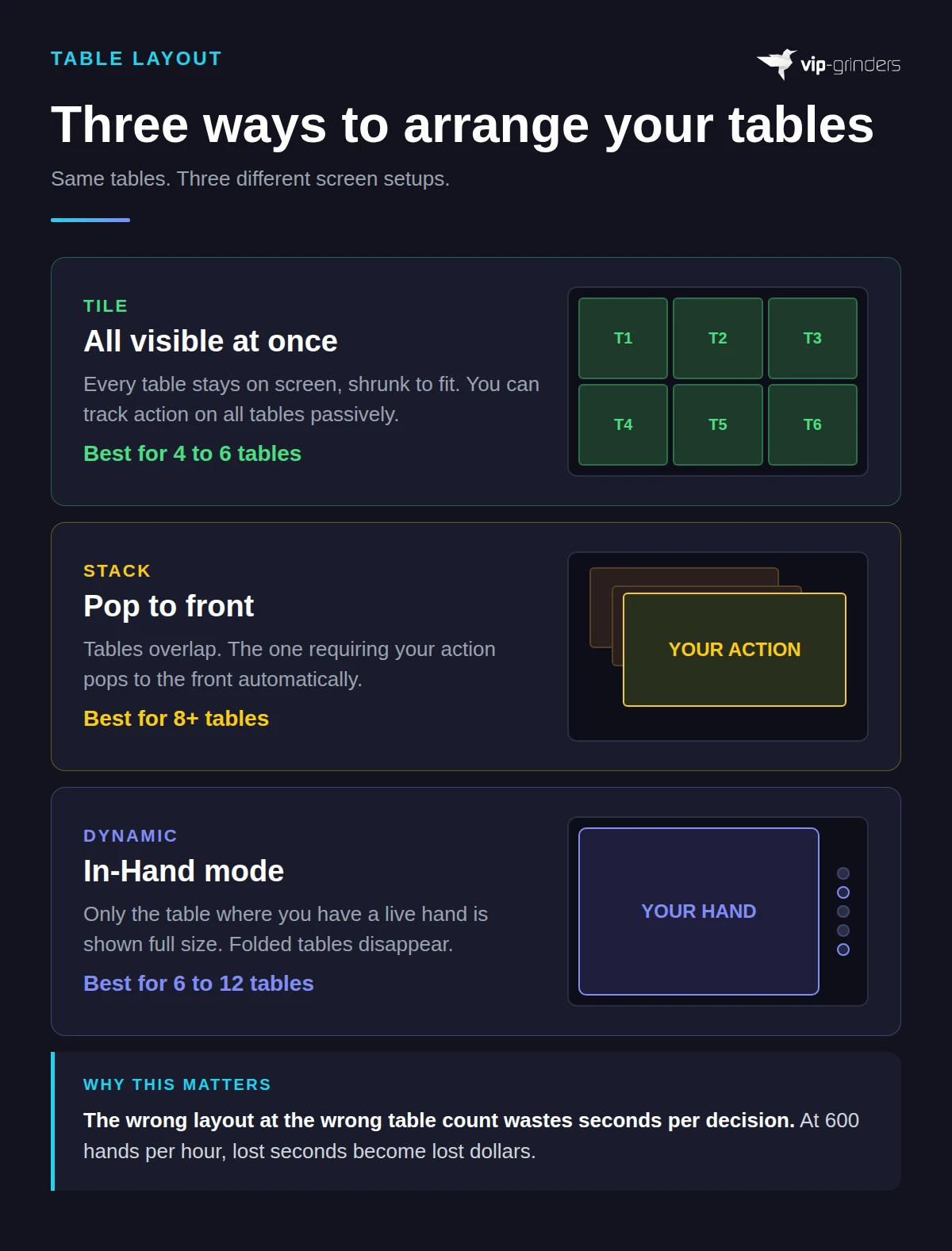
- Tile: all tables are visible on screen at the same time, shrunk to fit. Best for 4 to 6 tables on a single monitor or up to 12 across two monitors. You can see the action on every table without clicking anything, which helps you track opponent patterns passively.
- Stack: tables overlap in a pile and the table that needs your action pops to the front automatically. Best for 8+ tables when screen space is limited. The downside is you lose sight of tables where you are not yet involved in a hand.
- Dynamic slots: tools like Jurojin Poker's In-Hand mode display only the table that currently requires a decision at full size. Tables where you have folded shrink or disappear until your next hand is dealt. This is the newest approach and works well for 6 to 12 tables on a single screen.
Hardware and Software That Help
A second monitor is the single biggest hardware upgrade for multi-tabling. It doubles your screen space and lets you tile 8 tables comfortably instead of stacking them. Beyond that, a few software tools handle the repetitive parts of table management so you can focus on decisions.
- Table managers: Jurojin Poker, Table Ninja II, and StackAndTile automate layout, seating, and bet-size presets. Jurojin is free up to NL10 ($0.05/$0.10 blinds) and supports most major rooms.
- Hotkeys: keyboard shortcuts for folding, calling, raising, and preset bet sizes save 1 to 2 seconds per decision. Over a 600-hand-per-hour session, that adds up to minutes of extra thinking time.
- Four-color deck: this changes each suit to a different color (typically red hearts, blue diamonds, green clubs, black spades). It eliminates suit-misread errors when your tables are small or you are making fast decisions. Every major poker client offers this in settings.
Mobile Setup
On mobile, your only layout option is stacking. Tables rotate to the front when it is your turn to act. You cannot tile or use third-party table managers.
Keep your table count at 2 to 3 on mobile and focus on formats with fewer decisions per hand, such as Spins or hyper-turbo SNGs. Regular-speed cash on mobile works best at 1 to 2 tables because the small screen makes it harder to read board textures and bet sizes quickly.
How Multi-Tabling Connects to Your Long-Term Results
Multi-tabling is a volume tool, not a strategy tool. It does not make you a better player. It amplifies whatever edge you already have, which means it also amplifies your leaks if your fundamentals are not solid.
Before adding tables, make sure you are actually winning at your current count. A player who breaks even at 2 tables will not magically become profitable at 6.
They will just lose money faster while paying more rake. If you are not yet a winning player, focus on improving your game at 1 to 2 tables first.
More Tables Means a Faster Path to Your True Win Rate
One underrated benefit of multi-tabling is sample size acceleration. Poker results are heavily affected by short-term variance, and small samples can make a winning player look like a losing one (or the other way around).
If you need 50,000 hands to get a reliable picture of your actual win rate, playing 1 table at 75 hands per hour means roughly 667 hours of play. At 4 tables (300 hands per hour), that drops to 167 hours. You reach statistical clarity four times faster, which means you can identify leaks, confirm improvements, and make bankroll decisions with real data instead of guesswork.
Reassess When Your Variables Change
Your optimal table count is not permanent. It shifts every time one of the five variables from this guide changes.
- You move up stakes: opponents are tougher, so each table demands more attention. Drop your table count by 1 to 2 when you first take a shot at a higher stake.
- You switch formats: moving from regular cash to fast-fold or from SNGs to MTTs changes your decision density. Recalibrate using the format table above.
- You change rooms: a new room may have a different table cap, a different HUD policy, or a different rakeback structure. All three affect your sweet spot.
- Your rakeback deal changes: a better deal pushes your optimal count slightly higher. A worse deal or no deal pulls it lower.
- Your skill improves: as decisions become more automatic through study and repetition, your brain frees up bandwidth. That is when adding a table becomes profitable again.
The question whether online poker is still profitable comes down to the same equation every grinder faces: Skill × Volume + Rakeback − Costs. Multi-tabling is the volume multiplier in that equation. Getting the number right is one of the simplest ways to increase your monthly income without changing anything else about your game.
Frequently Asked Questions
Does multi-tabling lower your win rate?
Yes. Every table you add reduces the amount of thinking time you have per decision, which leads to more mistakes and a lower win rate per table. The trade-off is that your total hands per hour increase, so your overall income can still go up even as your per-table results dip. The goal is to find the table count where total income peaks before the win rate drops too far.
How many tables do professional poker players play?
It depends on the format. Cash game professionals typically play 4 to 8 regular-speed tables or 2 to 3 fast-fold tables. Tournament professionals often register 8 to 14 MTTs during a session and scale down as they go deeper. Some high-volume Spin & Go specialists play 6 to 8 games at once because the short-stacked format requires fewer complex decisions per hand.
Can I multi-table on PokerStars?
Yes. PokerStars raised its cash game cap from 6 to 8 tables in September 2025, and that limit remains in place. Zoom tables count toward the same 8-table total. For MTTs and SNGs, the cap is much higher (24+ tables), so tournament grinders are rarely limited by the platform itself.
Is multi-tabling worth it without rakeback?
It can be, but your sweet spot will be lower. Rakeback recovers a portion of the rake you pay on every hand, which means each additional table generates extra income even if your win rate dips. Without rakeback, the rake cost of adding tables hits harder and the diminishing-returns curve drops off earlier. If you are playing without a rakeback deal, you are leaving money on the table, so check our rakeback deals page to see what is available at your room.
Can I multi-table poker on my phone?
Yes, but with limits. Most mobile poker apps cap you at 3 to 5 tables, and the small screen means you cannot tile tables side by side. Stacking (tables pop to the front when it is your turn) is the only layout option. For mobile sessions, stick to 2 to 3 tables in formats with fewer decisions per hand, such as Spins or hyper-turbo SNGs.
What is the best multi-tabling software?
The most popular table management tools are Jurojin Poker, Table Ninja II, and StackAndTile. Jurojin is free up to NL10 ($0.05/$0.10 blinds) and supports most major rooms including PokerStars, GGPoker, 888, iPoker, and ACR. Table Ninja II is a subscription-based alternative with a 14-day trial. All three handle table layout, hotkeys, and bet-size presets so you can focus on decisions instead of window management.
Should I multi-table cash games or tournaments?
Both work, but the approach is different. Cash games offer a steady, predictable volume where you can keep the same number of tables open for the entire session. Tournaments require a phased approach: register many early, stop adding as you go deep, and focus on 1 to 2 tables at final tables where every decision has large payout implications. The best format for multi-tabling depends on which one you already beat at a single table, and good session planning and break cadence will keep you sharp regardless of format.