

GTO Wizard Review 2026: Hands-On Test by VIP-Grinders
We put GTO Wizard through a three-month test: 20,000+ hands uploaded to the analyzer, hundreds of trainer spots drilled across NL50 to NL500, and every subscription tier evaluated side by side.
Our review covers what each pricing plan actually gives you, how the training tools perform in practice, and where the software still has gaps.

If you’re weighing GTO Wizard against PioSolver or GTO+, the feature comparison and ROI breakdown below will help you pick the right tool for your stakes.
Our Verdict: 9.2/10
| Category | Details |
|---|---|
| Formats Supported | Cash Games, MTT, Spin & Go, HU SNG |
| Pricing | Free tier available. Paid plans from $39/mo (Starter) to $229/mo (Ultra) |
| Solution Accuracy | ~0.21% Nash Distance |
| Pre-solved Library | 10,000,000+ game trees |
| Key Strength | No local hardware needed. Runs entirely in your browser. |
| Best For | Players at NL25+ who study between sessions and want structured GTO training |
What Is GTO Wizard?
GTO Wizard is a browser-based poker solver with over 10 million pre-computed game trees stored on remote servers. Simply log in, select a spot, and the solver output will appear in seconds.
There is no software to install, no hardware requirements, and no waiting periods.
The platform supports four formats, each with its own dedicated preflop and postflop solution sets:
- Cash Games: 2-max through 9-max at all standard stack depths
- Multi-Table Tournaments: full ICM and chipEV solutions across all stack sizes
- Spin & Go: 3-max with push/fold and postflop trees
- Heads-Up Sit & Go: dedicated HU solutions for all blind levels
Each solution is calculated to a Nash Distance of approximately 0.21%. Most local solvers running on home hardware reach 0.3% to 0.5% before compute time becomes impractical, so GTO Wizard’s pre-solved output matches or beats what most players achieve with hours of custom solving on their own hardware.
March 2026: 50x Library Expansion
Before the update, the database lacked postflop continuation for many preflop-only spots. Now, every opening range, 3-bet, and cold call is connected to a complete postflop strategy through the river.
GTO Wizard published the technical details of the expansion on their blog.

How GTO Wizard Compares to Local Solvers
Most players have the same question: Why pay a monthly subscription fee when you can buy PioSolver once for $249?
The answer depends on your study habits. Here’s what each workflow looks like:
For players who want both the speed of pre-solved libraries and the flexibility of custom solving, GTO Wizard’s Elite and Ultra tiers include an AI-powered solver that lets you run custom spots directly in the browser.
We cover this feature in detail in the features breakdown below.
Accuracy Check: 94% Match Rate
Trainer accuracy showed measurable improvement. After 200 practice spots in a single format (NL100 6-max cash), our tester’s correct-decision rate climbed from 61% to 78% over four weeks.
This aligns with what you would expect from focused repetition with solver-backed feedback.
We ran each paid subscription tier for a minimum of two weeks, using the same study workflows for all tiers.
This lets us pinpoint exactly where each tier’s feature gates start to matter and where you’re paying for tools you won’t use at certain stakes.
Key Features Breakdown
The GTO Wizard is a platform that bundles five core tools: a practice trainer, a pre-solved solution browser, a hand history analyzer, a custom AI solver, and a range reporting system.

Each tool targets a different part of your study workflow. The table below summarizes what each tool does, its strengths, and its limitations based on our testing.
GTO Trainer (Practice Mode)
The GTO Trainer places you in a simulated situation and asks you to make decisions on each street.

After every action, it shows whether your play was correct according to the solver output, what the optimal play was, and how much EV you gained or lost with your choice.
- Format selection: Cash 6-max, MTT 8-max, Spin & Go, HU SNG
- Difficulty levels: filters by spot complexity (preflop only, single-raised pots, 3-bet pots, multiway)
- Position filters: drill specific seats (BTN vs BB, CO open, SB 3-bet, etc.)
- Free tier: 10 hands per day. Starter and above: unlimited
During our test, we ran 200 training sessions in NL100 6-max cash over the course of four weeks. Our tester’s correct-decision rate climbed from 61% to 78%.
The tester saw the most improvement in 3-bet pot scenarios, where the solver feedback corrected a consistent c-bet sizing leak on dry boards.
Setup takes almost no time. You can start drilling just 60 seconds after creating an account, making it one of the most accessible poker training tools on the market.
The interface displays your action, the GTO-optimal action, and the EV difference simultaneously, so you can see exactly how costly each mistake is.
Trainer Limitation
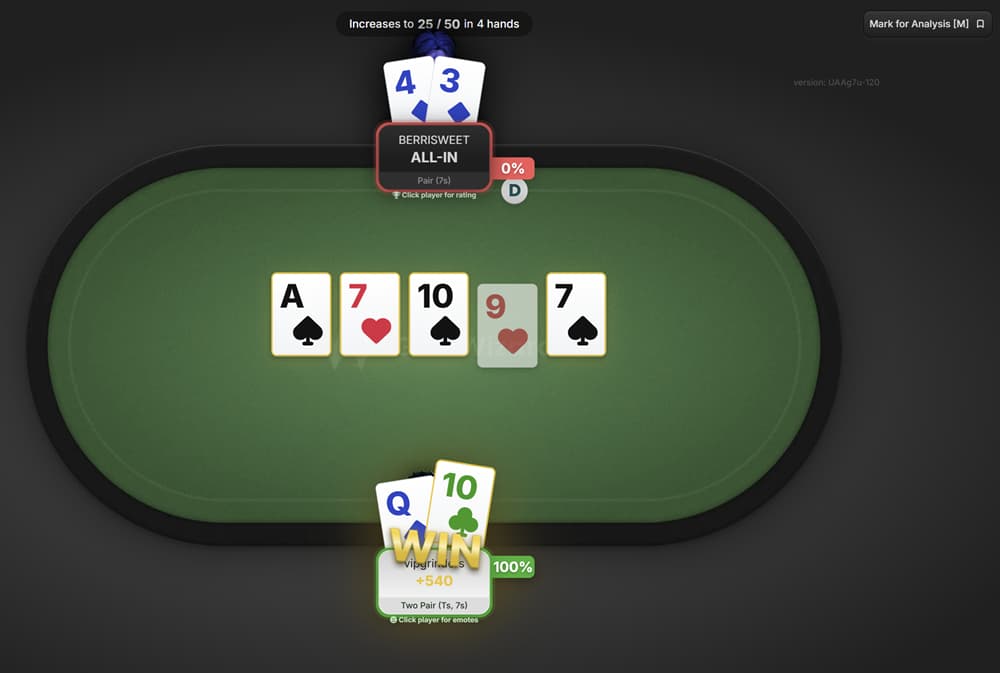
PokerArena (Play Against Real Opponents)
GTO Wizard launched PokerArena in mid-2025 as a free competitive poker platform built on top of its solver engine.
Instead of drilling against pre-solved spots, you play actual heads-up matches against other players, with every hand automatically analyzed by the solver after the match.
The platform runs three modes:
- Competitive: ranked heads-up matches with a rating system that rewards GTO-accurate play, not just wins. Monthly seasons with leaderboards and rewards
- Casual: same gameplay without rankings or pressure. Good for testing new strategies before taking them to ranked
- Play With Friends: private tables for up to 9 players via shareable link. No registration required for guests
The key difference from the Trainer is that you face unpredictable human opponents rather than scripted solver scenarios.
After each match, every hand is saved to your GTO Wizard account and linked to the solver. You can review your decisions against optimal play, check your GTO Score, and identify exactly where you leaked EV in a real match context.

PokerArena is completely free to play across all three modes. Basic post-match analysis is also free. Deeper breakdowns (aggregated reports, full hand history analysis) require a Premium or higher subscription.
The rating system measures decision quality against GTO benchmarks rather than just results, so running hot in a session does not inflate your rank.
This makes the leaderboard a more reliable indicator of actual skill improvement over time.
Cross-Platform Play
Pre-Solved Solution Browser
This is the core of the platform. You select the format, positions involved, preflop action sequence, and stack depth.
The output displays as a color-coded range grid with action frequencies for every combo, and the load speed means you can check 20+ spots in a single study session without downtime between lookups.

In practice, this changed our study workflow significantly: you can follow any preflop decision through flop, turn, and river without hitting a dead end in the database.
One gap worth flagging: the pre-solved library uses fixed bet sizing trees. If you typically use a non-standard sizing (for example, 2.2x opens instead of 2.5x), the closest available tree may not match your actual game.
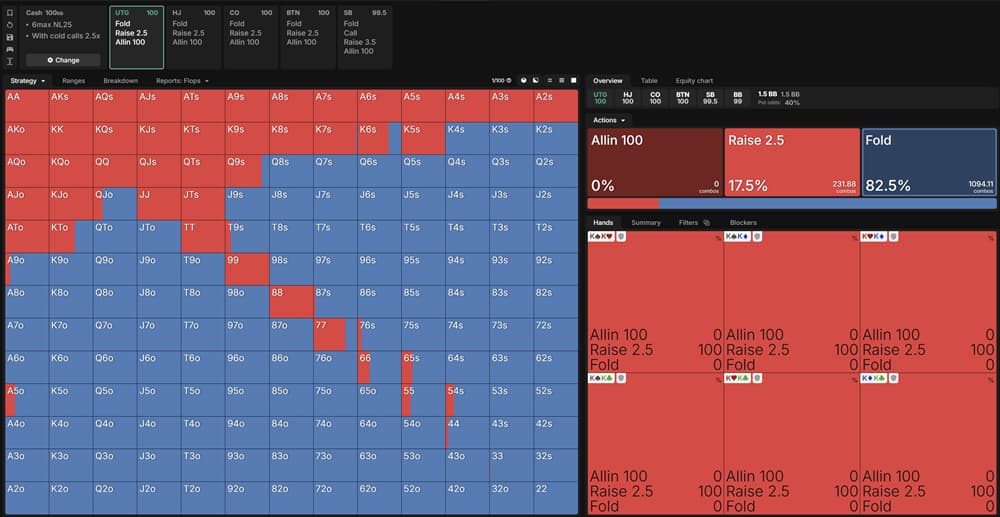
The stakes and formats where this matters most are micros and low stakes, where players often deviate from standard sizings.
Hand History Analyzer
The Hand History Analyzer lets you upload your own played hands and run them against GTO Wizard’s solution library.
Each hand gets an accuracy score showing how closely your decisions matched solver-optimal play, with street-by-street breakdowns of where you deviated and how much EV each deviation cost.
- 17 supported poker sites: PokerStars, GGPoker, 888, PartyPoker, Winamax, WPN (ACR), Ignition, iPoker, CoinPoker, Unibet, Chico, PokerBros, PPPoker, UPoker, WePoker, PokerMaster, PokerTime
- Supported formats: Cash 6-max, Cash 8-max, Cash HU, MTT 8-max, Spin & Go, HU SNG
- Bulk upload: drag and drop entire session folders or database exports
Upload limits vary significantly by tier:
| Tier | Hands Analyzed per Month | Best For |
|---|---|---|
| Free | 5 hands/month | Quick test before subscribing |
| Starter ($39/mo) | 100 hands/month | Reviewing key hands from weekend sessions |
| Premium ($79/mo) | 100,000 hands/month | Regular grinders running full session reviews |
| Elite ($139/mo) | 150,000 hands/month | High-volume multi-tablers and coaches |
| Ultra ($229/mo) | 150,000 hands/month | Same as Elite, bundled with AI solver credits |
Tournament grinders who want to supplement their hand analysis with opponent scouting can pair the Analyzer with SharkScope, a tool that tracks public tournament results across all major networks.
Use it to identify the weakest fields before you register, then use GTO Wizard to study the spots where you lost the most EV.
The Starter Bottleneck
One practical detail: when you upload a hand where your bet sizing doesn’t exactly match a pre-solved tree, GTO Wizard snaps it to the nearest available size. A 3bb open gets mapped to a 2.5bb solution, for example.
This is generally accurate enough for study purposes, but be aware that edge cases with unusual sizings may not reflect true optimal play for your specific line.
GTO Wizard AI Solver
The AI Solver is a custom solving engine that runs inside GTO Wizard’s servers. Instead of looking up pre-solved trees, you define your scenario (custom ranges, stack depths, bet sizes, rake structure) and the solver computes a fresh solution.
This is the feature that bridges the gap between GTO Wizard’s convenience and the full flexibility of running PioSolver locally.
Node locking is the standout feature at the Elite tier. You define how a specific opponent plays (for example, the villain never folds top pair, or villain over-folds to river bets), and the AI Solver recalculates the entire tree to generate the maximum-EV exploit strategy.
You can lock by individual combo, hand category, or use frequency sliders to quickly model player tendencies.
During testing, we ran node-locked solves against three common opponent profiles: a passive calling station, an over-aggressive 3-bettor, and a player who folds too much on the river.
In contrast, when it came to the calling station profile, the solver moved towards thinner value bets and disregarded most bluffs. This is what you would anticipate from sound bluffing and exploitative theory.
Range Builder and Aggregated Reports
The Range Builder lets you visualize and customize hand ranges for any spot in the solution library. You can filter by position, action taken (open, 3-bet, call, fold), board texture, and equity bucket.
The output is a visual range grid that you can modify, lock combos, and re-solve to see how changes affect downstream play.
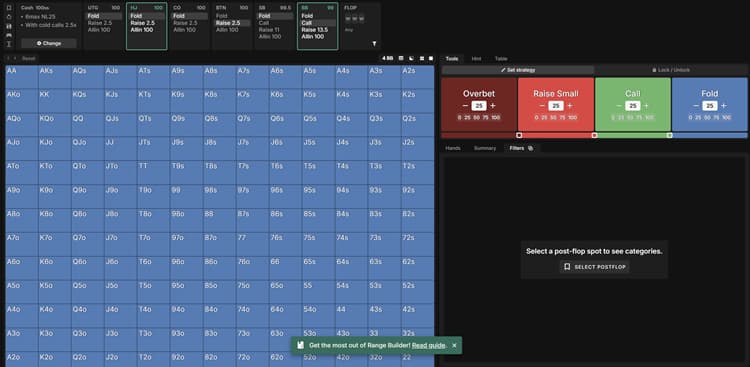
Aggregated reports take it a level deeper. Rather than examining one specific flop, they analyze strategy data across all 1,755 distinct flops simultaneously.
They demonstrate patterns such as how frequently the button should c-bet on paired versus connected boards and how range advantage shifts when the big blind check-raises monotone flops.
- Data points: EV, equity, equity realization, action frequencies, bet sizing distribution
- Filtering: board texture (paired, monotone, rainbow, connected), position, pot type
- Custom reports (Elite): solve aggregated data with your own ranges, sizing, stack depth, and rake
- PKO support: aggregated reports account for bounty dynamics in progressive knockout tournaments
Standard aggregated reports are available from the Premium tier. Custom aggregated reports (where you define your own parameters) require Elite and consume Power Credits based on scenario complexity.
For poker strategy study, the aggregated reports are where GTO Wizard delivers the most unique value. No local solver can produce this kind of cross-flop analysis without days of batch processing and custom scripting.
If you’re a coach or a player building a study curriculum around specific board textures, this feature alone may justify the Premium or Elite price tag.
Pros and Cons of GTO Wizard
After 12 weeks of testing by four team members and the analysis of more than 20,000 hands, the strengths and weaknesses of GTO Wizard are revealed.
Every point below is supported by specific data from our testing or verifiable product specifications.
Pro
- Runs in any browser on any OS - no hardware or installation needed
- 10M+ pre-solved game trees with instant lookup, expanded 50x in March 2026
- Built-in GTO Trainer with per-decision EV feedback
- All formats covered: Cash, MTT, Spin and Go, HU SNG, and PKO
- Weekly coaching sessions and 200+ hours of recorded content from Starter tier
- Hand history analysis from 17 poker sites with automated leak detection
Con
- Monthly cost exceeds PioSolver's one-time $249 price within 7 months
- AI Solver and node locking locked behind Elite tier ($139/mo)
- No offline mode - requires internet for every lookup
- Fixed bet-sizing trees snap non-standard lines to nearest available size
- Starter analyzer capped at 100 hands/month - Premium ($79/mo) is the realistic minimum
If you have a Mac or an inadequate desktop computer, expect to spend an extra $500 to $800 on hardware or setting up a virtual machine.
Consider that most players spend over 20 hours learning how to build custom game trees, and GTO Wizard’s monthly fee becomes a worthwhile investment.
The Fixed-Sizing Trade-off
There is no workaround for offline access. The GTO Wizard does not store anything locally and does not have a downloadable client.
If your internet connection drops during a session, your study time stops. Players who regularly study while commuting or traveling should consider this when choosing a tool.
GTO Wizard Pricing Plans (2026 Updated)
GTO Wizard restructured its subscription model on March 31, 2026. The most significant change: Cash and Tournament are now two standalone formats instead of five.
Players who previously needed separate subscriptions for Cash, Straddles & Antes, Tournament, Spin & Go, and HU SNG can now access everything under one Cash or one Tournament plan.
Here is the full pricing breakdown as of April 2026, sourced from GTO Wizard’s official pricing page:
| Tier | Monthly Billing | Annual Billing | Annual Savings |
|---|---|---|---|
| Free | $0 | $0 | n/a |
| Starter | $49/mo | $39/mo | ~20% ($120/year) |
| Premium | $99/mo | $79/mo | ~20% ($240/year) |
| Elite | $169/mo | $139/mo | ~18% ($360/year) |
| Ultra | $279/mo | $229/mo | ~18% ($600/year) |
Loyalty Pricing for Existing Users
Each tier is a single subscription that covers one format (cash or tournament). If you want both, you need two subscriptions.
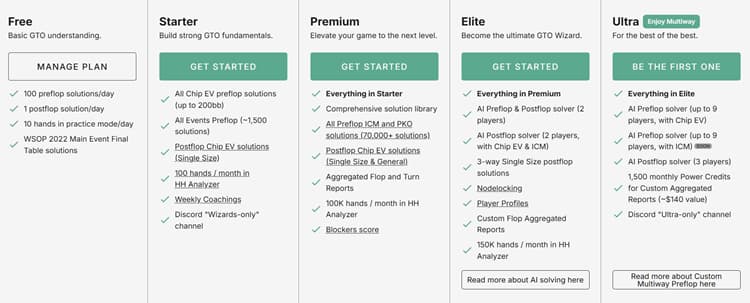
The feature set is identical across Cash and Tournament at every tier. Only the solution library content differs.
What Changed in March 2026
Before the restructure, GTO Wizard sold five separate format subscriptions. A player who studied both 6-max cash and MTTs needed two plans.
The consolidation merged those into two broader formats, which reduced cost for multi-format players but came with a price increase of $10 to $20 per month for new subscribers on Premium and above.
- Starter: price unchanged. Added weekly coaching sessions and 200+ hours of recorded coaching content
- Premium: increased $10/mo. Added heads-up postflop solutions and Single Size coverage
- Elite: increased $20/mo. Added 3-way Single Size postflop solutions
- Ultra: price unchanged. Added Custom Preflop Tree Builder for full tree editing
Net effect for most players is positive. You get access to more formats and a larger solution library at each tier.
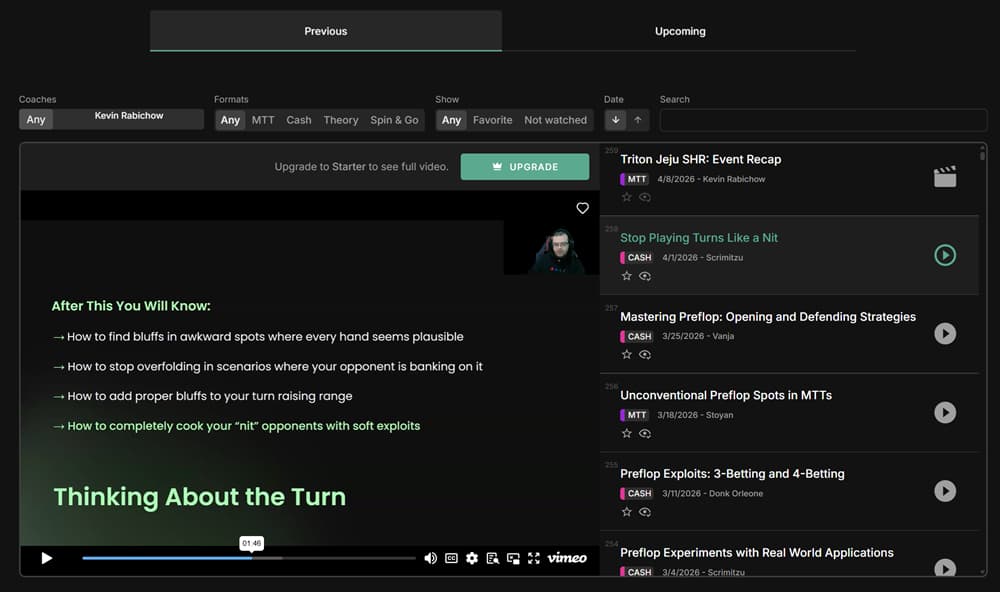
The price bump stings on Premium and Elite, but the added features (especially the 50x postflop library expansion covered in the features section) make the per-solution cost lower than before the update.
Which Plan Should You Get? (By Stakes and Format)
Your right plan depends on your stake level, how many formats you play, and whether you need custom solving or just pre-built solutions. Here is how we’d map it after testing all three paid tiers:
| Your Stakes | Plan | Key Reason |
|---|---|---|
| Learning basics | Free | 10 trainer hands/day covers fundamentals |
| NL2 to NL25 | Starter | Unlimited trainer, 100 analyzed hands/mo |
| NL50 to NL200 | Premium | 100K hands/mo, aggregated reports |
| NL500+ | Elite | Node locking and AI solver for exploits |
| Coach / Pro | Ultra | 9-player preflop, 3-way postflop, batch reports |
MTT and Spin & Go grinders at any stakes should start at Premium minimum. ICM solutions and GTO Reports for bubble and final table spots require that tier.
Tournament players should also run their ROI and sample size through our MTT variance calculator to understand how many events they need before results become meaningful.
One detail worth highlighting: the jump from Starter to Premium is the highest value gap in the entire pricing structure. Starter gives you the trainer and basic solutions, which is solid for learning.
But the moment you want to upload real hand histories in meaningful volume or use aggregated reports, you need Premium. There is no middle tier.
Annual Billing Pays for Itself
For players who grind both cash games and tournaments, the dual-subscription cost is the main pain point. Two Premium plans on annual billing run $158/mo combined, approaching Elite-tier pricing for a single format.
If you split your volume 70/30 between formats, consider subscribing to the higher tier for your primary format and using the Free tier to spot-check occasional hands in your secondary format.
GTO Wizard vs. PioSolver vs. GTO+ (Head-to-Head)
Earlier in this review, we discussed the workflow differences between cloud and local solvers.
The table below provides a full three-way product comparison across 14 dimensions, including specifications that the earlier overview did not cover, such as convergence accuracy, format support, preflop solving, multiway pots, and built-in training tools.
| GTO Wizard | PioSolver Pro | GTO+ | |
|---|---|---|---|
| Price | $39-$229/mo | $249 one-time ($475 Edge) | $75-$375 one-time |
| Platform | Any browser, mobile included | Windows only, desktop only | Windows only, desktop only |
| Accuracy | ~0.21% Nash Distance | Configurable (0.1%-0.5%) | Converges to 0% |
| Formats | Cash, MTT, Spin & Go, PKO, HU | Cash, MTT (Edge only) | Cash only |
| Preflop | Full library + custom (Elite+) | Edge only ($475) | No |
| Multiway | 3-way postflop (Elite+) | 2-player only | 2-player only |
| Trainer | Built-in with EV feedback | Built-in (Pro+) | No |
| HH Analysis | Built-in, 17 sites | Manual import | Manual import |
| Node Locking | Elite+ only | All versions | All versions |
| Hardware | None (cloud) | 16GB+ RAM, fast CPU | 8GB RAM, 4+ cores |
On raw convergence accuracy, GTO+ has the theoretical edge: it can solve to 0% Nash Distance if you give it enough time and RAM.
PioSolver’s accuracy depends on how long you let it run and your hardware specs. GTO Wizard’s pre-solved library sits at a fixed ~0.21%, which is tighter than what most players achieve with local solvers in practical use.
For players who combine solver study with session tracking, pairing GTO Wizard with a HUD like PokerTracker 4 or Holdem Manager 3 creates a complete study loop: analyze your leaks in the tracker, then drill those exact spots in GTO Wizard’s trainer.
The Mac and Linux Factor
Which Solver Fits Which Player?
Specifications tell only half the story. Here’s which solver we’d recommend based on your playing style:
| Player Type | Best Fit |
|---|---|
| Beginner or intermediate | GTO Wizard – built-in trainer, no setup |
| Grinder wanting full control | PioSolver Pro – custom trees, all-tier node locking |
| Budget cash player | GTO+ – $75 one-time, solid postflop solving |
| MTT / Spin specialist | GTO Wizard – only solver with ICM from Starter |
| Coach | GTO Wizard Elite/Ultra – aggregated reports, browser sharing |
| Wants both speed and depth | GTO Wizard + PioSolver combo |
The Cost Crossover Point
We noticed one pattern across all three tools: players who improve the fastest use a solver consistently for at least 30 minutes per day, regardless of which solver they choose.
If using GTO Wizard means that you actually open it five days a week instead of letting PioSolver collect dust on your desktop, then the convenience it offers has real EV value.
Is GTO Wizard Worth the Money? (ROI Analysis)
No competitor review runs the actual numbers on this. A GTO Wizard subscription is not a purchase but a bet that structured solver study will improve your win rate enough to pay for itself.
Here is the math at each stake level, assuming a conservative 2bb/100 win rate improvement from plugging one or two major leaks.
| Stakes (1bb) | 2bb/100 Gain per 500 Hands/Day | Monthly EV Gain | Recommended Plan | Net Monthly Profit |
|---|---|---|---|---|
| NL5 ($0.05/bb) | $0.50/day | $15/mo | Starter ($39/mo) | -$24/mo |
| NL10 ($0.10/bb) | $1.00/day | $30/mo | Starter ($39/mo) | -$9/mo |
| NL25 ($0.25/bb) | $2.50/day | $75/mo | Starter ($39/mo) | +$36/mo |
| NL50 ($0.50/bb) | $5.00/day | $150/mo | Premium ($79/mo) | +$71/mo |
| NL100 ($1.00/bb) | $10.00/day | $300/mo | Elite ($139/mo) | +$161/mo |
| NL200 ($2.00/bb) | $20.00/day | $600/mo | Elite ($139/mo) | +$461/mo |
The Breakeven Line
A 2bb/100 improvement is conservative for a player who has never studied with a solver before.
Keep in mind that even with a solid edge, short-term results can fluctuate greatly. Run your stakes and sample size through our poker variance simulator to find out how many hands you need to play before your true win rate emerges.
Common leaks that GTO Wizard’s trainer and analyzer expose (over-folding in the big blind, incorrect c-bet sizing on dry vs. wet boards, missed thin value bets on the river) can individually account for 1 to 3bb/100.
Fixing two of those leaks puts you in the 2-6bb/100 range. For NL5 and NL10 players, the math is negative, but the calculation changes if you treat the subscription as a move-up accelerator.
A player who spends three months at NL10 with GTO Wizard, developing the fundamentals needed to beat NL25, will recoup the subscription cost in month four at the higher stakes.
GTO Wizard vs. Coaching Costs
Private poker coaching for low- to mid-stakes players costs between $50 and $200 per hour, depending on the coach’s credentials and the player’s stake level. A typical study plan includes two to four sessions per month.
Your strongest study setup combines GTO Wizard with occasional coaching sessions. Use GTO Wizard daily for trainer drilling and hand analysis.
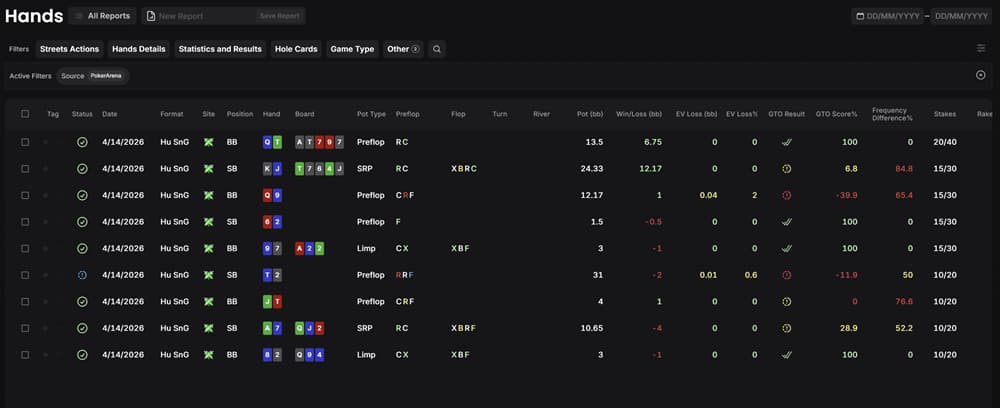
Work with a coach every month to review your Analyzer output. Together, you will identify patterns that the tool cannot detect, such as tilt, table selection, and mental game. Then, you will develop a study plan based on your weakest areas.
To see how GTO Wizard stacks up against every major solver, HUD, and tracker on the market, check out our complete guide to the best poker tools in 2026.
Who Should NOT Use GTO Wizard
The GTO Wizard is not the right tool for every player. It would be dishonest to recommend it to everyone, so here are the profiles that should look elsewhere:
- Complete beginners who don't know preflop ranges. If you can't identify the positions at a 6-max table or don't know what a 3-bet is, the solver's output will be meaningless. Before investing in a solver subscription, start with our guide to building poker ranges and a basic equity calculator like Equilab.
- Recreational players with no interest in off-table study. GTO Wizard only works if you use it. If poker is purely entertainment and you don't want to spend 30 minutes a day reviewing hands, the subscription is wasted money.
- Players on extremely tight budgets. If the $39 monthly fee cuts into your poker bankroll, prioritize managing your bankroll. Use our bankroll calculator to see if your bankroll can handle the subscription at your current stakes. If not, read our bankroll management guide and focus on moving up first. Meanwhile, GTO Wizard's free tier (10 trainer hands/day, 1 postflop solution/day) and free tools like Equilab and FreeBetRange can help you learn the fundamentals.
- Players who need full custom solving on a budget. If your study requires custom game trees with non-standard parameters and you can't afford Elite ($139/mo), a one-time GTO+ purchase ($75) gives you unlimited custom postflop solving for cash games.
Start with the free tier if you are in doubt. Use the 10 daily trainer hands and 1 postflop solution to gauge whether solver-based study fits your learning style before committing to a paid plan.
Is GTO Wizard Legal to Use?
Yes. GTO Wizard is a study tool, not real-time assistance (RTA) software. Every major poker room allows its use between sessions.
RTA feeds you optimal decisions while you play a hand. Solvers running in the background, overlay apps that suggest bet sizes mid-hand, and preflop charts open on a second monitor during an active session all count as RTA. Penalties include permanent account closure plus fund seizure.
GTO Wizard operates on the other side of that line. You use it between sessions to review hands, drill spots in the trainer, and study preflop ranges. The poker client is closed while you study.
The Simple Rule
GTO Wizard’s Built-In Safeguards Against RTA Abuse
GTO Wizard does not just rely on the honor system. The platform has built multiple anti-abuse measures directly into its software.
Fair Play Check is the most visible safeguard. It lets anyone (players, operators, or integrity teams) check whether a specific board was solved on GTO Wizard within a chosen time window.
If someone solved that exact board during an active hand, the tool flags the timestamp. This turns GTO Wizard into a detection tool rather than a cheating vector.
Forced processing delays on certain features also make real-time use impractical. The AI Solver queue, custom solves, and hand history bulk uploads all have built-in wait times that prevent live-session exploitation.
The GGPoker Partnership: Anti-Cheat in Action
In March 2025, GGPoker formally partnered with GTO Wizard to strengthen game integrity enforcement. The results were immediate: 31 accounts were banned for confirmed RTA usage within the first reporting period.
Detection works in both directions. GGPoker feeds suspicious hand data to GTO Wizard’s detection systems, and GTO Wizard’s Fair Play Check confirms whether those players accessed solver outputs during active play.
Banned players also lose eligibility for WSOP events under the Poker Integrity Council (PIC) framework. GGPoker’s move reflects how the industry now views solver companies.
Instead of treating GTO Wizard as a threat, operators recognized that the same technology used to study poker can also catch the people misusing it.
Poker Room Policies: What Each Site Actually Allows
Every major poker room draws the same line, but the enforcement details vary.
| Poker Room | Study Tools Between Sessions | Solvers During Play | RTA Detection Method |
|---|---|---|---|
| GGPoker | Allowed | Banned (permanent closure) | GTO Wizard Fair Play Check + internal analysis |
| PokerStars | Allowed (client must be closed) | Banned (permanent closure) | Proprietary detection + manual review |
| WPT Global | Allowed | Banned (permanent closure) | GTO Wizard partnership + internal tools |
| 888poker | Allowed | Banned (permanent closure) | Internal detection systems |
| partypoker | Allowed | Banned (permanent closure) | Internal detection systems |
888poker and partypoker use internal detection systems. PokerStars specifically requires that solver software (including GTO Wizard, PioSolver, and GTO+) is not running while the poker client is active.
Some sites use general language rather than naming specific programs, but the policy is the same everywhere: study between sessions, never during play.
PokerStars Users
What About Live Poker?
WSOP, WPT, and EPT all prohibit electronic devices at the table during play. You cannot pull out your phone and check GTO Wizard mid-hand in a live tournament or cash game.
You can study on your phone without any issue between tournament levels, during breaks, and after busting.
Many pros openly use the mobile trainer from GTO Wizard during dinner breaks at major events. The same rule applies online: don’t use it during active play.
For home games and private clubs, there are no universal rules. Each host sets the policy. GTO Wizard itself has no restrictions on when you access the platform.
The Broader Industry Trend
GTO Wizard’s anti-cheat role is expanding beyond GGPoker. The company has engaged with every major poker operator to offer its game integrity solutions.
WPT Global already uses GTO Wizard’s detection tools, and additional partnerships have been reported throughout 2025.
As more operators integrate Fair Play Check, the platform becomes harder to misuse. That reduces the likelihood that legitimate study-tool users face false accusations or account reviews.
How to Get Started with GTO Wizard
You can go from zero to running your first practice session in under five minutes.
Step 1: Create Your Account
Go to gtowizard.com and click “Begin Your Journey” You can register with an email address or use Google/Apple/facebook sign-in. No credit card is required for the free tier.
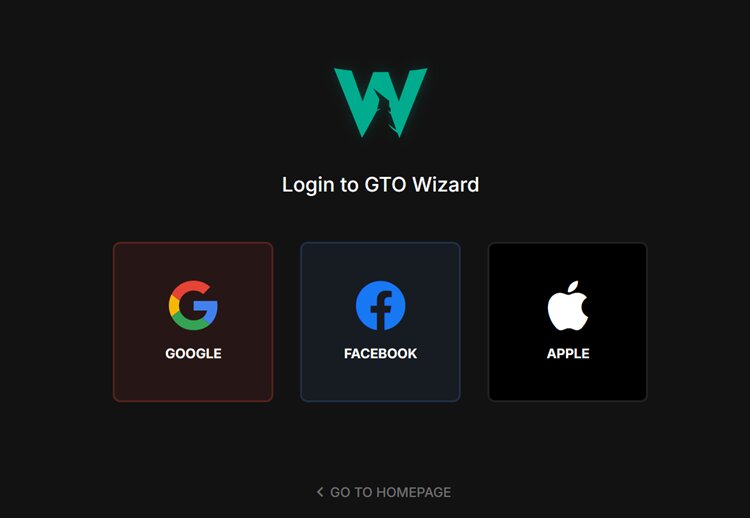
The free plan provides daily access to the trainer and solution browser, but with usage caps. This allows you to test whether GTO Wizard fits your study style before committing to a paid plan.
Full tier details and our stake-specific recommendations are in the pricing section above.
Start Free, Upgrade Later
Step 2: Choose Your Format
After logging in, GTO Wizard asks you to select a primary format: Cash, MTT, Spin & Go, or HU SNG. This determines which solution library loads by default.
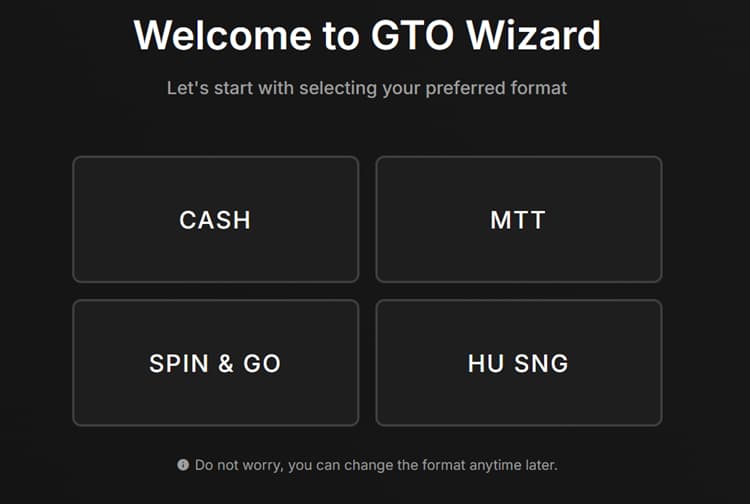
Pick the format where you play the most volume. If you grind NL50 6-max cash five days a week and play one Sunday MTT, choose Cash.
You can switch formats at any time from the dashboard.
On paid plans, Cash and Tournament are separate subscriptions. The free tier includes both, so you do not need to decide at signup.
Step 3: Learn the Dashboard
Five tabs run across the top of the main dashboard. Each tool is covered in detail in the features breakdown above, but here is the quickstart version of where to click first.
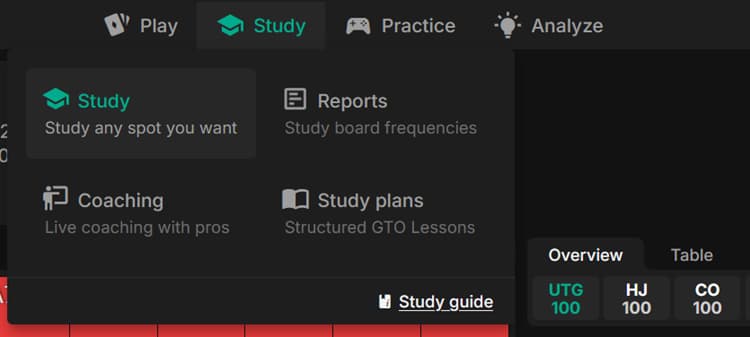
| Tab | First-Time Action | Time Needed |
|---|---|---|
| Trainer | Select a scenario, start drilling. No setup required. | 2 minutes |
| Solutions | Search a specific board you played, review the range grid | 3 minutes per spot |
| Analyzer | Drag and drop your hand history file, sort by largest mistakes | 5 minutes for upload + review |
| AI Solver | Build a custom game tree with your preferred bet sizes (Elite+ only) | 10 minutes per solve |
| Reports | Run an aggregated report on your most-played positions | 5 minutes |
Start with the Trainer tab. It is the fastest path to your first GTO feedback loop.
Step 4: Run Your First Practice Session
In the Trainer tab, select your format (Cash or Tournament) and then choose a scenario.
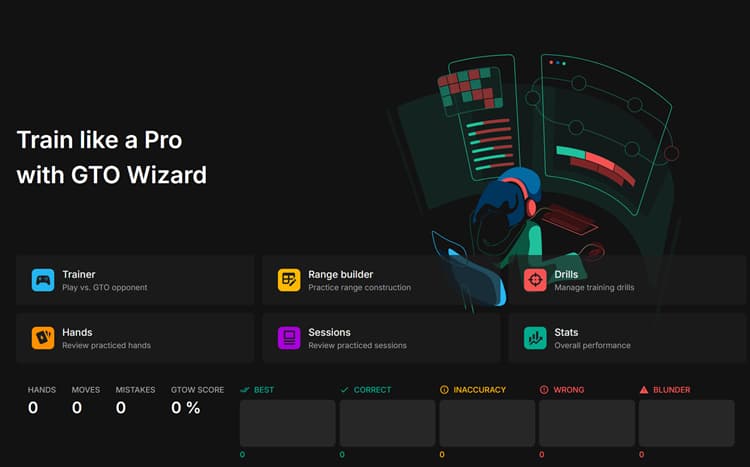
Good starting scenarios for new users include:
| Scenario | Why Start Here | What You Will Learn |
|---|---|---|
| BTN vs BB Single Raised Pot | Highest-frequency spot in 6-max cash games | Continuation bet sizing, check-raise frequencies, turn barreling |
| CO vs BTN 3-Bet Pot | Common spot where most players over-fold or over-call | Range advantage shifts, when to check vs. bet in 3-bet pots |
| BB vs SB (Tournaments) | Highest-frequency tournament spot with ICM pressure | Defend-or-fold decisions, stack-depth adjustments |
Play ten hands in one scenario. This takes about five minutes and provides a snapshot of how your instincts align with GTO and where they differ.
Track Your Score
Step 5: Review Your First Real Session
After your next online session, go to the Analyzer tab and drag your hand history file from your poker client’s export folder. The upload takes seconds.
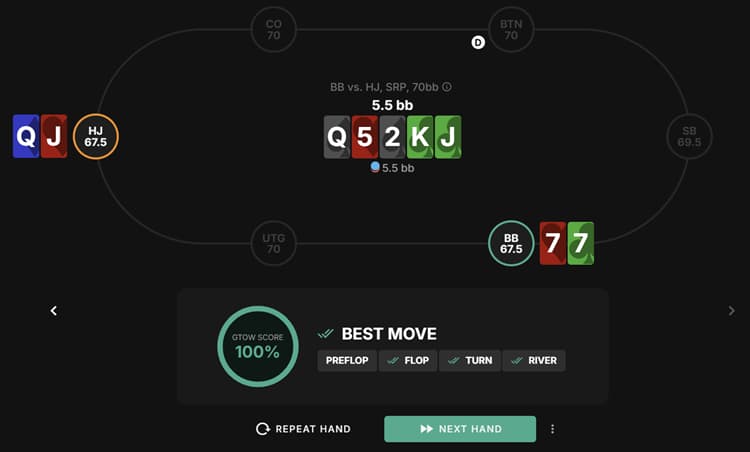
Sort the results by “Top Mistakes” to find the 3-5 spots where you lost the most expected value. Click any flagged hand to open the full solution in the browser and study the correct line.
The study loop from here is straightforward: play, upload, fix top leaks, repeat. Our guide to using poker solvers walks through how to structure these sessions for maximum retention.
Our poker news section covers the latest tool updates and industry developments if you want to track GTO Wizard changes after subscribing.
GTO Wizard FAQ
Is GTO Wizard free?
GTO Wizard has a free tier with no time limit. It includes 10 trainer hands per day and 1 postflop solution per day. No credit card is required to sign up. Paid plans start at $39 per month (Starter) on annual billing and scale up to $229 per month (Ultra).
Is GTO Wizard better than PioSolver?
They serve different needs. GTO Wizard is better for convenience, mobile access, built-in training, and tournament formats (MTT, Spin & Go, PKO). PioSolver is better for custom solving with full control over bet sizes, game trees, and convergence settings. Many serious players use both.
Can you use GTO Wizard while playing poker?
No. Using GTO Wizard during an active poker session counts as real-time assistance (RTA) and will get you banned. GTO Wizard is a study tool designed for use between sessions with the poker client closed. GTO Wizard actively partners with GGPoker and other operators to detect and ban RTA users.
Does GTO Wizard have a mobile app?
GTO Wizard does not have a dedicated iOS or Android app. The platform runs as a mobile-responsive web app in any phone or tablet browser. The Trainer, Solution Browser, and hand analysis tools all work on mobile screens. You can study on your phone between tournament levels or during breaks.
How accurate is GTO Wizard?
GTO Wizard’s pre-solved library has a Nash Distance of approximately 0.21%, which matches or beats what most players achieve running local solvers like PioSolver on consumer hardware.
What poker formats does GTO Wizard support?
GTO Wizard covers Cash games (2-max through 9-max), Multi-Table Tournaments (ICM and chipEV), Spin & Go (3-max), Heads-Up Sit & Go, and Progressive Knockout (PKO) tournaments. The March 2026 restructure consolidated these into two subscription categories: Cash and Tournament.
Is GTO Wizard worth it for beginners?
Yes, if you already understand basic poker concepts such as position, hand rankings, and pot odds. The built-in Trainer provides feedback for each decision, which accelerates the learning process more effectively than studying charts alone. Complete beginners who do not know what a 3-bet is should start with free preflop charts and an equity calculator before subscribing.