

Holdem Manager 3 Review 2026: Features, Pricing & Unbiased Verdict
Holdem Manager 3 is the most widely used poker tracking and HUD software on the market, with over one million licenses sold across all versions since 2007.
We have tested HM3 across NL cash games, MTTs, and Spin & Go formats on multiple networks over the past three years.
This review covers every detail that matters before you buy: the HUD system, Situational Views, pricing tiers, the free trial’s actual limitations, and a head-to-head comparison with PokerTracker 4. We also flag which poker sites restrict or ban HUD use entirely, so you don’t pay for software you can’t run.

What Is Holdem Manager 3?
Holdem Manager 3 (HM3) is a poker tracking application that imports your hand histories, stores them in a searchable database, and overlays real-time statistics on your opponents through a Heads-Up Display (HUD).
The software supports Hold’em and Omaha across cash games, MTTs, Sit & Go, and Spin & Go formats. It works with 12+ poker networks, including PokerStars, 888poker, partypoker, Winamax, and Bovada/Ignition.
The interface is available in 14 languages: English, German, French, Spanish, Chinese, Dutch, Portuguese, Brazilian Portuguese, Italian, Polish, Romanian, Russian, Slovenian, and Japanese.
HM3 launched after three years of development with a complete rebuild of the HUD editor, a new database engine (no more PostgreSQL installs!), and Situational Views that consolidate multiple reports into single dashboards.
Key Features of Holdem Manager 3
HM3 is built around three core functions: tracking your hand histories, displaying live opponent data through a HUD, and generating post-session reports for leak analysis.
Heads-Up Display (HUD)
Most players buy HM3 for the HUD. It displays semi-transparent stat boxes over each opponent’s seat at your poker table and updates in real time as hands are played.
You can see exactly how an opponent has been playing without having to remember past sessions.

Default HUD profiles ship with the stats that matter most: VPIP (Voluntarily Put Money In Pot), PFR (Preflop Raise), 3-bet percentage, aggression factor, and total hand count.
| HUD Stat | What It Measures | Purpose |
|---|---|---|
| VPIP | % of hands a player voluntarily enters | Identifies loose vs. tight players instantly |
| PFR | % of hands a player raises preflop | Separates passive limpers from aggressive openers |
| 3-Bet % | Frequency of re-raising preflop | Reveals who is 3-betting light vs. for value only |
| Aggression Factor | Ratio of bets+raises to calls postflop | Shows who fires barrels and who calls down |
| WTSD% | % of hands that reach showdown after seeing the flop | Flags calling stations that go to showdown too often |
Together, these stats allow you to reconstruct your opponents’ preflop ranges within the first 100 to 300 hands, turning abstract percentages into actionable information about which hands they’re playing from each position.
HM3 also offers a graphical HUD mode that replaces numeric stats with colored rings. Each ring represents a stat category, and its fill level shows where the opponent falls on the spectrum.
During testing, graphical mode was effective for playing eight tables of NL50 on the Winning Poker Networksimultaneously.
It classified opponents in under two seconds per table, making table selection nearly instantaneous and eliminating the need to read numbers.
HUD Editor and Customization
There are over 2,000 individual stats available to add to your HUD. With the drag-and-drop editor, you can position each stat box exactly where you want it on the table layout.
Once HM3 reveals your statistical tendencies, you can benchmark those decisions against solver-approved lines using a tool like GTO Wizard, which scores your actual hands against game-theory optimal play.
You can also create separate profiles for different game types, such as no-limit, pot-limit, and limit, as well as for different table sizes, from two to ten seats.

The pop-up panels are fully configurable, too. While playing, click any stat in the HUD to expand a pop-up with deeper breakdowns, such as positional splits, board texture filters, and street-by-street action frequencies.
Anyone who used HM2’s editor will appreciate the rebuild. HM3 replaced the old interface with a cleaner layout and a search function that lets you find any stat by name or category in seconds.
Pro Tip
Situational Views
Situational Views are pre-built analytical dashboards that combine multiple reports into a single screen.
Rather than opening separate tabs to check your 3-bet frequency, your continuation bet success rate, and your river aggression, you can open one Situational View to see it all together.
HM3 comes with views for the most common scenarios: 3-betting, continuation betting, river play, tournament all-ins, and bubble decisions. Each view cross-references the relevant statistics, allowing you to spot patterns.
For example, the c-bet view shows your flop c-bet frequency alongside fold-to-raise stats and turn follow-through percentages, all filtered by position and board texture.

We used the c-bet Situational View to analyze 80,000 hands from an NL100 6-max sample. It immediately surfaced a turn c-bet frequency of 34% vs. a flop c-bet of 71%, a gap that was costing roughly 1.5 bb/100 in missed value on dry boards.
When you spot a gap like this, run the numbers through our variance simulator first. At 80,000 hands, the sample size is large enough for most statistics.
However, it’s worth confirming that the leak isn’t just a downswing in disguise.
Analysis Reports and Filters
Reports are where you study your game after sessions end. HM3 supports hand-specific drill-downs filtered by position, stake level, board texture, action sequence, opponent type, and dozens of other criteria.

The autocomplete filter system is one of the most underrated additions. Start typing a condition, and HM3 will suggest matching filter combinations.
This feature saves significant time compared to manually building complex filters through dropdown menus.
Use Case
Hand Replayer
Step through any hand in your database action by action. Pot sizes, stack depths, and bet amounts are displayed at each decision point.
You can also add notes to specific spots for later review or coaching sessions.

The replayer is especially useful for reviewing the hands that you flagged during play.
Mark a hand with a tag, such as “tough spot,” “possible leak,” or “coolered,” then review all tagged hands after your session. This transforms raw hand histories into a structured study routine.
No PostgreSQL Required
Holdem Manager 2 required a separate installation of the PostgreSQL database, which was a major headache for players without a technical background.
For years, failed installations, port conflicts, and database corruption were common complaints on poker forums.
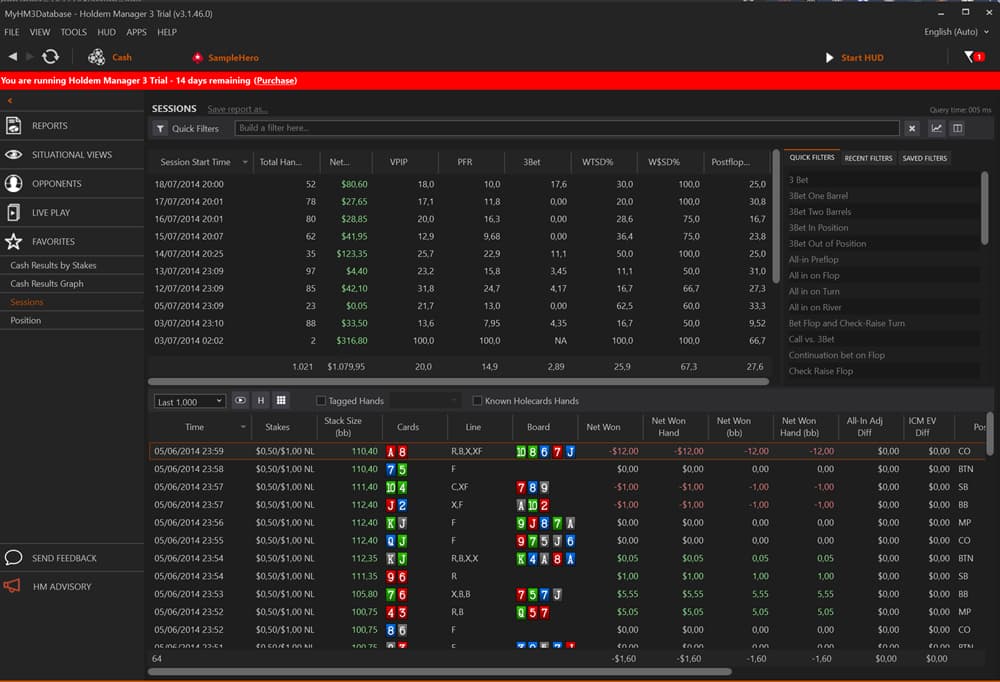
HM3 eliminates this dependency entirely. It uses its own internal database engine, making installation a simple one-step process.
Database maintenance, backups, and migrations are all handled automatically. In our testing, creating a database of 412,000 hands from scratch took 87 seconds on a Ryzen 5 5600X with 16 GB of RAM.
Third-Party App Integration
HM3 supports a growing ecosystem of add-on applications built by third-party developers:
- Table Ninja II: Automates table management for multi-tablers (hotkeys, auto-seating, bet sizing presets)
- Hand Grabber (Beta): Imports hand histories from poker apps that don't save them locally (PPPoker, PokerBros, ClubGG)
- NoteCaddy (Coming Soon): Generates automated opponent notes based on hand history patterns
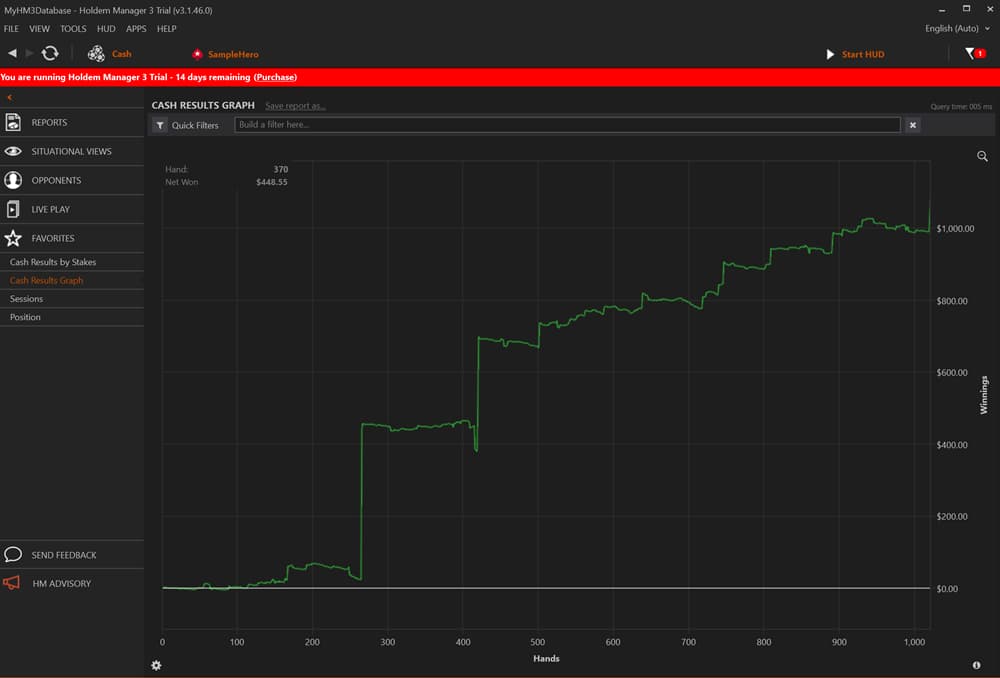
Max Value Software also opened a developer API, allowing third-party creators to build tools that plug directly into HM3.
Supported Poker Sites and Platforms
HM3 officially supports 12+ poker networks, but “supported” and “allowed” are two different things.
The software can import hand histories and display a HUD on all the sites below. Whether the site permits that is a separate question.
Check this table before purchasing a license:
| Poker Site / Network | HM3 Supported | HUD Allowed at Tables | Notes |
|---|---|---|---|
| PokerStars | Yes | Yes (with restrictions) | Static HUDs only. No dynamic color-coding, no auto player tagging. |
| 888poker | Yes | Yes | Fully allowed. 888poker also offers its own built-in tracker (“HUDdy”). |
| iPoker Network | Yes | Yes | Allowed across most iPoker skins. |
| Winning Poker Network (ACR) | Yes | Yes | No restrictions on third-party HUDs. |
| Bovada / Ignition | Yes (via Converter) | Limited | Anonymous tables. HUD works but only tracks session data per seat. |
| Winamax | Yes | Partial | Basic HUDs allowed. Positional and dynamic HUD features blocked at tables. |
| Microgaming (MPN) | Yes | Yes | Allowed on most skins. |
| Boss Network | Yes | Yes | No known restrictions. |
| GGPoker | Via Hand Grabber | No | Third-party HUDs banned. Offline analysis only via PokerCraft exports. |
| partypoker | Yes | No | HUDs fully banned since 2019. Local hand history only. |
| PPPoker / PokerBros / ClubGG | Via Hand Grabber | Varies by club | Club-based apps. HUD use depends on individual club rules. |
| CoinPoker | Yes | Yes | No restrictions on tracking software. |
Important
If you use HM3 on another site while GGPoker is open, you may receive a warning or account restriction. Close HM3 entirely before launching GGPoker.
For players who grind primarily on GGPoker or partypoker, HM3 still has value as an offline study tool. You can export your hand histories and analyze them in HM3 after sessions.
If you play exclusively on sites that ban HUDs and have no interest in offline analysis, see our list of poker sites that don’t allow HUDs for rooms where the playing field is level by design.
Does HM3 Work on Mac?
No. Holdem Manager 3 is Windows-only software. There is no native macOS version and no official timeline for one.
The two workarounds are Parallels Desktop (runs Windows as a virtual machine inside macOS) and Boot Camp (dual-boots your Mac into Windows).
Parallels is the more practical option since it lets you run HM3 alongside your poker client without rebooting.
Mac Cost
If you are a Mac user who wants a native tracker without workarounds, Poker Copilot is the only established macOS-native alternative. We cover it in the Free Alternatives section below.
HM3 Pricing and License Tiers
Holdem Manager 3 uses a one-time purchase model. Once you purchase a license, it is yours permanently. There are no monthly fees to maintain the software.
However, most review sites fail to clearly mention the annual maintenance cost that starts in Year 2. There are six license tiers, which are split by game variant (Hold’em or Omaha) and stakes level.
| Version | Stakes Limit | Games | Price |
|---|---|---|---|
| Hold ’em Small Stakes | Up to $50 NL / $100 FL | Hold’em | $60 |
| Omaha Small Stakes | Up to $50 NL / $100 FL | Omaha | $60 |
| Holdem All Stakes | Unlimited | Hold’em | $100 |
| Omaha All Stakes | Unlimited | Omaha | $100 |
| Combo Small Stakes | Up to $50 NL / $100 FL | Hold’em + Omaha | $100 |
| Combo All Stakes | Unlimited | Hold’em + Omaha | $160 |
For most NL Hold’em grinders, the Holdem All Stakes license at $100 is the best value. It covers every cash game and tournament without stake restrictions.
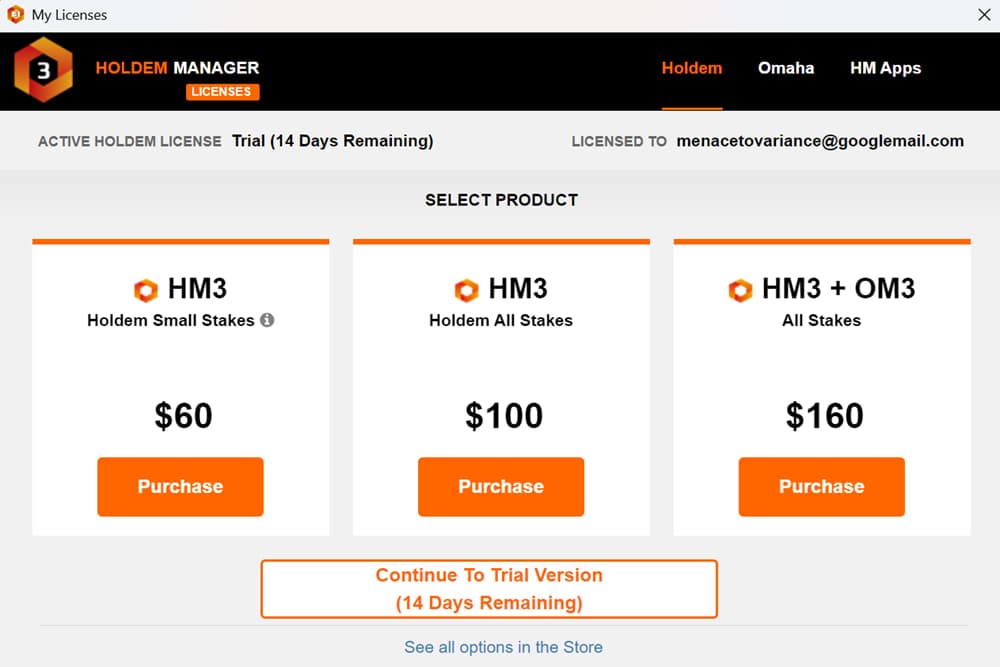
If you play both Hold’em and Omaha, the Combo All Stakes at $160 saves $40 compared to buying each All Stakes license separately.
The Small Stakes versions cap you at $50 No Limit and $100 Fixed Limit. If you are currently playing NL25 or lower and don’t plan on moving up anytime soon, the $60 tier is a reasonable starting point.
Just make sure the purchase fits within your bankroll management. You can upgrade to All Stakes later by paying the difference.
Annual Support and Maintenance Fee
One year of updates and support is included with every license. Starting in Year 2, an annual Support and Maintenance (S&M) fee is required to continue receiving software updates, poker site compatibility patches, and customer support.
| License Type | Annual S&M Fee (Year 2+) |
|---|---|
| Small Stakes (Holdem or Omaha) | $25/year |
| All Stakes (Holdem or Omaha) | $40/year |
| Combo Small Stakes | $25/year |
| Combo All Stakes | $40/year |
Why This Fee Matters
This is not a subscription for the software itself. HM3 continues to function without renewal. You keep your database, your HUD profiles, and your reports.
What you lose is access to new updates, bug fixes, and support tickets. For most active players, the $25 to $40 annual fee is worth it to keep HUD compatibility intact across site updates.
The actual cost of the most popular license (Hold’em All Stakes) in Year 1 is $100. From year two onward, budget $40 per year. That totals $180 over three years for a tool that runs during every session you play.
HM3 Free Trial: What You Actually Get
Every HM3 license begins with a 14-day trial that unlocks the entire software program. All features, stats, and reports are available.
There is just one catch: the trial restricts you to micro stakes tables ($0.10 big blind maximum for cash games) and only allows you to display the HUD on one table at a time.
That means you can test HUD overlays, Situational Views, the hand replayer, and the filter system on real hands at NL10 or below.
You cannot test multi-tabling with 6+ HUD instances running simultaneously, which is where performance matters most.
What Happens After the Trial Expires
HM3 does not lock you out after 14 days. The software switches to a permanent “limited free version” that you can keep using indefinitely. Here is what you keep and what you lose:
| Feature | During 14-Day Trial | Limited Free Version |
|---|---|---|
| Hand history import | Yes | Yes |
| Database and reports | Full access | Full access |
| Hand replayer | Yes | Yes |
| HUD on live tables | 1 table, micro stakes only | 1 table, micro stakes only |
| Situational Views | Yes | Yes |
| Multi-table HUD | No | No |
| Stakes above NL10 | No | No |
The limited version is essentially HM3 as a post-session analysis tool with a single-table micro HUD attached.
If you play NL10 or lower on one table, it is a functional free tracker. If you play higher stakes or multi-table, you need a paid license.
Trial Strategy
Download the trial directly from the official Holdem Manager 3 site. No credit card is required, and the limited version continues working after the trial ends with no further action needed.
Holdem Manager 3 vs. PokerTracker 4
PokerTracker 4 is the only direct competitor to HM3 in the full-featured tracker category. Both do the same core job: import hands, build a database, display a HUD, generate reports.
The differences come down to interface philosophy, performance, and which edge cases each handles better.
User Interface and Ease of Use
PT4 has a cleaner default layout. Menus are more intuitive, the color scheme is easier on the eyes, and a new user can navigate reports without reading documentation.
HM3 ships with more data visible by default, which is powerful for experienced players but overwhelming for beginners.
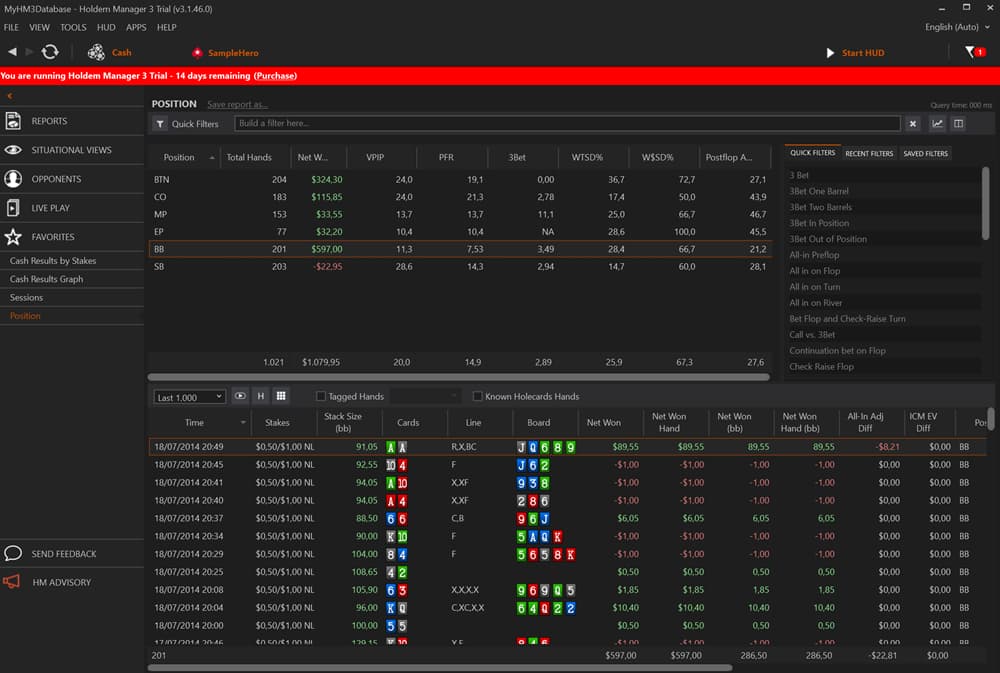
If you have never used a tracker before, PT4 has a shorter learning curve. If you have used HM2 or any tracker previously, HM3’s denser interface is an advantage because you spend less time customizing to get the data you actually want.
Performance and Resource Usage
HM3 uses more RAM than PT4, especially with large databases (500K+ hands) and multiple HUD instances active. On a modern machine with 16GB RAM, this is not noticeable.
On an older laptop with 8GB, PT4 feels noticeably snappier when running a HUD across 8+ tables simultaneously.
Database query speed favors HM3 for large datasets. When filtering through 1M+ hands with complex conditions, HM3’s internal engine returns results faster than PT4’s PostgreSQL backend. For databases under 200K hands, both perform equally.
Performance Note
Features and Customization
HM3 offers 2,000+ stats vs. PT4’s ~1,500. HM3’s Situational Views have no direct equivalent in PT4.
PT4 counters with LeakTracker (automated leak detection), NoteTracker (auto-generated opponent notes), and a built-in ICM calculator for tournament players. All of these are included free with PT4’s license.
HM3’s equivalent add-ons (NoteCaddy, Table Ninja II) are separate purchases or still in development. If bundled tools matter to you, PT4 includes more out of the box.
Game-Type Strengths
HM3 has an edge in cash games and MTTs. Situational Views for c-betting, 3-betting, and river play are built for cash game leak analysis, and the database engine handles high-volume hand counts efficiently.
PT4 is stronger for Spin & Go and hyper-turbo formats. Its tournament-specific tools (ICM calculator, push/fold charts, SNG Wizard 2 integration) are more mature than HM3’s tournament features.
Tournament grinders who use either tracker should also consider using SharkScope to scout opponents before sessions. It covers a different data layer than either HUD. However, if you primarily play Spins, PT4 is a better fit.
Pricing Comparison
| Category | Holdem Manager 3 | PokerTracker 4 |
|---|---|---|
| Hold’em Small Stakes | $60 | $44.99 |
| Hold’em All Stakes | $100 | $69.99 |
| Hold’em + Omaha All Stakes | $160 | $99.99 |
| Free Trial | 14 days (micro stakes, 1 table HUD) | 14 days (full features, no restrictions) |
| Post-Trial Free Version | Yes (limited) | No |
| Annual Maintenance (Year 2+) | $25 to $40/year | Included (lifetime updates) |
| Mac Support | No (Parallels workaround) | Yes (native) |
| Bundled Add-ons | Minimal (separate purchases) | LeakTracker, NoteTracker, ICM calc included |
PT4 is cheaper across every tier and includes lifetime updates with no recurring fee. HM3’s true cost advantage is the permanent limited free version after trial, which PT4 does not offer.
Over three years at the All Stakes level, HM3 costs $180 ($100 + two years at $40) vs. PT4’s one-time $69.99.
Pros and Cons of Holdem Manager 3
Based on our testing across cash games, MTTs, and Spin & Go formats on multiple networks:
Pro
- 2,000+ customizable HUD stats with drag-and-drop editor and popup panels
- Situational Views consolidate leak analysis into single-screen dashboards
- Lifetime license with one-time purchase from $60
- 12+ poker networks supported including club-based apps via Hand Grabber
- No PostgreSQL install required (eliminated the #1 HM2 setup complaint)
- 14-day free trial plus a permanent limited free version after expiry
Con
- Windows only with no native Mac version (requires Parallels at $99.99/year)
- Higher RAM usage than PT4, noticeable on machines with 8GB or less
- Annual maintenance fee of $25 to $40/year starting Year 2 (PT4 includes lifetime updates)
- HUD banned on GGPoker and partypoker; restricted on Winamax and Bovada
- Omaha costs extra: $100 for the Combo or $60 for standalone Omaha license
- HUD customization learning curve: 2,000+ stats is powerful but overwhelming for new users
Pick HM3 if you are a high-volume cash game or MTT grinder who values deep stat customization and Situational Views. The larger stat library and faster database engine justify the price premium at serious volume.
Pick PT4 if you play Spin & Go formats, want native Mac support, prefer a cleaner interface out of the box, or want to minimize cost with no recurring fees. PT4 bundles more tools at a lower price point.
Both offer free trials with no credit card required. Test each on your actual game for a week before committing. For a full breakdown of PT4’s features from the other side, see our PokerTracker 4 review.
The annual fee and Windows-only limitation are the two factors most likely to push players toward PokerTracker 4 instead. If neither bothers you and you grind Hold’em cash or MTTs on HUD-friendly sites, HM3 earns the investment.
Who Should (and Shouldn’t) Use HM3
Your format, stakes, platform, and operating system all determine whether HM3 is the right investment or a waste of $60 to $160.
| Player Type | HM3 Recommended? | Why |
|---|---|---|
| NL Cash Grinders (NL25+) | Yes | HM3’s core strengths (HUD, Situational Views, large-database performance) are built for high-volume cash sessions |
| MTT Regulars | Yes, with caveats | HUD and reports are valuable. Tournament-specific tools (ICM, push/fold) are weaker than PT4’s |
| Spin & Go Specialists | PT4 is the better fit | PT4’s Spin-specific tools and SNG Wizard 2 integration outperform HM3 in hyper-turbo formats. |
| Omaha Players | Yes, but pricier | Requires a separate $60 Omaha license or the $100 to $160 Combo tier |
| Recreational / Weekend Players | Probably not | If you play 1 to 2 tables casually a few times per month, the free limited version or a free alternative covers your needs |
| Mac Users | Only with workarounds | No native macOS version. Parallels Desktop ($99.99/year) adds cost and 10 to 15% performance overhead |
| GGPoker / partypoker Mains | Check first | Both sites ban third-party HUDs. HM3 still works for offline post-session analysis via hand history exports, but you cannot run the HUD live |
The Break-Even Test
The simplest decision framework: if you play 20,000+ hands per month on a HUD-friendly site, HM3 pays for itself quickly.
If you play less than 5,000 hands per month on a site that bans HUDs, your money is better spent elsewhere.
Free Alternatives to Holdem Manager 3
If the price, the Windows requirement, or the HUD ban on your main site makes HM3 impractical, these four alternatives cover different needs at lower price points or zero cost.
| Software | Price | Platform | Best For | Key Tradeoff vs. HM3 |
|---|---|---|---|---|
| Hand2Note | From $15.99/mo (annual). 14-day free trial. | Windows | Dynamic/positional HUDs | Subscription model costs more over time. Steeper learning curve. Free BASE version discontinued in 2025. |
| FPDB | Free (open source) | Windows, Mac, Linux | Zero-cost basic tracking | No active development. Limited site support. Bare-bones HUD. |
| DriveHUD 2 | From $23.99/year (micro). 30-day free trial. | Windows | Budget grinders, modern UI | Fewer stats and shallower analysis. Lower cost ($23.99 to $74.99/year) but renewal fees from Year 1. |
| Poker Copilot | $99 one-time | macOS (native) | Mac users refusing Parallels | ~100 stats vs. HM3’s 2,000+. No Situational Views. No Omaha. Limited to major sites. |
Keep in mind that all four of these are online HUD trackers, so if your grind is live tournaments rather than online tables, a live session tracker like Pokerbase is the better fit: it logs live sessions, scans buy-in receipts for tax records, and even lets you sell action through a built-in staking marketplace, none of which HM3 or its online rivals handle.
Hand2Note is the closest feature competitor. Its dynamic HUD adjusts stats based on position and game state, which HM3 does not offer natively.
Our full Hand2Note review covers the Dynamic HUD, Range Research, and ROI math at every stake level if you want the comprehensive side-by-side.
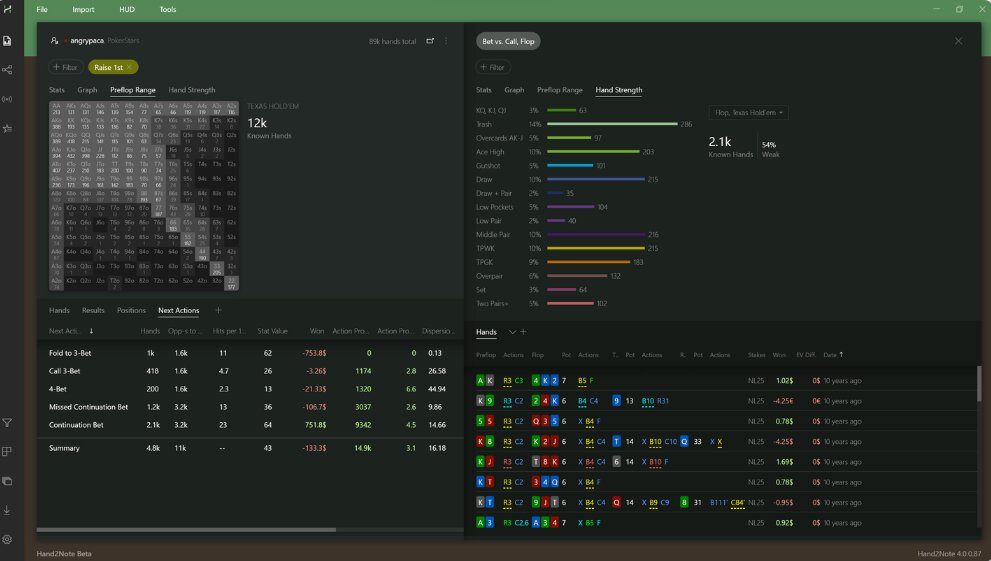
The paid Pro tier ($49/mo billed annually) unlocks everything without stake limits. The tradeoff: it is a subscription. Over two years, Hand2Note Pro costs more than HM3’s All Stakes license plus maintenance.
FPDB (Free Poker Database) is fully free and open source, running on Windows, Mac, and Linux.
Development has slowed significantly, site compatibility updates lag behind, and the HUD lacks polish. It works as a starter tool for players who want to learn what a tracker does before investing money.
DriveHUD 2 is the budget pick at $23.99/year for micro stakes, with the longest free trial in the category (30 days, unrestricted).
It includes a quiz builder and ICM calculator that HM3 charges extra for. The tradeoff: the stat library and report filtering are significantly shallower. High-volume grinders will outgrow it.
Poker Copilot is the only native macOS tracker worth considering. At $99 one-time with lifetime updates, the pricing mirrors HM3’s model.
It covers the basics: HUD, hand replayer, leak detector, 100+ stats. It falls short on deep analysis, stat count, and network support. If you are on a Mac and refuse to deal with Parallels, Poker Copilot is the default choice.
Our Recommendation
For a full comparison of every tracker, solver, and equity tool available, see our guide to the best poker tools in 2026.
How to Get Started with HM3 (Quick Setup)
Below are the six steps from download to your first HUD session.
Step 1: Download and Install
Go to the official HM3 download page and grab the installer. Run it, accept the defaults, and let it finish. No PostgreSQL setup, no database configuration. The internal database engine creates itself on first launch.
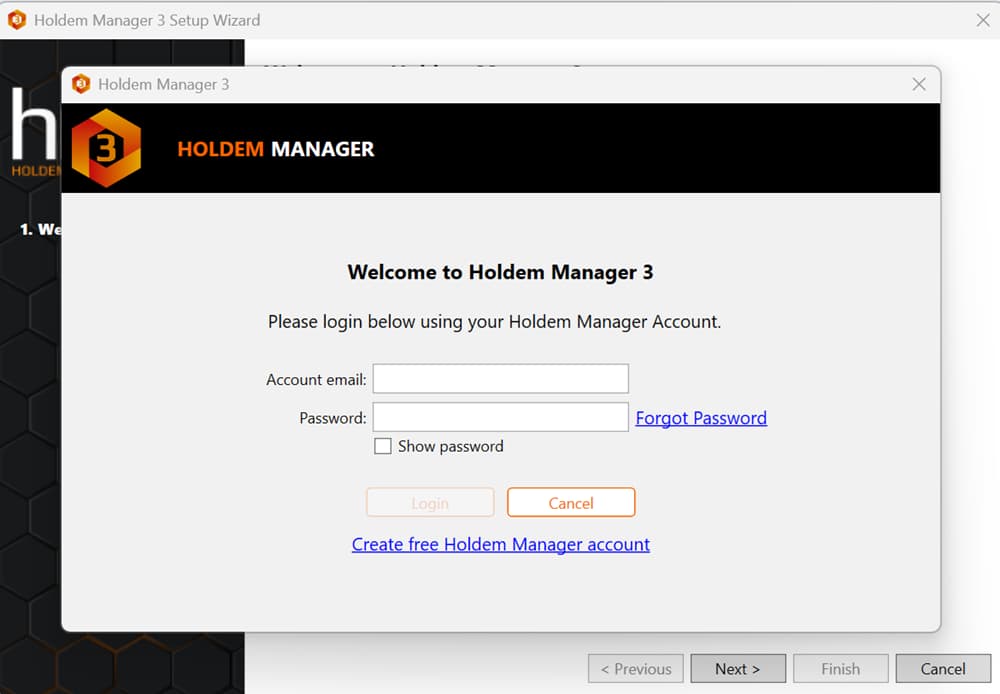
Step 2: Connect Your Poker Site
Open HM3 and navigate to Site Setup. Select your poker site from the dropdown list. HM3 needs to know where your poker client stores hand history files.
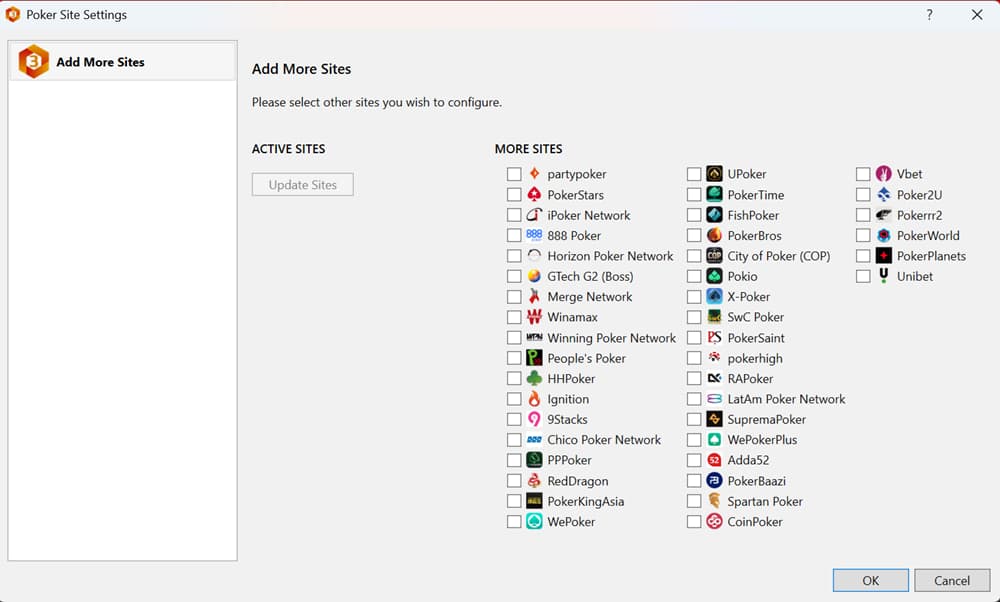
Most sites auto-detect. If yours does not, point HM3 to the hand history folder manually (usually found in the poker client’s settings under “Hand History” or “Game History”).
Step 3: Import Existing Hand Histories
If you have hand histories from previous sessions, click the Import button and select the folder where they are saved. HM3 processes them into the database.
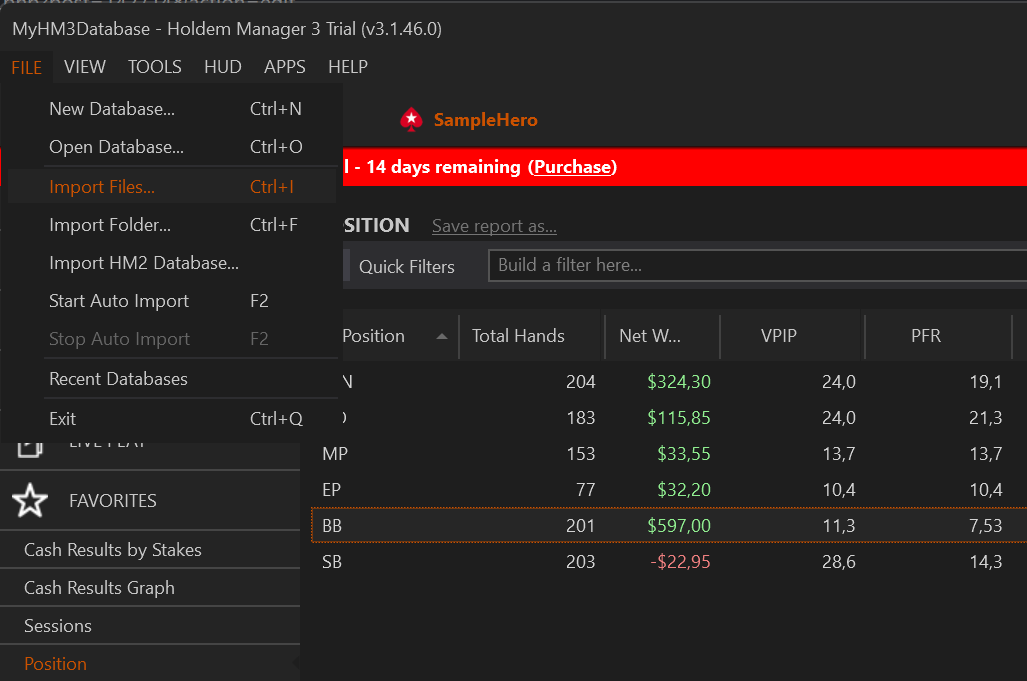
A database of 100,000 hands typically imports in under 2 minutes on modern hardware. You can start playing while the import runs in the background.
Step 4: Select a HUD Profile
Go to HUD > HUD Editor and pick a starting profile. “HM3 Standard” displays VPIP, PFR, 3-bet%, and aggression factor.
“HM3 Advanced” adds WTSD%, c-bet frequency, and fold-to-c-bet. Start with Standard unless you already know which stats you want to track.
Step 5: Play Your First Session
Open your poker client and sit at a table. HM3 auto-detects the table and overlays the HUD within a few hands.
Stat boxes appear next to each opponent’s seat as soon as HM3 has enough data on them. Hover over any stat to compare the current session value against the long-term database figure.
Step 6: Review After the Session
Close the poker client and open HM3’s Reports tab. Filter for the session you just played. Check your VPIP, PFR, and win rate by position.
Open the hand replayer on any hands you flagged. This post-session review loop is what turns raw data into better decisions over time.
The entire process from download to first HUD session takes under 10 minutes. Our poker equity calculator pairs well with HM3’s hand replayer: review a tough spot in the replayer, then run the equity numbers to confirm whether your call or fold was correct.
Frequently Asked Questions About Holdem Manager 3
Is Holdem Manager 3 free?
HM3 offers a 14-day free trial with micro-stakes and single-table HUD restrictions. After the trial, a permanent limited free version remains available with the same restrictions. Full licenses start at $60 for Small Stakes and $100 for All Stakes.
Does HM3 work on Mac?
No. Holdem Manager 3 is Windows-only. Mac users need Parallels Desktop ($99.99/year) or Boot Camp to run it. Poker Copilot ($99 one-time) is the native macOS alternative with a 30-day free trial.
Which poker sites support HM3?
Is HM3 better than PokerTracker 4?
HM3 has more stats (2,000+ vs. ~1,500), faster large-database queries, and Situational Views for cash game analysis. PT4 has a cleaner interface, native Mac support, lifetime updates with no recurring fee, and stronger Spin & Go tools. HM3 suits high-volume cash grinders. PT4 suits Spin & Go players and Mac users.
What happens after the HM3 free trial ends?
HM3 switches to a limited free version that you keep indefinitely. You retain full access to reports, the hand replayer, and Situational Views. The HUD remains active but limited to one table at micro stakes ($0.10 BB max). Multi-table HUD and higher stakes require a paid license.
Does HM3 work with GGPoker?
HM3 can import GGPoker hand histories for offline analysis via Hand Grabber, but you cannot run the HUD live at GGPoker tables. GGPoker bans all third-party tracking software during play and actively monitors for background processes. Use GGPoker’s built-in PokerCraft tool for live session stats instead.
Is using a poker HUD cheating?
No. A HUD displays data from your own hand history database. It does not hack, scrape, or access hidden information. Most major poker sites explicitly allow HUDs, including PokerStars, 888poker, iPoker, and WPN. Sites that prohibit HUDs (GGPoker, partypoker) do so as a level-playing-field policy choice, not because HUD use is classified as cheating.
Can I use my HM2 database in HM3?
Yes. HM3 has a built-in importer at File > Import HM2 Database. Select the source database, choose hero-only or all hands, set a date range if needed, and HM3 exports the hands from PostgreSQL and re-imports them into its own engine. If the HM2 database is no longer available, you can re-import directly from the HM2Archive folder (default location: C:\HM2Archive).
How much RAM does HM3 need?
Minimum: 4GB with an i3 or AMD equivalent. Recommended: 8GB for comfortable single-table use. Optimal: 16GB with a quad-core processor for multi-tabling with a full HUD across 8+ tables and a large database. With 8GB or less, close other applications while playing to avoid performance drops.
Is HM3 a one-time purchase or a subscription?
One-time purchase. Licenses range from $60 to $160 depending on game variant and stakes. Year 1 updates and support are included. From Year 2, an optional annual Support and Maintenance fee ($25 to $40) keeps you receiving compatibility patches and site updates. The software continues working without renewal; you just stop getting new updates.