

DriveHUD 2 Review 2026: Hands-On Test by VIP-Grinders
DriveHUD 2 is the cheapest serious poker tracker on the market, and one of the most underrated. From $23.99/year for Micro stakes plus a 30-day no-restrictions trial, it undercuts PokerTracker 4 and Holdem Manager 3 on price while shipping 600+ stats, a built-in database, and native Catcher support for Ignition and Bovada.
We’ve loaded 80,000 hands through DriveHUD 2 over six weeks on ACR and Ignition before writing a single sentence of this review.

What Is DriveHUD 2?
DriveHUD 2, built by Ace Poker Solutions, is a poker tracking software and heads-up display (HUD). The team is also responsible for the original DriveHUD, which was released in 2014.
It imports and stores your hand histories in a local database and overlays real-time stats (VPIP, PFR, 3-Bet%, Aggression Factor, and WTSD) on your poker tables.
It sits in the same product category as PokerTracker 4 and Holdem Manager 3, but it targets a different player. DriveHUD 2 is the budget-friendly, beginner-friendly tracker for the NL2 to NL100 crowd who want a clean HUD-friendly toolkit without paying $99+ upfront.
Where PT4 and HM3 chase the high-volume pro market, DriveHUD 2 chases the grinder who values clean UX, native Ignition/Bovada support, and a real 30-day trial.
It now supports No-Limit Hold’em, Pot-Limit Omaha (4, 5, and 6-card), and Omaha Hi/Lo.
Pricing and full feature breakdowns are published on the official DriveHUD 2 pricing page.
Our VIP-Grinders Tip
DriveHUD 2 Pros and Cons
DriveHUD 2 has clear strengths and limitations. Our six weeks of in-house testing across NL10 to NL50 cash on ACR and Ignition, plus a 4,200-hand PLO sample, revealed both. Here is our honest summary before you consider the price.
- 30-day fully functional free trial, longer than the 14-day caps from PokerTracker 4 and Holdem Manager 3
- Built-in database (about 730MB install), no PostgreSQL setup required
- Native Catcher support for Ignition, Bovada, and Bodog
- 600+ stats, dynamic position-aware HUD, drag-and-drop designer
- Cheapest serious tracker on the market: from $23.99/yr for Micro stakes
- Hold'em and 4/5/6-card PLO + Omaha Hi/Lo all supported
- Windows-only, Mac users need Parallels or WINE
- Live HUD overlay is not legal on GGPoker (import-only)
- Patch delays after poker sites push client updates
- Some Trustpilot reports of missed hands and EV display glitches
- Smaller third-party plugin ecosystem than PT4 or HM3
What’s New in DriveHUD 2 vs. DriveHUD 1
The upgrade from DriveHUD 1 to DriveHUD 2 is remarkable. Ace Poker Solutions rebuilt the database engine to be 8 to 12x faster, redesigned the entire interface, and added more than 300 new stats.
If you remember DriveHUD 1 as being cheap but clunky, you will be surprised by this new version. Startup time, multi-table HUD performance and report generation are now on a par with PT4 on databases of under 500,000 hands.
- 18 to 12x faster database engine vs. DriveHUD 1
- 2300+ new stats (now 600+ total) with position-aware filtering
- 3Redesigned interface with dark and light themes
- 4Improved popup designer and position-aware displays
- 5Tilt Meter stat that flags opponents likely tilting after recent losses
DriveHUD 2 Key Features
The feature set is extensive. We have organised it by use case, allowing you to jump to the relevant section for your game.
HUD Customization and Dynamic Stats
The drag-and-drop HUD designer is the easiest in its category. Simply pick from over 600 stats, drag them onto a panel, set colour-coded thresholds (for example, VPIP above 30% turns red) and save the layout.

Position-aware stats mean that your Heads-Up Display (HUD) can show a 3-bet number that only counts hands where the opponent was in the cutoff versus the button.
The pop-up designer lets you create extensive stat trees for any seat, enabling you to analyse a tight regular’s flop continuation bet by texture and street without leaving the table.
Built-In Catcher Technology for Ignition, Bovada, and Bodog
This is the quiet killer feature. Ignition, Bovada, and Bodog are anonymous rooms by default, but DriveHUD 2 includes Catcher Technology that legally screen-scrapes hand data and links it to player IDs you can profile.
PokerTracker 4 and Holdem Manager 3 force you to buy a separate hand grabber that costs roughly $20/month. Over a year, that is $240 in fees DriveHUD 2 simply does not charge.
Most reviews skip this
Leak Buster 2 and Player X-Ray
Leak Buster 2 is the standout add-on. It runs your database against winning-player baselines and flags 465+ specific leaks: preflop frequencies that are too tight, c-bet sizings on dry boards, river fold-vs-bet leaks, tournament push/fold gaps.
Player X-Ray automates note-taking by tagging opponents in real time based on their stat profile. It is not a replacement for hand-by-hand notes, but it surfaces fish, nits, and aggressive 3-bettors before you have 30 hands on them.
Key Stat
Hand Replayer and Equity Calculator
The built-in replayer rewinds any hand from your database with one click, then runs an equity calculation against ranges you define.
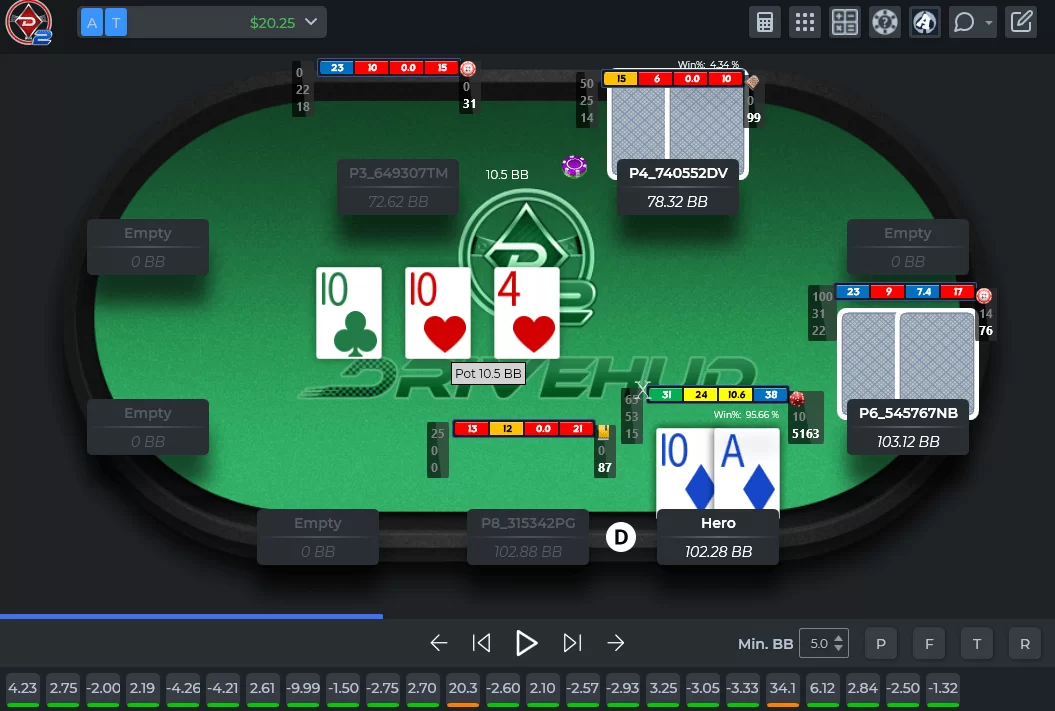
It is not as polished as the standalone Flopzilla or Equilab, but it is good enough that you rarely need a second tool.
Population Reports and R&D Tools
Population reports aggregate the entire database into pool tendencies (e.g., average flop c-bet by board texture, river check-raise frequencies).
The R&D tools dig deeper, letting you slice continuation betting by stack depth or check-raising by street.
For the off-table side of the same workflow, pair DriveHUD 2 with a real solver. Our GTO Wizard review covers the cloud-based option that most mid-stakes grinders use today.
Quiz Builder and Hand Chart Deviation
The quiz builder converts saved hand charts (GTO solutions, your own playing ranges) into interactive trainers you run away from the tables.
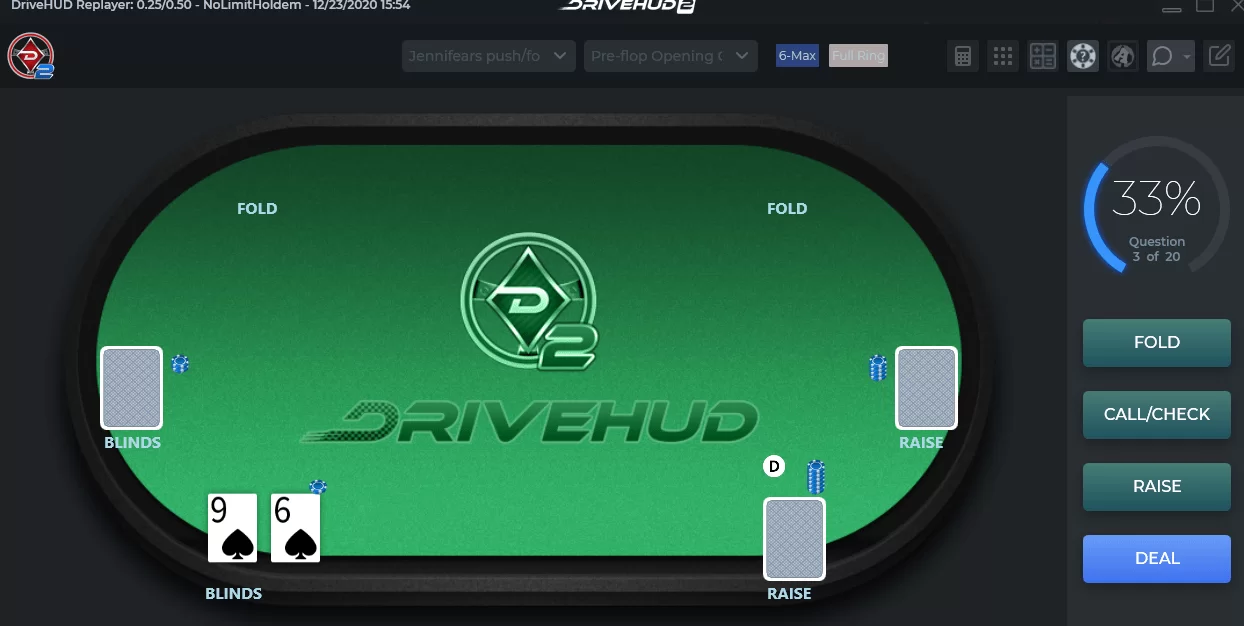
The hand chart deviation tool then compares your actual play against the saved chart and flags where you are losing EV.
Most competitor reviews skip this feature entirely. In practice it is a 20-minute daily habit that pays off after a few hundred quiz hands.
Tournament and SNG Features
DriveHUD 2 tracks all tournament formats: MTTs, SNGs, knockouts, satellites, and Spin-style lottery sit-and-gos.
The built-in ICM calculator runs side-by-side with the replayer, so you can rewind a final-table hand and see chip-EV versus ICM-EV at every decision point.
For deeper ICM modeling, DriveHUD 2 integrates with ICMizer 3 via the combo packages. Tournament players also get push/fold stat overlays that adjust based on effective stack depth, a feature PT4 and HM3 only provide through paid add-ons or third-party plugins.
If MTTs are your main format, pair DriveHUD 2 with our MTT strategy fundamentals guide and our SharkScope review for pre-session opponent scouting that no tracker can replace.
Supported Poker Sites
DriveHUD 2 covers more than 50 poker rooms across every major network. Coverage on Hold’em and Omaha sites is broad and reliable; the only major exception is GGPoker, where third-party HUDs are banned at the tables. See the official DriveHUD 2 supported sites knowledge base for the current full list.
- PokerStars (Hold'em, Omaha, tournaments)
- 888poker and the 888 network
- PartyPoker and the bwin network
- Ignition, Bovada, Bodog with native Catcher Technology
- ACR (America's Cardroom) and the Winning Poker Network
- Winamax, BetOnline, iPoker skins (Bet365, Betfair, etc.)
- PokerBaazi, Adda52, Spartan Poker and most major Indian rooms
- GGPoker: hand history import only (live HUD prohibited by the room)
For Ignition, Bovada, and Bodog players, DriveHUD 2 is arguably the single best choice on the market because Catcher Technology is built in. For ACR and PokerStars grinders, the experience is on par with PT4 and HM3.
Important: GGPoker and Live HUDs
The GGPoker third-party HUD ban is documented in their No Third-Party Tools policy.
DriveHUD 2 Pricing and Plans 2026
Pricing is where DriveHUD 2 swings hardest. The annual model is built so year-one buyers pay a low full price, then renew for under $10 per year, which is the cheapest serious tracker on the market.
| Plan | Stake range | Year 1 price | Renewal | Best for |
|---|---|---|---|---|
| Micro Stakes | NL2 to NL5 | $23.99 to $25.99 | $4.99/yr | Beginners and bankroll builders |
| Small Stakes | NL10 to NL50 | $45.99 to $48.99 | $7.99/yr | NL10 to NL50 grinders |
| Pro (All Stakes) | Unlimited | $74.99 to $79.99 | $9.99/yr | NL100+ and mid stakes |
| Holdem Pro Combo | Unlimited NLH | $219.99 | Varies | NLH + Leak Buster 2 + Player X-Ray |
| Omaha Pro Combo | Unlimited PLO | $219.99 | Varies | PLO + Leak Buster 2 + Player X-Ray |
| All-Stakes Combo | NLH + PLO + Asian Converter | $269.99 | Varies | Multi-game pros |
The 30-day free trial is unrestricted: full features, full database, no hand-history limit. After the 30 days you will be automatically downgraded to a read-only mode unless you purchase a tier.
Confirm current numbers against the official DriveHUD 2 pricing page before buying, since seasonal promos roll over each quarter.
Which DriveHUD 2 Plan Fits Your Stakes?
DriveHUD 2 has six pricing tiers, and most reviews leave the stake-to-plan mapping implicit. Here is the direct mapping by stake and format.
- NL2 to NL10 cash, microstakes tournaments: Micro Stakes at $23.99 to $25.99 per year is the right call. The HUD plus 600+ stats is enough to spot every major fish-vs-reg pattern at this level.
- NL25 to NL50 cash, $5 to $22 tournaments: Small Stakes at $45.99 to $48.99 per year. You get the same engine plus the larger database overhead these stakes generate.
- NL100+ cash, $33+ tournaments, mixed games: Pro at $74.99 to $79.99 per year. Unlocks all stakes plus the full feature set with no in-game cap.
- PLO grinders at any stake: Omaha Pro Combo at $219.99 bundles the Omaha tracker with Leak Buster 2 and Player X-Ray. PT4 still uses converters for 5-card and 6-card PLO.
- Multi-game pros: All-Stakes Combo at $269.99 covers Hold'em, Omaha, and the Asian Hand Converter for PPPoker and similar mobile apps.
If you are not sure, start with the 30-day Pro trial.
You get the full feature set, and at the end you can buy the tier that matches your actual usage.
Our recommendation: Match the plan to the stake and volume you actually play this month, not the stake you intend to climb to.
DriveHUD 2 ROI: When the Annual Fee Pays for Itself
DriveHUD 2 pays for itself faster than any tracker in its price tier, and no other reviewer on the current SERP runs this calculation.
We did, assuming a modest +1 bb/100 win-rate lift from the population exploits a good HUD enables, with NL400 set to a more conservative +0.5 bb/100.
- NL10: $10/100 BB. A +1 bb/100 lift over 25,000 hands = $25/month profit. Micro Stakes plan at $2.00/month (annualized) breaks even at roughly 2,000 hands per month.
- NL25: $25/100 BB. A +1 bb/100 lift over 25,000 hands = $62.50/month. Small Stakes at $3.83/month pays for itself 16x over.
- NL100: $100/100 BB. A +1 bb/100 lift over 30,000 hands = $300/month. Pro at $6.25/month pays for itself 48x over.
- NL400: $400/100 BB. A +0.5 bb/100 lift over 40,000 hands = $800/month. Pro pays for itself 128x over in a single month.
The break-even threshold for Micro Stakes ($23.99/yr) is roughly 2,000 hands per month at NL10. Below that volume you are paying for capability you will not load.
Before banking on these projections, plug your win rate and volume into our variance simulator to see how often a +1 bb/100 edge actually shows up in 30,000 hands of real play.
How to Set Up DriveHUD 2: Step-by-Step
DriveHUD 2 setup is more involved than the official walkthrough makes it look, but it is not actually difficult if you go in the right order. Skipping steps causes most of the configuration headaches you read about in forum threads.

- 1Download and install: Grab the installer from drivehud.com. Run as administrator on Windows 10 or Windows 11. The 30-day trial activates automatically on first launch.
- 2Auto-detect rooms: On first run, DriveHUD 2 scans your machine for hand-history folders from supported rooms. PokerStars, 888poker, PartyPoker, and ACR are detected without manual setup.
- 3Enable Catcher for Ignition, Bovada, or Bodog: Open Settings then Catcher and toggle the rooms you play. The service starts logging hands the moment you sit at a table; no $20/month add-on required.
- 4Configure your HUD: Open the HUD Designer, pick a preset (or build custom), and bind a profile to each game type. Assign separate layouts to regs and fish using bumper sticker thresholds.
- 5Run Leak Buster 2 after 5,000 hands: Once your database has at least 5,000 hands, run a full Leak Buster scan. The first audit usually surfaces 6 to 12 high-priority leaks across preflop and flop play.
System requirements
Windows 10 or 11, 4GB RAM minimum (8GB recommended for serious multi-tabling), and 170MB of free storage for the application plus database growth.
Most laptops bought after 2019 will run DriveHUD 2 with eight tables open without breaking a sweat.
Mac users
DriveHUD 2 is Windows-only. Mac users can run it via Parallels Desktop (paid, the cleanest option) or WINE (free, more setup friction).
If you are on Apple Silicon (M1, M2, M3, M4), Parallels 19+ is the only path with full stability.
Sample size matters (and here is how much)
Who Should and Should Not Buy DriveHUD 2
Be honest about your stake, your volume, and your room mix. DriveHUD 2 rewards specific player profiles and actively punishes others. Buy DriveHUD 2 if you fit any of these:
- Ignition, Bovada, or Bodog regulars: The only mainstream tracker with built-in Catcher; saves about $240/year vs. PT4/HM3 add-ons.
- NL2 to NL100 cash grinders: Lowest entry price and lowest renewal cost in the category.
- PLO and Omaha Hi/Lo specialists: Native 4/5/6-card PLO at the same price tier, no converter friction.
- Beginners building a first database: 30-day no-restrictions trial plus drag-and-drop HUD designer is the gentlest learning curve.
- Tournament players who want ICM-aware overlays: Push/fold stat panels by effective stack depth that PT4 and HM3 charge extra for.
Skip DriveHUD 2 if you fit any of these:
- GGPoker-only grinders: The live HUD is banned at GGPoker tables. Pay for tracking you cannot legally run.
- Mac-first players who refuse Parallels: PokerTracker 4 ships a native macOS app, which is the cleaner setup.
- High-stakes pros wanting deep custom filters: PT4 and HM3 both have richer plugin marketplaces and more mature situational filter systems.
Our Verdict
DriveHUD 2 earns an 8.4/10 from us. VIP-Grinders has been benchmarking poker software since 2013, and DriveHUD 2 is the first budget tracker we have recommended without major caveats.
It is the best poker HUD for budget-conscious grinders, the obvious choice for Ignition/Bovada players, and a genuinely strong alternative to PT4 and HM3 for everyone outside the GGPoker ecosystem.
The 30-day trial removes 100% of the buying risk. The pricing makes it the lowest total cost of ownership over three years in its category.
The honest weaknesses (Mac support, GGPoker, patch lag) are clearly defined so you can match them against your own setup.
Before you decide, browse our best poker tools roundup for 2026 to confirm DriveHUD 2 fits your overall stack.
Frequently Asked Questions About DriveHUD 2
Is DriveHUD 2 worth buying?
Yes for grinders at NL2 to NL100 and Omaha players, especially on Ignition, Bovada, or Bodog. It is the cheapest serious tracker on the market and the only one with built-in Catcher Technology for anonymous rooms. Skip it if GGPoker is your main room or if you refuse to run Parallels on Mac.
How does DriveHUD 2 compare to PokerTracker 4?
DriveHUD 2 wins on price ($23.99 vs $99.99), trial length (30 days vs 14), and built-in database simplicity. PokerTracker 4 wins on plugin ecosystem, native macOS support, and the depth of its custom filter system. Mid stakes pros tend to prefer PT4; lower-stakes and Ignition players tend to prefer DriveHUD 2.
How does DriveHUD 2 compare to Holdem Manager 3?
DriveHUD 2 is cheaper, easier to set up, and includes Catcher for free. Holdem Manager 3 has stronger situational filters for tournament play and a more mature mobile companion. Tournament specialists who need ICM-aware filtering often pick HM3 plus ICMizer; cash-game grinders typically pick DriveHUD 2.
Does DriveHUD 2 support GGPoker?
Partially. DriveHUD 2 can import GGPoker hand histories for off-table review, but it cannot run a live HUD overlay during play because GGPoker bans all third-party HUDs at the tables. The only legal in-game overlay on GGPoker is its built-in Smart HUD.
Can DriveHUD 2 track Omaha and PLO?
Yes. DriveHUD 2 supports Pot-Limit Omaha including 4-card, 5-card, and 6-card variants, plus Omaha Hi/Lo. The Omaha Pro Combo at $219.99 bundles the tracker with Leak Buster 2 and Player X-Ray for PLO specialists.
How long is the DriveHUD 2 free trial?
The free trial is 30 days with full functionality and no hand-history limits. PokerTracker 4 and Holdem Manager 3 both cap their free trials at 14 days, which makes the DriveHUD 2 trial the longest no-restrictions trial in the category.
Does DriveHUD 2 run on Mac?
Not natively. Mac users need Parallels Desktop (paid) or WINE (free) to run DriveHUD 2 on macOS. Apple Silicon users (M1, M2, M3, M4) should use Parallels 19 or later for full stability; PokerTracker 4 is the only mainstream tracker with native macOS support.
Is DriveHUD 2 good for beginners?
Yes. The drag-and-drop HUD designer, auto-detect setup, and 30-day no-restrictions trial make DriveHUD 2 the most beginner-friendly serious tracker on the market. The built-in Quiz Builder also doubles as a learning tool away from the tables.