

BC.Game Payment Methods: How to Deposit and Withdraw in 2026
BC.Game supports 170+ cryptocurrencies and tokenized assets for deposits and withdrawals, plus fiat on-ramps through MoonPay, Banxa, and TransFi. This guide covers every payment method available at BC.Game in 2026: deposit walkthroughs with screenshots from our own account, minimum deposit and minimum withdrawal amounts per coin, payout times, fees, and network comparisons based on our testing.
We also cover the questions the official help pages skip: how to cash out to a bank account when the casino pays in crypto only, why a balance shows as locked, and which BC.Game tokens can never be withdrawn.
For the full platform breakdown including games, bonuses, and licensing, see our BC.Game review. If you are comparing crypto-friendly operators, our best crypto casinos guide covers all tested platforms.
BC.Game Payment Methods: Quick Reference
| Detail | Info |
|---|---|
| Supported Coins | 170+ cryptocurrencies and tokenized stocks (BTC, ETH, USDT, SOL, LTC, TRX, DOGE, XRP, BNB, and more) |
| Minimum Crypto Deposit | From 0.00001 BTC / 1 USDT / 0.0002 ETH (varies by coin) |
| Minimum Crypto Withdrawal | From 21 USDT / 0.000874 BTC / 0.0201 ETH (varies by coin and network) |
| Withdrawal Fee | 0.1% platform fee + blockchain network fees (0% platform fee at VIP Platinum Level 38+) |
| Crypto Deposit Speed | Near-instant for most coins (network confirmation dependent) |
| Crypto Withdrawal Speed | Typically under 10 minutes |
| Fiat On-Ramp | MoonPay, Banxa, TransFi (Visa, Mastercard, Apple Pay, Google Pay; ~3.5% to 4.5% card fee) |
| Monthly Withdrawal Limit | €10,000 (€5,000 if balance exceeds 10x total deposits) |
| Bonus Code | vipgrinders: 380% up to $4,000 + 400 Free Spins + $5 no deposit after KYC |
| License | Government of Anjouan, Union of Comoros (No. ALSI-202410011-FI1) |
All minimums in this table were verified from the BC.Game cashier on July 17, 2026. Per-coin figures fluctuate with network conditions. Check the live cashier for the current values before transacting.
BC.Game Deposit Methods: Coins, Networks, and Minimums
BC.Game is a crypto-first platform. The fastest and cheapest way to deposit money at BC.Game is by sending cryptocurrency directly from your external wallet. Players who do not hold crypto can buy it on-site through MoonPay, Banxa, or TransFi using a card or bank transfer.
BC.Game does not charge any fees on incoming crypto deposits. You only pay the outgoing network fee set by your external wallet or exchange. Once the transaction receives enough network confirmations, the funds appear in your BC.Game balance automatically.
BC.Game Minimum Deposit by Coin and Supported Cryptocurrencies
BC.Game supports over 170 deposit currencies, one of the widest crypto deposit selections among Bitcoin casinos in 2026. The major coins are available across multiple networks, and BC.Game also lists tokenized stock assets such as AAPLx (Apple), TSLAx (Tesla), NVDAx (Nvidia), and GOOGLx (Alphabet). Most competing casinos do not support tokenized assets at all.
The table below shows the most commonly used coins, their networks, deposit minimums, and expected confirmation times. Minimum amounts were verified from the BC.Game cashier on July 17, 2026. Processing times are standard estimates based on typical blockchain confirmation speeds.
| Coin | Network | Min Deposit | Processing Time |
|---|---|---|---|
| USDT | TRC-20 / ERC-20 | 1 USDT | Under 1 min (TRC-20) / 1 to 5 min (ERC-20) |
| BTC | SegWit | 0.00001 BTC | 10 to 30 min (1 confirmation) |
| ETH | ERC-20 | 0.0002 ETH | 1 to 5 min |
| LTC | Litecoin | 0.009 LTC | 2 to 5 min |
| SOL | Solana | 0.005 SOL | Under 30 sec |
| TRX | Tron | 2 TRX | Under 1 min |
| DOGE | Dogecoin | 1 DOGE | 2 to 10 min |
| XRP | Ripple | 0.5 XRP | Under 30 sec |
| BNB | BEP-20 | 0.0002 BNB | Under 1 min |
| USDC | ERC-20 / Solana | 1 USDC | 1 to 5 min (ERC-20) / Under 30 sec (Solana) |
| XMR | Monero | 0.005 XMR | 2 to 20 min |
The full list of supported coins and tokens is available in the BC.Game cashier under the Deposit tab. You can search by coin name or ticker to check whether your preferred asset is supported. Privacy coins are included, and BC.Game is one of the few operators accepting Monero deposits alongside the mainstream assets.
How to Deposit Crypto at BC.Game (Step by Step)
Here is how to deposit money at BC.Game. The process is the same for all 170+ supported cryptocurrencies.
- 1Log in to your BC.Game account and click Wallet in the top menu
- 2Select Deposit from the left sidebar
- 3Choose your cryptocurrency from the Currency dropdown (BTC, ETH, USDT, or any of the 170+ supported coins)
- 4Select the correct network for your chosen coin. For USDT, this means choosing between TRC-20, ERC-20, BEP-20, or Solana. Sending funds on the wrong network can result in permanent loss
- 5Copy the deposit address shown on screen and paste it into your external wallet or exchange withdrawal form
- 6Send the funds and wait for network confirmation. Most deposits appear in your BC.Game balance within seconds to a few minutes
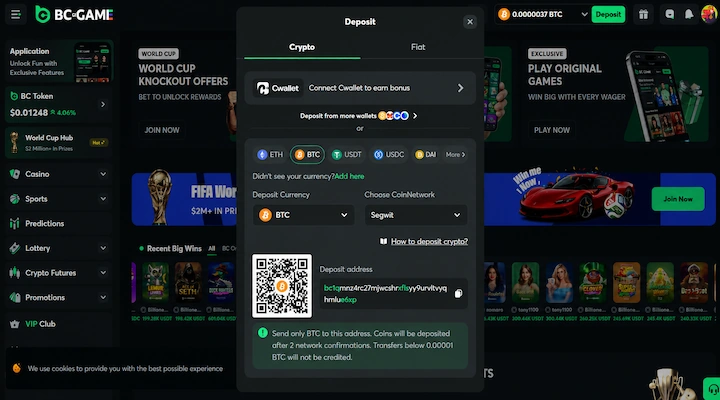
The screenshot below shows the BTC deposit screen from our VIP-Grinders test account. BTC uses a single network (SegWit), so there is no network dropdown to worry about. The minimum deposit (0.00001 BTC) and deposit address are displayed directly.
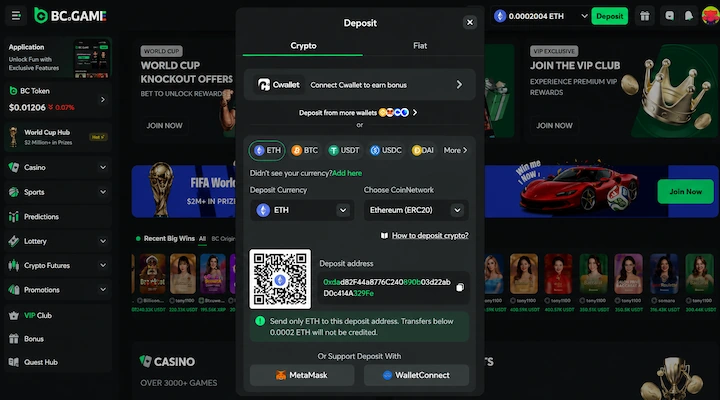
For coins with multiple networks, the cashier adds a network selector. The ETH deposit screen below shows ERC-20 selected as the only option for Ethereum, with a 0.0002 ETH minimum.
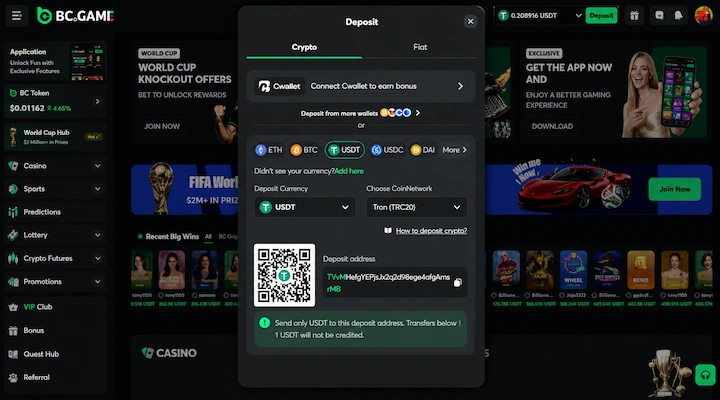
USDT is where the network choice matters most. The screenshot below shows TRC-20 selected, but the same screen offers ERC-20, BEP-20, and Solana. Picking the wrong network here is the most common deposit mistake at any crypto casino.
How Long Does a BC.Game Deposit Take?
Deposit speed at BC.Game is set by the blockchain, not by the casino. BC.Game credits your balance automatically as soon as the network confirms your transaction, and there is no manual approval step on incoming crypto.
Solana and XRP typically land in under 30 seconds. TRC-20 USDT, TRX, and BNB clear in under a minute. ERC-20 assets take 1 to 5 minutes, and Bitcoin needs 10 to 30 minutes for its first confirmation.
Fiat Deposits: Buy Crypto via MoonPay, Banxa, and TransFi
BC.Game does not accept fiat currencies (USD, EUR, GBP) as direct deposits into your casino wallet. Instead, three integrated on-ramp providers let you buy crypto with a card or bank transfer. The purchased coins are then credited to your BC.Game balance automatically.
This is not a traditional fiat deposit. You are purchasing cryptocurrency through a third-party provider, and the conversion fee is set by that provider, not by BC.Game.
| Provider | Payment Methods | Approx. Fee | Fiat Currencies |
|---|---|---|---|
| MoonPay | Visa, Mastercard, Apple Pay, Google Pay, bank transfer | ~3.5% to 4.5% (card) | 30+ fiat currencies |
| Banxa | Visa, Mastercard, bank transfer | ~2.5% to 3.5% (card) | 30+ fiat currencies |
| TransFi | Visa, Mastercard, local payment methods | Varies by region | Regional availability |
To buy crypto on BC.Game, click Buy Crypto in the Wallet sidebar, select your provider, choose the fiat currency and amount, and complete the purchase through the provider’s checkout. The crypto arrives in your BC.Game wallet once the payment clears.
How to Withdraw from BC.Game
BC.Game withdrawals are crypto-only. Funds are sent directly from your BC.Game wallet to your external crypto address. There is no fiat cashout option: if you deposited via MoonPay, Banxa, or TransFi, you still withdraw in crypto and convert to fiat outside BC.Game.
All crypto withdrawals are processed by BC.Game within minutes. For most coins, your funds arrive in your external wallet within 10 minutes. Large or flagged withdrawals may take 1 to 6 hours due to BC.Game’s security audit process.
How to Withdraw Money from BC.Game (Step by Step)
Here is how to withdraw money from BC.Game. The process is the same for all supported cryptocurrencies.
- 1Log in and click Wallet in the top menu
- 2Select Withdraw from the left sidebar
- 3Choose the cryptocurrency you want to withdraw from the Currency dropdown
- 4Select the network. For USDT, choose between Ethereum (ERC-20), TRC-20, BEP-20, or Solana. The minimum withdrawal amount changes depending on which network you select
- 5Paste your external wallet address in the Withdrawal Address field
- 6Enter the withdrawal amount (the minimum is displayed in red next to the field) and click Preview to review the fee breakdown before confirming
The screenshot below shows the USDT withdrawal screen from our BC.Game account. The minimum withdrawal (21 USDT on ERC-20) is displayed in red next to the amount field, and the Preview button lets you review the exact fee breakdown before confirming.
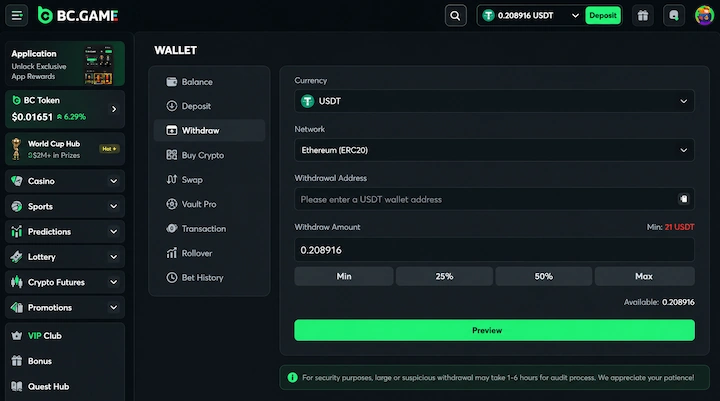
BC.Game also integrates with Cwallet (visible at the bottom of the withdrawal screen), a third-party multi-chain wallet. Connect it from the withdrawal page for details on how it works with your BC.Game balance.
Why Are My BC.Game Funds Locked?
Your deposit must be wagered at least 1x before any withdrawal is approved. This is a standard anti money laundering requirement, not a bonus wagering condition, and it applies even if you never claimed a bonus.
If you deposit $100 and try to withdraw immediately without placing any bets, the withdrawal is declined and the balance shows as locked. Placing bets totaling your deposit amount releases it. The requirement is 1x turnover, not 1x profit, so the wagering can be spread across any number of bets.
Bonus balances are separate. Funds credited from the welcome package carry their own wagering requirement, and they cannot be withdrawn until that requirement is cleared.
Can You Withdraw JB Coin from BC.Game?
JB Coin cannot be withdrawn. It is BC.Game’s in-house play token, credited on signup and through promotions, and it does not appear in the withdrawal currency selector at all. It cannot be deposited, exchanged for cryptocurrency, or converted to cash.
JB is there to let you try BC Originals and selected games without risking your own funds. Treat it as demo credit, not as a balance you are working toward cashing out.
Which Network Is Cheapest for BC.Game Withdrawals?
When you withdraw a coin that supports multiple networks, the network you select directly affects the fee you pay, the speed of the transaction, and the minimum withdrawal amount. This is the biggest cost variable in any BC.Game withdrawal, and the section most competing guides skip entirely.
The table below compares USDT withdrawal costs across four networks. USDT is the most popular withdrawal currency at crypto casinos, and the fee difference between networks can be significant.
| Network | Typical Network Fee | Speed | Best For |
|---|---|---|---|
| TRC-20 (Tron) | ~$0.50 to $2 | Under 1 min | Best balance of low fees and speed |
| BEP-20 (BSC) | ~$0.10 to $0.50 | Under 1 min | Lowest network fees |
| ERC-20 (Ethereum) | $2 to $20+ | 1 to 5 min | Widest wallet compatibility |
| Solana | ~$0.01 | Under 30 sec | Fastest and cheapest |
Network fees in this table are typical ranges based on normal blockchain conditions. Actual fees vary with congestion. The 0.1% BC.Game platform fee applies on top of the network fee regardless of which network you choose.
One detail worth noting: the USDT minimum on TRC-20 (22.58 USDT) is actually higher than on ERC-20 (21 USDT), as shown in the withdrawal table below. This is counterintuitive since TRC-20 is the cheaper network, but BC.Game sets its own minimums independently of network costs. If you are withdrawing a small amount, ERC-20 has the lower floor despite higher gas fees.
The same network logic applies to deposits. If you are sending USDT from an exchange, choosing TRC-20 or Solana instead of ERC-20 can save you $5 to $20 in fees per transaction. For a broader comparison of how different casinos handle USDT deposits and withdrawals, see our Tether casinos guide.
How to Cash Out from BC.Game to a Bank Account
BC.Game does not send money to a bank account, and there is no fiat withdrawal option anywhere in the cashier. Every payout leaves the platform as cryptocurrency, sent to an external wallet address you control. Converting to your local currency happens outside BC.Game.
The route is the same in every market, and it takes three steps.
- 1Withdraw USDT on TRC-20 from BC.Game to your exchange deposit address. This is the cheapest and most widely supported route for local cashouts
- 2Sell the USDT on the exchange for your local currency, either on the spot market or through a peer to peer desk
- 3Withdraw the local currency to your bank account or mobile money wallet using whichever payout rails that exchange supports in your country
Which payout rail you use at step three depends on your exchange, not on BC.Game. In Nigeria that usually means a bank transfer or an Opay wallet, in Kenya it is normally M-Pesa, and in India and South Africa it is a direct bank transfer.
One point that causes constant confusion: BC.Game displays balances in more than 40 local currencies including the Nigerian naira, Kenyan shilling, Indian rupee, and South African rand. Those are display currencies only. They convert your crypto balance for readability and do not create a fiat deposit or withdrawal method.
BC.Game Minimum Withdrawal, Limits, Fees, and Payout Times
This section covers the three most searched questions about BC.Game withdrawals: minimum amounts per coin, what fees apply, and BC.Game withdrawal times in practice. All per-coin minimums were verified from the BC.Game cashier on July 17, 2026.
| Coin | Network | Min Withdrawal | Processing Time |
|---|---|---|---|
| USDT | TRC-20 | 22.58 USDT | Under 10 min |
| USDT | ERC-20 | 21 USDT | Under 10 min |
| BTC | Bitcoin | 0.000874 BTC | Under 10 min |
| ETH | ERC-20 | 0.0201 ETH | Under 10 min |
| LTC | Litecoin | 0.105 LTC | Under 10 min |
| TRX | Tron | 21 TRX | Under 10 min |
| DOGE | Dogecoin | 96 DOGE | Under 10 min |
| SOL | Solana | 0.101 SOL | Under 10 min |
| XRP | Ripple | 22.25 XRP | Under 10 min |
| BNB | BEP-20 | 0.0501 BNB | Under 10 min |
| USDC | ERC-20 / Solana | 5.1 USDC | Under 10 min |
| XMR | Monero | 0.1211 XMR | Under 10 min |
These minimums fluctuate with network conditions. The values above are a snapshot from our July 17, 2026 cashier check. Always confirm the current figure in the withdrawal screen before transacting.
BC.Game Withdrawal Fees Explained
BC.Game’s own documentation and support FAQ confirm a 0.1% platform fee on all crypto withdrawals. This fee is charged by BC.Game and is separate from the blockchain network fee. Players who reach VIP Platinum Level 38 or above pay 0% platform fee on crypto withdrawals.
In practice, the total cost of a BC.Game withdrawal is: (withdrawal amount x 0.1%) + network gas fee. For a $500 USDT withdrawal on TRC-20, that works out to roughly $0.50 in platform fees plus $0.50 to $2 in network fees. Total cost: approximately $1 to $2.50.
For comparison, a $500 USDT withdrawal on ERC-20 during a high-gas period could cost $0.50 in platform fees plus $10 to $20 in network fees. The network you choose is almost always a bigger cost factor than BC.Game’s 0.1% fee.
The Preview button on the withdrawal screen shows the exact fee breakdown before you confirm. We recommend always clicking Preview to check the total cost, especially on larger amounts.
BC.Game Monthly Withdrawal Limits
BC.Game caps withdrawals based on your account balance relative to your deposit history. These limits come from Section 8.6 of BC.Game’s terms of service.
| Condition | Monthly Withdrawal Cap |
|---|---|
| Standard (most players) | €10,000 per month (or currency equivalent) |
| Balance exceeds 10x total deposits | €5,000 per month (or currency equivalent) |
The reduced €5,000 cap applies when your current balance is at least 10 times larger than the total sum of all deposits you have made. In practice, this mainly affects players who hit a large win relative to their deposit history.
For most recreational and mid-volume players, the €10,000 monthly cap is unlikely to be a factor. Players with larger bankrolls or significant single wins should plan withdrawal timing accordingly to avoid hitting the monthly ceiling.
There is no published per-transaction maximum for crypto withdrawals at BC.Game. The monthly cap is the only hard ceiling, so a single large payout is possible provided it sits inside your monthly allowance. Cashouts above the usual range trigger the 1 to 6 hour security audit before funds are released.
BC.Game Payment Tips from Our Testing
We deposit and withdraw regularly from our own BC.Game account to keep this guide current. These are the practical lessons that save time and fees, based on what we have seen across multiple transactions in 2026.
- For USDT transactions, use TRC-20 as your default network. It offers the best combination of low fees (~$0.50 to $2), fast confirmation (under 1 minute), and wide wallet support. Solana is technically cheaper and faster, but fewer exchanges support Solana USDT withdrawals
- Avoid ERC-20 for amounts under $500. Ethereum gas fees during busy periods can reach $10 to $20 per transaction, making small deposits and withdrawals disproportionately expensive
- Use BC.Game's built-in Swap instead of withdrawing and re-depositing. If you hold BTC but want to play in USDT, the Swap function (in the Wallet sidebar) converts between currencies inside your wallet. This avoids two sets of network fees and the withdrawal minimum threshold
- Always click Preview before confirming a withdrawal. The fee breakdown shows exactly what you will pay in platform fees and network fees. This is especially important on ERC-20 where gas costs can spike unexpectedly
- If you deposited via MoonPay, Banxa, or TransFi and need to cash out, remember that withdrawals are crypto-only. Send your crypto to an exchange (such as Binance, Coinbase, or Kraken) and sell it there to convert back to fiat
BC.Game’s Wallet sidebar also includes a Swap function for converting between supported coins and Vault Pro for additional balance management options. Both are accessible directly from the same Wallet menu you use for deposits and withdrawals.
Before your first deposit, make sure to enter the bonus code vipgrinders during registration to unlock 380% up to $4,000 + 400 Free Spins + $5 no deposit after KYC. The code is case-sensitive and must be entered at sign up. For the full breakdown of how the bonus works, activation steps, and wagering requirements, see our BC.Game bonus code page.
BC.Game Payment Methods FAQs
What are the payment methods for BC.Game?
BC.Game supports 170+ cryptocurrencies including BTC, ETH, USDT, LTC, SOL, TRX, DOGE, XRP, BNB, and tokenized stock assets. Fiat deposits are available through MoonPay, Banxa, and TransFi, which let you buy crypto with Visa, Mastercard, Apple Pay, Google Pay, or bank transfer. All withdrawals are processed in cryptocurrency only.
How do I deposit money at BC.Game?
Log in to your BC.Game account, click Wallet, select Deposit, choose your cryptocurrency and network, then copy the deposit address and send funds from your external wallet. Most crypto deposits appear in your balance within seconds to a few minutes. If you do not hold crypto, use the Buy Crypto option to purchase coins through MoonPay, Banxa, or TransFi with a card or bank transfer.
How do I withdraw from BC.Game?
Go to Wallet, select Withdraw, choose your cryptocurrency and network, paste your external wallet address, enter the amount, and click Preview to review fees before confirming. Crypto withdrawals typically process in under 10 minutes. Your deposit must be wagered at least 1x before any withdrawal is approved.
What is the minimum withdrawal at BC.Game?
The minimum withdrawal varies by coin and network. As of July 2026, verified minimums include: 21 USDT (ERC-20), 22.58 USDT (TRC-20), 0.000874 BTC, 0.0201 ETH, 0.105 LTC, 21 TRX, 96 DOGE, 0.101 SOL, 22.25 XRP, 0.0501 BNB, 5.1 USDC, and 0.1211 XMR. These values fluctuate with network conditions. Always check the live cashier for the current figure.
What is the minimum deposit at BC.Game?
Crypto deposit minimums are very low: 0.00001 BTC, 1 USDT, 0.0002 ETH, 0.009 LTC, 2 TRX, 1 DOGE, 0.005 SOL, 0.5 XRP, 0.0002 BNB, 1 USDC, and 0.005 XMR as of July 2026. Most coins require well under one dollar equivalent to deposit. For fiat purchases through MoonPay, Banxa, or TransFi, the minimum depends on the provider and payment method.
Does BC.Game charge withdrawal fees?
Yes. BC.Game charges a 0.1% platform fee on all crypto withdrawals. This is separate from the blockchain network fee, which varies by coin and network. Players who reach VIP Platinum Level 38 or above pay 0% platform fee. Many competing guides incorrectly state that BC.Game charges no withdrawal fees.
How long does a BC.Game withdrawal take?
Most crypto withdrawals at BC.Game are processed in under 10 minutes. The exact time depends on blockchain confirmation speed for your chosen coin and network. Large or flagged withdrawals may take 1 to 6 hours due to BC.Game’s security audit process.
Can I use a credit card at BC.Game?
Not directly. BC.Game does not accept credit or debit cards as a direct deposit method. You can use Visa or Mastercard through the Buy Crypto feature, which routes through MoonPay, Banxa, or TransFi. These providers purchase crypto on your behalf and credit it to your BC.Game wallet. Card purchases carry a processing fee of approximately 2.5% to 4.5% depending on the provider.
Does BC.Game support PayPal?
BC.Game does not support PayPal as a direct payment method. PayPal may appear as an option inside MoonPay in some regions, but availability is inconsistent and region-dependent. Do not rely on PayPal as your primary deposit route at BC.Game.
Can I use Apple Pay or Google Pay at BC.Game?
Apple Pay and Google Pay are available through MoonPay’s Buy Crypto checkout in supported regions. They are not direct deposit methods at BC.Game. You use them to purchase crypto through MoonPay, and the coins are then credited to your BC.Game wallet. The standard MoonPay card processing fee applies.
What is the BC.Game withdrawal limit?
BC.Game sets a monthly withdrawal cap of €10,000 (or currency equivalent) for most players. If your current balance is at least 10 times larger than the total sum of your deposits, the cap drops to €5,000 per month. These limits are defined in Section 8.6 of BC.Game’s terms of service. There is no published per-transaction cap for crypto withdrawals, but large cashouts may take 1 to 6 hours for security review.
How do I withdraw from BC.Game to a bank account?
BC.Game does not send money to a bank account. Every withdrawal leaves the platform as cryptocurrency. To reach your bank, withdraw a liquid coin such as USDT on TRC-20 to an exchange that operates in your country, sell it for local currency, then transfer to your bank or mobile money wallet. BC.Game displays balances in local currencies such as the naira, shilling, rupee, and rand, but those are display currencies only and not withdrawal methods.
What is the maximum withdrawal at BC.Game?
BC.Game does not publish a per-transaction maximum for crypto withdrawals. The effective ceiling is the monthly cap of €10,000, or €5,000 if your balance is at least 10 times your total deposits. Large cashouts may take 1 to 6 hours while BC.Game completes its security audit before releasing funds.
Does BC.Game pay real money?
Yes. BC.Game processes real cryptocurrency withdrawals, typically in under 10 minutes, sent to an external wallet address you control. Winnings are paid in the coin you select at the cashier and can be converted to local currency on any exchange. JB Coin is the exception, as that token has no cash value and cannot be withdrawn.