

PokerTracker 4 Review 2026: Setup Guide, HUD & Full Analysis
PokerTracker 4 is one of the most established poker tracking and HUD tools in the game. We have used PT4 across tens of thousands of hands at stakes ranging from NL2 to NL200, and it remains a core part of our daily grinding toolkit.

In our PokerTracker 4 review for 2026, we break down every feature that matters, walk you through setup, compare it head-to-head with Holdem Manager 3 and Hand2Note, and give you an honest verdict on whether it is worth your money.
If you are serious about improving your win rate and want a data-driven edge over your opponents, a poker tracker is not optional. It is essential. PokerTracker 4 has been the go-to choice for online grinders since its launch, and for good reason.
What Is PokerTracker 4?
Pros and Cons
- One-time purchase. No monthly fees. Pay once starting at $64.99 and own the software for life
- Comprehensive HUD with 500+ stats. Fully customizable vector-based HUD with detailed pop-up panels for street-by-street analysis
- Built-in LeakTracker and NoteTracker. Leak detection and automated opponent notes included at no extra cost
- Tournament ICM tools. Built-in 9-player ICM calculator and quiz mode for push/fold training
- Cross-platform. Native support for both Windows and macOS. Each license works on two computers
- Growing site restrictions. Major networks like GGPoker, partypoker, and WPT Global have banned third-party HUDs, limiting where PT4 is fully functional
- Resource-intensive. PT4 uses a PostgreSQL database that can consume significant RAM, especially with large hand history databases (1M+ hands)
- Dated interface. The UI has not received a major visual overhaul and feels less polished than Holdem Manager 3 or Hand2Note
- No 5-card or 6-card PLO support. Only standard 4-card PLO is supported. Players grinding PLO5 or PLO6 need a different solution
- Steep learning curve for advanced features. While basic setup is quick, mastering custom reports, filters, and HUD profiles takes dedicated study time
Key Features of PokerTracker 4
PT4 packs a significant amount of functionality into a single application. Read on to learn what you get and why each feature matters for your bottom line.
Heads-Up Display (HUD)
Most players buy PT4 for the HUD. It displays real-time statistics on each opponent at your table directly beneath or beside their avatar.
The default HUD shows core stats such as VPIP (Voluntarily Put Money in Pot), PFR (Pre-Flop Raise Percentage), and AF (Aggression Factor).
These three numbers alone can tell you if you’re facing a tight-passive nit, a loose-aggressive maniac, or a solid regular.
PT4’s HUD is fully customizable. You can add or remove any of the more than 500 available statistics, change colors, resize elements, and create separate profiles for cash games, tournaments, Sit & Go formats, and Omaha.
The vector-based Heads-Up Display (HUD) engine automatically adjusts to the size of your poker tables, ensuring that your layout never gets distorted.
Pop-up panels add another layer. Hovering over a player’s Heads-Up Display (HUD) reveals detailed breakdowns by street, including preflop three-bet frequency, flop continuation bet percentage, turn check-raise rate and river fold-to-bet frequency. The latter is critical for identifying profitable bluffing spots.
For multi-tablers, this eliminates the need for guesswork. Rather than relying on memory or instinct, you base your decisions on hundreds or thousands of observed hands.
Below are the essential HUD stats that every serious player should display:
| Stat | Abbreviation | What It Tells You | Useful After |
|---|---|---|---|
| Voluntarily Put Money In Pot | VPIP | How loose or tight the player is preflop. A VPIP of 25-30% at 6-max is typical for a regular. | 100+ hands |
| Pre-Flop Raise | PFR | How aggressively the player enters pots. The gap between VPIP and PFR reveals calling tendencies. | 100+ hands |
| Aggression Factor | AF | Ratio of bets+raises to calls postflop. An AF above 3.0 indicates an aggressive player. | 200+ hands |
| 3-Bet Percentage | 3B% | How often the player re-raises preflop. A 3B% above 8% at 6-max signals a wide 3-betting range. | 300+ hands |
| Fold to 3-Bet | F3B | How often the player folds after facing a 3-bet. Above 65% means you can 3-bet them profitably with a wide range. | 300+ hands |
| Continuation Bet Flop | CBF | How often the player bets the flop after raising preflop. Above 70% means they c-bet too often and can be floated or raised. | 200+ hands |
| Went To Showdown | WTSD | How often the player reaches showdown when seeing the flop. Above 30% at 6-max is typically too high (calling station territory). | 500+ hands |
| Attempt To Steal | ATS | How often the player raises from the cutoff, button, or small blind when folded to them. High ATS (above 35%) means they steal wide. | 300+ hands |
These eight stats form the foundation of any effective HUD layout. Together, they help you reconstruct an opponent’s preflop ranges and predict their postflop tendencies.
PT4 lets you add dozens more, but starting with these gives actionable reads on almost every decision point.

You can use the equity calculator alongside your HUD reads to quantify whether a specific call or raise is profitable against a given opponent profile.
Database and Hand History Analysis
PT4 becomes a genuine study tool rather than just a table overlay when it is used with the database. Every hand is stored, tagged, and searchable.
You can filter by date, stake, position, hand type, action taken, board texture, and dozens of other parameters.

Want to know your win rate from the button at NL50 over the last three months? Two clicks. Want to see every hand where you 3-bet from the small blind and got 4-bet? Three clicks.
The filtering system lets you isolate specific scenarios, identify patterns, and spot leaks you would never notice just from playing.
The hand replayer walks you through individual hands visually, showing pot sizes, stack depths, and all-in equity at each decision point.
The “My Reports” section gives you a top-level view of your results across stakes, game types, and time periods, complete with graphs, distribution charts, and customizable columns.
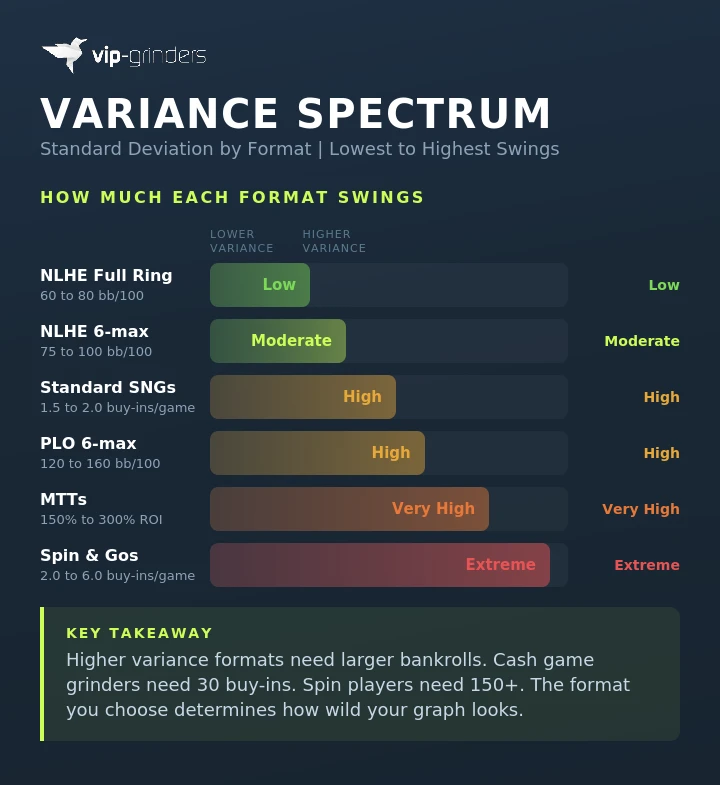
Pair this with a variance simulator, and you can differentiate genuine leaks from short-term downswing noise. Our guide to variance in poker explains how to interpret your results when sample sizes are small.
One of the most powerful but underused database features is the ability to study winning opponents.
You can filter your All Players Report by win rate (for example, players winning 5+ bb/100 over 10,000+ hands), then drill into their stats to reverse-engineer what they are doing differently.
This is particularly useful when you move up stakes and want to understand how the regulars at NL50 or NL100 differ from the player pool you came from.
We used this workflow extensively when transitioning from NL25 to NL50 and identified three key strategic adjustments that winning players at the higher stake were making consistently: higher 3-bet frequencies from the blinds, more aggressive turn barreling, and tighter preflop opening ranges from early position.
LeakTracker
LeakTracker compares your statistical profile against benchmark ranges for winning players at your stake level. It highlights metrics where you fall outside the expected range, flagging potential leaks in your game.
For example, if your WTSD (Went To Showdown) percentage is 32% and the winning benchmark at NL25 is 24-28%, LeakTracker flags it.
If your flop continuation bet frequency is 45%, which is below the 55-65% benchmark, that shows up too.
While it doesn’t tell you how to fix the leak, it does tell you exactly where to focus your study time.
We found this tool to be most valuable during the first month of using PT4 at new stakes. It quickly identified three areas where our postflop game was too passive, and we saw a measurable improvement once we made adjustments.
For players who want to go beyond statistical benchmarks and understand the theory behind correct plays, a dedicated GTO solver and trainer can show you exactly where your decisions deviate from optimal strategy.
NoteTracker and Automated Opponent Profiling
NoteTracker watches your opponents in real time, automatically generating notes based on predefined triggers. For example, if a player open-limps from early position, NoteTracker logs it.
If someone calls a 3-bet out of position with a speculative hand and shows down, NoteTracker records the tendency.

You can customize the triggers and note templates to build a detailed behavioral profile of each regular in your player pool without having to type anything manually.
Over time, these notes accumulate to form a rich data layer that supplements the numerical HUD stats. This combination of quantitative stats and qualitative behavioral notes provides a more comprehensive overview than either system alone.
ICM Calculator and Tournament Tools
Tournament players receive a built-in, nine-player Independent Chip Model (ICM) calculator. Enter the stack sizes and payout structure, and PT4 will calculate each player’s equity in real dollar terms.
This is crucial when making final table decisions, especially when chip EV and dollar EV differ significantly.

PT4 also includes an ICM Quiz mode, in which you can practice push/fold situations against the calculator’s recommendations.
For players grinding tournament poker and SNGs, these tools save the cost of a separate ICM training subscription.
Combined with our MTT variance calculator, you can build a complete tournament study workflow inside PT4 and the VIP-Grinders toolkit.
How to Set Up PokerTracker 4
Setting up PT4 takes about 10 minutes. Here is the process from download to your first tracked hand.
- 1Download PT4 from the official PokerTracker website. Choose the 15-day free trial or enter your license key if you have already purchased.
- 2Install the software. The installer handles the PostgreSQL database setup automatically. Accept the defaults unless you have a specific reason to change the database location.
- 3Enable hand histories on your poker site. In PokerStars, go to Settings > Playing History > Hand History and enable 'Save My Hand History'. Each site has a slightly different path, but PT4's Setup Assistant walks you through it.
- 4Run the Setup Assistant. Go to Tools > Setup Assistant inside PT4. Select your poker site and follow the prompts. PT4 auto-detects the hand history folder for most major sites.
- 5Play a few hands. Open a table on your poker site and play 10-20 hands. The HUD should appear within the first few hands as PT4 imports the history files in real time.
The entire process is straightforward. If you hit any issues, PT4’s community forums and built-in help guides cover every poker site configuration in detail.
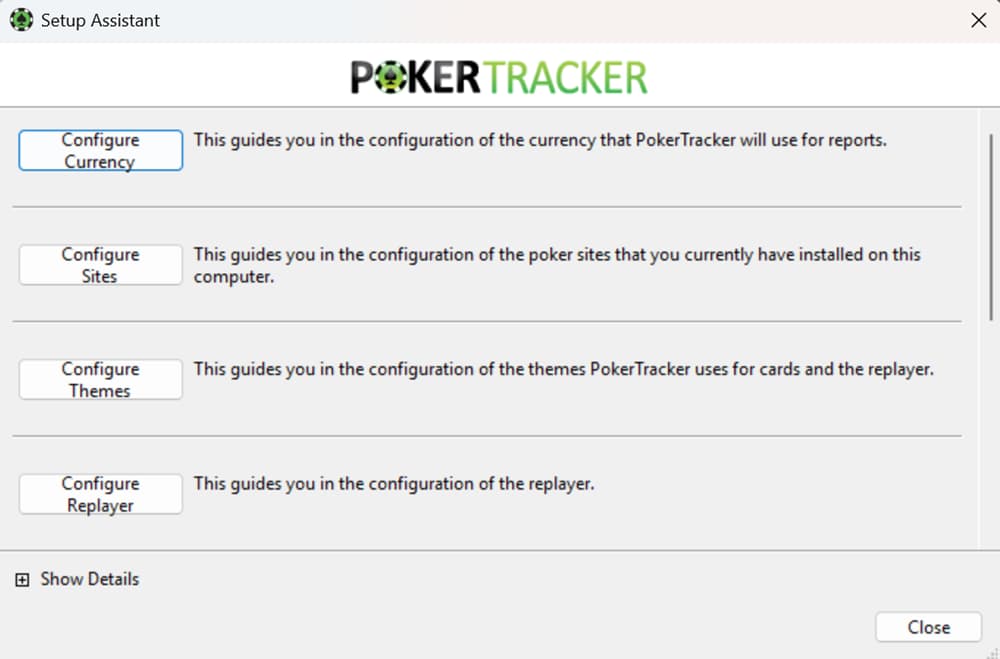
We tested the setup on a fresh Windows 11 install and a MacBook Pro running macOS Sonoma, and both were fully operational within 10 minutes.
PokerTracker 4 Pricing in 2026
PT4 uses a one-time license model. You pay once and own the software for life. There is no monthly subscription. Here is the current pricing breakdown.
| License | Stakes Covered | Price |
|---|---|---|
| Hold’em Small Stakes | Up to NL50 / $22 buy-in tournaments | $59.99 |
| Hold’em Full | All stakes | $99.99 |
| Omaha Small Stakes | Up to PLO50 / $22 buy-in tournaments | $59.99 |
| Omaha Full | All stakes | $99.99 |
| Hold’em + Omaha Small Stakes | Both games, limited stakes | $99.99 |
| Hold’em + Omaha Full | Both games, all stakes | $159.99 |
Each purchase includes one year of free support and software updates. After that, annual maintenance plans are available if you want continued access to updates.
Each license allows you to run PT4 on two computers simultaneously, so you can use it on your desktop and laptop without buying a second copy.
For micro-stakes grinders starting out at NL2 or NL5, the Small Stakes license, priced at $59.99, is the optimal starting point.
Use our bankroll calculator to ensure the purchase aligns with your bankroll, and refer to our VIP-Grinders bankroll management guide if you’re looking to build up from the micros. You can upgrade to the full license later by paying the difference.
If you play both Hold’em and Omaha, the combo package at $159.99 offers the best value per game type.
The 15-day free trial gives you access to all features with no restrictions, so there is zero risk in testing it before buying.
Which Poker Sites Support PokerTracker 4 in 2026?
This is one of the most important factors in deciding if PT4 is right for you. Policies regarding HUD and trackers vary significantly across poker networks, and the situation has changed in recent years as several major sites have moved to restrict or ban third-party tracking software.
| Poker Site / Network | HUD Allowed? | Notes |
|---|---|---|
| PokerStars | Yes (with restrictions) | HUD allowed, but PokerStars has limited the number of stats that can be displayed and restricted certain automated data mining features. |
| 888poker | Yes | Fully supported. Hand histories exported for tracking. |
| partypoker | No | Banned all HUDs and tracking software as of 2019. PT4 cannot import hand histories from partypoker. |
| GGPoker | No (built-in only) | Third-party HUDs are banned. GGPoker offers its own built-in tracking tools instead. |
| WPT Global | No | No HUD support. Hand histories not available for export. |
| ACR (Americas Cardroom) | Yes | Fully supported on the Winning Poker Network. |
| CoinPoker | No | No HUD support. Emphasizes a HUD-free environment. |
| iPoker Network | Yes | Supported across most iPoker skins including Betfair and Ladbrokes. |
| Winamax | No | Banned HUDs and tracking tools. |
| Ignition / Bovada | Partial | Anonymous tables, but PT4 can still import hand histories for post-session analysis. No live HUD. |
The trend in online poker is moving toward HUD-free environments. Major networks like GGPoker and partypoker have already made the switch.
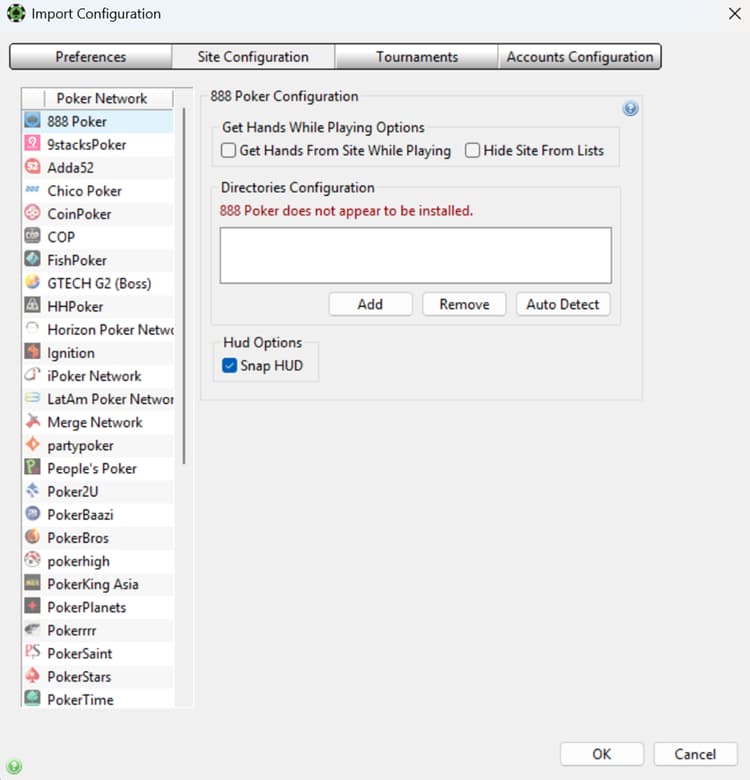
If you primarily play on a site that bans HUDs, PT4 still has value as a post-session analysis tool, but you will not get the real-time table overlay that most players consider the core feature.
Before purchasing, check whether your primary poker site supports PT4. If you grind on GGPoker or WPT Global, your money may be better spent on a different tool.
If you play on PokerStars, 888poker, or ACR, PT4 is fully functional and highly recommended.
PokerTracker 4 vs Holdem Manager 3
The PT4 vs HM3 debate has been running since the early days of online poker tracking. Both are mature, full-featured products built by dedicated teams. Here is how they compare in 2026.
| Feature | PokerTracker 4 | Holdem Manager 3 |
|---|---|---|
| Pricing (Hold’em Full) | $99.99 (lifetime) | $99 (lifetime) |
| HUD Customization | 500+ stats, vector engine, full pop-ups | 500+ stats, fully customizable, strong pop-ups |
| Leak Detection | LeakTracker (built-in) | LeakTracker equivalent with benchmarks |
| Automated Notes | NoteTracker (built-in) | NoteCaddy (separate add-on, extra cost) |
| Tournament ICM | Built-in 9-player ICM calculator + quiz | Basic ICM support |
| Interface | Functional, slightly dated look | More modern, streamlined UI |
| Mac Support | Yes (native) | Yes (native) |
| Omaha Support | Hold’em + 4-card PLO | Hold’em + 4-card PLO |
| Learning Curve | Moderate | Slightly easier for beginners |
| Community Resources | Large, established forum + tutorials | Active community, good documentation |
The honest answer is that both products deliver comparable core functionality. The meaningful differences come down to a few specifics.
PT4 includes NoteTracker for free, while HM3 charges extra for the equivalent NoteCaddy add-on. PT4’s ICM tools are more developed out of the box. HM3 has a cleaner, more modern interface that some players find easier to navigate.
One area where PT4 has a clear edge is the quality of community-created HUD profiles and resources. Because PT4 has been around longer, there is a larger library of free custom HUDs, tutorials, and configuration guides available from third-party creators.
If you like downloading a ready-made HUD profile and tweaking it rather than building one from scratch, PT4’s ecosystem is more mature.
On the flip side, HM3’s reporting interface is more intuitive for newer users. The drag-and-drop report builder and cleaner graph rendering make it slightly more approachable if you are not comfortable navigating complex software menus. For experienced users, this difference is negligible.
If you already own one and are considering switching, there is rarely enough of a gap to justify the cost and relearning time. If you are buying your first tracker, both are solid choices.
We give PT4 a slight edge for tournament-heavy players because of the built-in ICM tools, and for players who value automated note-taking without paying for add-ons.
PokerTracker 4 vs Hand2Note
Hand2Note is the newer competitor that has gained significant traction in the mid and high-stakes community.
It takes a fundamentally different approach from PT4 by offering dynamic HUD profiles that change based on the opponent type and game situation.
PT4 shows you static stats accumulated over all hands. Hand2Note can display different stat sets depending on whether you identified the player as a fish, a regular, or an unknown.
It also offers range research tools and a more advanced pop-up system with conditional logic.
The trade-off is complexity. Hand2Note’s learning curve is significantly steeper than PT4’s. Configuration requires more time, and the interface is less intuitive for beginners.
Hand2Note’s pricing model also differs: it offers a free version with limited features, but the full version requires a subscription that exceeds PT4’s one-time cost within the first year.
From a cost perspective, Hand2Note’s free tier covers basic tracking, but the Pro version runs $120/year. Over three years, that is $360 compared to PT4’s one-time $99.99.
If you plan to use a tracker long-term, PT4’s lifetime license is significantly cheaper.
For players grinding NL100 and above who want the most granular data analysis available, Hand2Note is worth evaluating.
For micro-stakes to mid-stakes grinders who want a reliable, well-documented tracker that works out of the box, PT4 remains the more practical choice. You can compare both of these alongside other options in our best poker tools roundup.
Those on a budget should also consider DriveHUD 2, which is cheaper than PT4’s $99.99 lifetime license. It costs $23.99 per year and includes native Catcher Technology for Ignition, Bovada, and Bodog at no extra cost.
Who Should Use PokerTracker 4?
PT4 is not for every player. Here is who benefits most and who should look elsewhere.
PT4 is ideal for: Cash game grinders on HUD-friendly sites (PokerStars, 888poker, ACR, iPoker). Tournament players who want built-in ICM tools.
Players moving up from micro-stakes who need structured data analysis to identify leaks. Multi-tablers who rely on HUD stats for table selection and volume play.
PT4 is less useful for: Players who exclusively play on GGPoker, partypoker, WPT Global, or other HUD-banned sites.
Live poker players (no hand history files to import), who are better served by a live tournament bankroll tracker and staking marketplace like Pokerbase for session logging, receipt and tax exports, and selling action.
Complete beginners who have not yet learned basic poker strategy concepts like position, pot odds, and hand ranges. Recreational players who play fewer than 5,000 hands per month (the sample sizes will be too small for meaningful stats).
PT4 is ideal for players who take the game seriously, play regularly on a supported site, and are willing to invest time studying their database after sessions.
While the tracker collects the data, improvement comes from how you use it. You can measure your progress by tracking your hourly rate before and after adopting a structured review workflow.
Should You Get PokerTracker 4?
PokerTracker 4 remains one of the best poker tracking and HUD tools available in 2026. The one-time pricing model is a major advantage over subscription-based alternatives.
The feature set covers everything a serious online grinder needs: a customizable HUD, deep database analysis, automated leak detection, opponent note-taking, and tournament ICM tools.
The biggest consideration is site compatibility. The online poker industry is trending toward HUD-free environments, and PT4’s value proposition weakens if your primary site does not support it.
If you grind on PokerStars, 888poker, ACR, or iPoker network sites, PT4 is a clear recommendation. If you play exclusively on GGPoker or partypoker, evaluate whether the post-session analysis features alone justify the cost.
If you are still on the fence, start with the 15-day free trial. Play your normal sessions, set up the HUD, and spend 30 minutes after each session reviewing your database.
By the end of two weeks, you will know whether the data-driven approach fits your play style. Most players who commit to that trial period end up purchasing.
Our overall rating: 8.5/10. A proven, feature-rich tracker with excellent value, held back only by the shrinking number of sites that allow third-party HUD software.
Frequently Asked Questions About PokerTracker 4
Is PokerTracker 4 worth it?
PokerTracker 4 is worth it if you play regularly on a site that supports third-party HUDs. The one-time cost of $59.99 to $159.99 pays for itself quickly through better decision-making and leak identification. If your primary site has banned HUDs (GGPoker, partypoker, WPT Global), the value drops significantly since you lose the real-time HUD overlay. PT4 still works for post-session analysis on those platforms if hand histories are available, but the core advantage is diminished.
How do I set up the PokerTracker 4 HUD?
Download PT4 from the official website and run the installer. Open PT4, go to Tools and then Setup Assistant, select your poker site, and follow the prompts to locate your hand history folder. Enable hand history saving in your poker client settings. Once configured, the HUD appears automatically on your tables after a few hands are imported. You can customize the HUD layout through the HUD Editor under the Options menu.
Is PokerTracker 4 better than Holdem Manager 3?
Neither is objectively better. PT4 includes NoteTracker and stronger ICM tools at no extra cost, making it slightly better value for tournament players. HM3 has a more modern interface and a slightly gentler learning curve. Both offer 500+ HUD stats, comprehensive databases, and similar pricing. The best choice depends on which interface you prefer and whether the included extras matter to your game type.
Does PokerTracker 4 work on Mac?
Yes. PT4 has a native macOS version that runs without emulation or virtual machines. Feature parity with the Windows version is close, though some minor interface differences exist. We tested PT4 on macOS Sonoma and it ran smoothly alongside PokerStars and 888poker without performance issues.
Which poker sites allow PokerTracker 4?
PokerTracker 4 is fully supported on PokerStars (with some stat restrictions), 888poker, Americas Cardroom, and most iPoker network skins. It is banned or non-functional on GGPoker, partypoker, WPT Global, CoinPoker, and Winamax. Ignition and Bovada allow hand history imports for post-session review but block real-time HUD use due to anonymous tables.
Can I use PokerTracker 4 for Omaha?
Yes. PT4 supports four-card Pot-Limit Omaha with dedicated Heads-Up Display (HUD) profiles, statistics, and filters. Pair it with our Pot-Limit Omaha (PLO) strategy guide to learn which statistics are most important in Omaha. You will need either an Omaha-specific license, which costs between $59.99 and $99.99, or the Hold’em + Omaha combo package. Please note that PT4 does not currently support five-card or six-card PLO variants.
How many hands do I need for accurate PokerTracker 4 stats?
For your own stats, 30,000 to 50,000 hands provides a reliable baseline for most metrics. For opponent stats, reliability depends on the specific stat. VPIP and PFR become useful after 100 to 200 hands. Positional stats and street-specific metrics like flop check-raise frequency need 500 to 1,000+ hands for statistical significance. The more hands you accumulate, the more accurate and actionable your data becomes.
Is there a free version of PokerTracker 4?
There is no permanent free version. PT4 offers a 15-day free trial with full access to all features. During the trial, you can test the HUD, database, LeakTracker, and every other tool without restrictions. If you decide not to purchase, the software stops functioning after the trial period. For free alternatives, tools like PokerCraft (built into GGPoker) or Equilab (for equity calculations) offer limited functionality at no cost. See our full list of poker tools for more options.