

GGPoker Download: Client, Mobile Apps and Install Fixes
The GGPoker download works from a button rather than a link. Click it and the client starts downloading, but there is no file URL to copy, share or paste, which is why so many people end up searching for an installer link that does not exist. GGPoker’s Spanish help article publishes one, and we tested it from two countries to find out what it actually does.
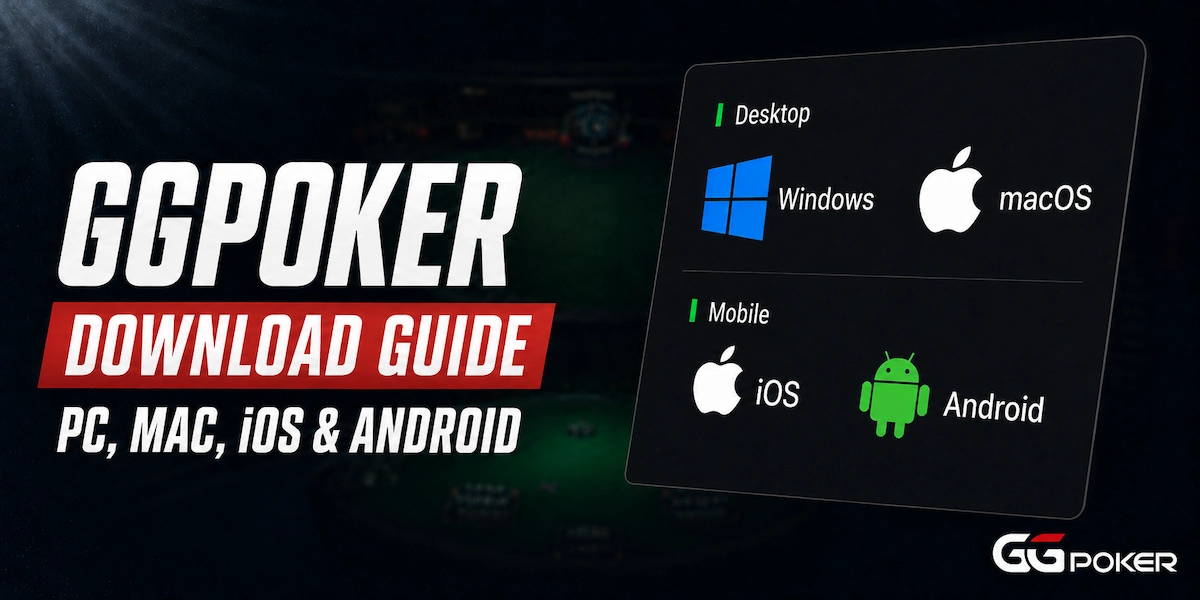
This page covers the install on every platform, the system requirements GGPoker publishes, what the installer file is actually called, and the fixes for a download, install or launch that will not work.
We installed the Windows client ourselves, so the screenshots below are from that run rather than from GGPoker’s marketing pages. The mobile sections follow GGPoker’s own documentation.
For rakeback, bonuses and the full platform breakdown, see our GGPoker review.
How to Download GGPoker on PC
The whole thing takes about two minutes. GGPoker runs the download in the background while you create the account, so the two steps overlap rather than following each other.
- 1Go to the GGPoker site and click the red Download button in the top right. Not the Sign Up button in the middle, which registers an account without starting the download.
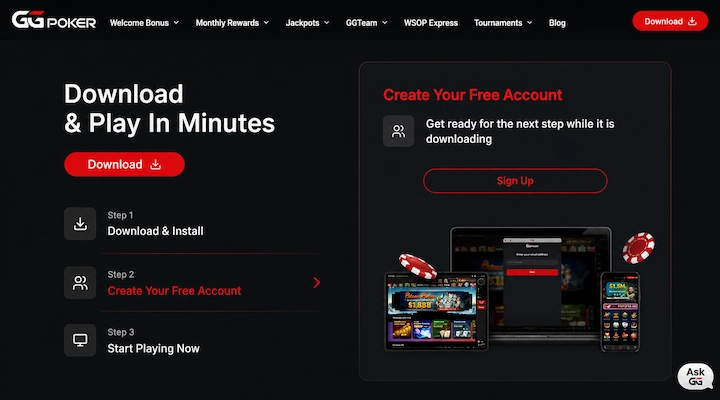
- 2The download starts immediately and the page switches to account creation while it runs.
- 3Create your GGPass with an email address and password, or sign in with Google, Facebook or Apple.
- 4Open the installer from your downloads folder once it finishes.
- 5Pick your language and click Install. The setup runs without further prompts.
- 6Log in with your GGPass. First launch takes longer than later ones while the client builds your profile.
Step one is where most guides get it wrong, including the version of this page we published before. The button is labeled Download and sits in the navigation bar, not in the middle of the screen.
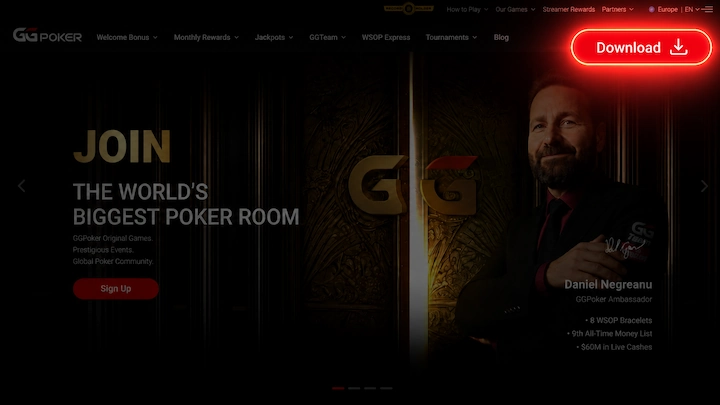
You can start from our GGPoker sign up page if you want the VIP-Grinders rakeback deal applied to the account.
The download page then shows GGPoker’s own three steps, with the client downloading while you fill in the account form.
The GGPoker Installer File
The file that lands in your downloads folder is called Installer_GGPoker_en.msi. The suffix changes with the language you selected on the site, so a Spanish download arrives as a different filename.
That matters if you are looking for the file after the fact, or checking that what downloaded is what you expected. Several guides publish the name without the language suffix, which is the version from an older client.
Opening it brings up the setup window with twenty-one language options.
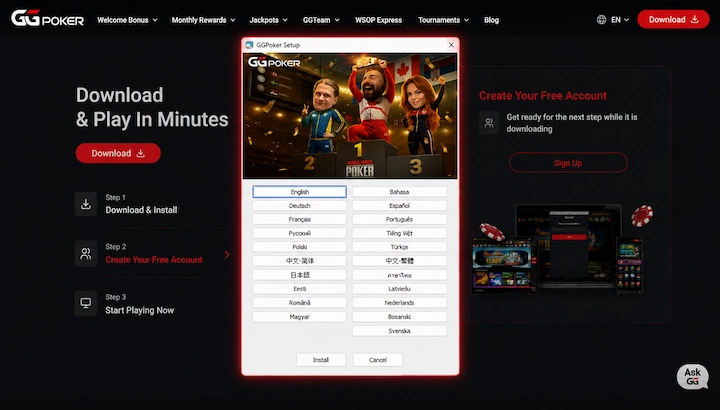
The languages available are English, Bahasa, Deutsch, Español, Français, Português, Russian, Tiếng Việt, Polski, Türkçe, both Chinese scripts, Japanese, Thai, Eesti, Latviešu, Română, Nederlands, Magyar, Bosanski and Svenska.
Windows System Requirements
| Component | Minimum | Recommended |
|---|---|---|
| Operating system | Windows 8 | Windows 10 |
| Processor | 3 GHz | Intel Core i3 or higher |
| Memory | 2 GB RAM | 4 GB or greater |
| Disk space | 3 GB free | 10 GB or greater |
These are GGPoker’s published figures. The gap between the 3 GB minimum and the 10 GB recommendation is for hand histories and client updates rather than the install itself.
GGPoker on Mac
The Mac client is a universal build, so it runs natively on both Intel machines and Apple Silicon. GGPoker requires macOS 10.13 or later and a Mac from 2017 onward, with the same 2 GB minimum and 3 GB of disk space.
The install arrives as a .dmg rather than an installer. Open it, drag the app into Applications, and launch it from there.
Expect a Gatekeeper prompt on first launch, since macOS blocks apps from developers outside the App Store by default. Open System Settings, go to Privacy and Security, and click Open Anyway.
Is There a Direct GGPoker Download Link?
Not in any usable form. GGPoker’s download is triggered by a button on its site, and there is no public file URL you can copy, bookmark or send to someone else.
That answer is worth stating plainly because a lot of people are looking for one. Searches for a direct installer link, a mirror, or a link from support are among the most common GGPoker download questions, and almost nobody answers them.
The Link GGPoker Publishes in Spanish
There is one apparent exception. GGPoker’s Spanish language help article on installing the Windows client publishes what it calls “el enlace directo,” the direct link, and gives the address gg.gl/ggpoker-windows.
The English version of the same article carries no such link. It says only to visit your local GGPoker website.
We followed the Spanish link twice from different countries. From Malta it redirected to ggpoker.eu, and through an Argentinian connection it landed on ggpoker.com. Neither downloaded anything.
It is a geo-redirector that sends you to your regional GGPoker site, which is the same place the download button lives. The article calls it a direct link, and it is not one.
Why There Is No Mirror
GGPoker distributes the client only through its own sites and the official app stores. It has no mirror, no alternative host, and no third party it authorizes to serve the installer.
That is deliberate rather than an oversight. Sites offering a GGPoker installer download outside those channels are hosting a file GGPoker did not put there, which is a meaningful risk with software that handles your money.
If a download will not start, the fix is in the next section rather than in finding another source for the file.
When the GGPoker Download Fails
Most failed downloads are not GGPoker’s doing. Something on your machine or network is stopping the file, and four causes account for almost all of it.
Your Antivirus Blocked It
Security software flags poker clients regularly, because they open network connections and update themselves without asking. GGPoker acknowledges this in its own guidance and recommends adding the client to your exceptions list.
On Windows, check Defender Firewall settings and whitelist GGPoker in whatever antivirus you run. The block often happens silently, so a download that seems to fail for no reason is worth checking here first.
Your Antivirus Reports a Trojan After an Update
This one is specific enough that GGPoker has a help article for it. After a client update, some antivirus programs report a Trojan in the GGPoker folder.
GGPoker’s guidance is to remove the affected program through Control Panel and reinstall. It is a false positive rather than an infection, though that is easier to accept when the operator says so than when a stranger does.
The Installer Will Not Run
If the file downloads but nothing happens when you open it, right click and choose Run as administrator. GGPoker’s own troubleshooting suggests this first, which implies the installer expects elevated rights.
Restarting the machine before trying again clears most of the rest. Graphics drivers matter more than people expect, since an out of date driver can stop the client launching after a clean install.
The Install Finished but the Client Will Not Open
Delete the GGPoker folder from AppData on Windows, or Application Support on Mac, then download and install again. That clears a corrupted install without touching your account.
Your GGPass credentials are stored on GGPoker’s side rather than locally, so a reinstall costs you nothing except the download.
If none of the four applies, GGPoker’s support handles installation problems directly. That is a faster route than working through forum threads, and it is the same channel people wrongly expect to hand out download links.
GGPoker Download for Android Devices
Where you get the Android app depends on where you are. GGPoker is on the Play Store in some licensed markets and distributed as a direct APK download in others.
The UK and Ontario apps are both on Google Play. For the global client, GGPoker’s own guidance covers the APK route, noting the app may not be available on the Play Store in every region.
Installing the APK Safely
Android blocks installs from outside the Play Store by default, so the process has one extra step.
- 1Open the GGPoker site in your mobile browser and tap Download. The site detects Android and serves the APK.
- 2Allow installs from your browser when prompted. On recent Android versions this is Settings, Apps, Special access, Install unknown apps.
- 3Open the downloaded file and tap Install.
- 4Log in with your GGPass or create one if this is your first install.
Turn the unknown apps permission back off afterward. It applies to whichever browser you granted it to, not just to this one file, and there is no reason to leave it open.
Only download the APK from GGPoker’s own site. APK repositories carry files nobody has verified, and a poker client is the last piece of software worth taking a chance on.
Android System Requirements
| Component | Minimum | Recommended |
|---|---|---|
| Operating system | Android 10 | Latest available |
| Memory | 2 GB RAM | 3 GB or greater |
| Storage | 500 MB free | 1 GB or greater |
GGPoker’s download page states Android 10 as the floor. Its blog still lists Android 6.0, which is the older figure and no longer matches what the current client needs.
GGPoker Download for iOS devices
GGPoker is on the App Store, but not as one app. There are separate listings for different licensed markets, all published by NSUS Ltd., and which one you get depends on your Apple account country.
| App | Market | Developer |
|---|---|---|
| GGPoker, Real Online Poker | Global, where licensed | NSUS Ltd. |
| GGPoker UK, Real Online Poker | United Kingdom | NSUS Ltd. |
| GGPoker Ontario, Poker Games | Ontario, Canada | NSUS Ltd. |
Search the App Store for GGPoker and install whichever listing appears for your region. If your Apple account is set to a country GGPoker does not serve, nothing will show up.
When the App Store Listing Is Missing
Where the App Store route is unavailable, GGPoker distributes the app directly and documents the process itself.
- 1Open the GGPoker download page in Safari and tap Download, then Install.
- 2Go to Settings and tap General.
- 3Select VPN and Device Management. On older iOS versions this is listed as Device Management or Profile.
- 4Tap NSUS Ltd. and press Trust NSUS Ltd.
- 5Open the app and log in with your GGPass.
That trust step exists because iOS will not run an app installed outside the App Store until you approve its developer. It is the same mechanism companies use to distribute internal apps to staff, and NSUS Ltd. is the developer name on both the App Store listings and the direct install.
Skipping it leaves you with an icon that will not open, which is the most common reason people think the iOS install failed.
iOS System Requirements
| Component | Minimum | Recommended |
|---|---|---|
| Operating system | iOS 15.x | Latest available |
| Memory | 2 GB RAM | 3 GB or greater |
| Storage | 500 MB free | 1 GB or greater |
The iOS 15 floor rules out anything older than an iPhone 6s. Older GGPoker documentation lists lower device requirements, but the current download page is the figure to go by.
When the GGPoker Download Fails
Most failed downloads are not GGPoker’s doing. Something on your machine or network is stopping the file, and four causes account for almost all of it.
Your Antivirus Blocked It
Security software flags poker clients regularly, because they open network connections and update themselves without asking. GGPoker acknowledges this in its own guidance and recommends adding the client to your exceptions list.
On Windows, check Defender Firewall settings and whitelist GGPoker in whatever antivirus you run. The block often happens silently, so a download that seems to fail for no reason is worth checking here first.
Your Antivirus Reports a Trojan After an Update
This one is specific enough that GGPoker has a help article for it. After a client update, some antivirus programs report a Trojan in the GGPoker folder.
GGPoker’s guidance is to remove the affected program through Control Panel and reinstall. It is a false positive rather than an infection, though that is easier to accept when the operator says so than when a stranger does.
The Installer Will Not Run
If the file downloads but nothing happens when you open it, right click and choose Run as administrator. GGPoker’s own troubleshooting suggests this first, which implies the installer expects elevated rights.
Restarting the machine before trying again clears most of the rest. Graphics drivers matter more than people expect, since an out of date driver can stop the client launching after a clean install.
The Install Finished but the Client Will Not Open
Delete the GGPoker folder from AppData on Windows, or Application Support on Mac, then download and install again. That clears a corrupted install without touching your account.
Your GGPass credentials are stored on GGPoker’s side rather than locally, so a reinstall costs you nothing except the download.
If none of the four applies, GGPoker’s support handles installation problems directly. That is a faster route than working through forum threads, and it is the same channel people wrongly expect to hand out download links.
GGPoker Download for Android Devices
Android is the awkward one. GGPoker is on Google Play in some markets and not in others, so where you are decides whether you install from the store or sideload an APK.
The UK and Ontario apps are both live on Google Play. For the global client, GGPoker’s own guidance covers installing the APK directly, which is the route most players outside those markets take.
| Requirement | Minimum | Recommended |
|---|---|---|
| Operating system | Android 10 | Latest available |
| Memory | 2 GB RAM | 3 GB or greater |
| Storage | 500 MB free | 1 GB or greater |
Worth noting that GGPoker’s own pages disagree here. The download page states Android 10, while an older blog article says Android 6. The download page is the more recent of the two, so that is the figure to work from.
Installing the APK Safely
Sideloading sounds riskier than it is, provided the file comes from GGPoker rather than from an APK repository. The steps are short.
- 1Open the GGPoker site on your phone and tap Download. The APK downloads through your browser.
- 2Allow installs from your browser when Android prompts you. The setting lives under Security or Install Unknown Apps, depending on your version.
- 3Open the downloaded file and tap Install.
- 4Log in with your GGPass, the same credentials you use on desktop.
Turn the unknown sources permission back off once the install finishes. It applies per app rather than globally on modern Android, so leaving it enabled for your browser is a standing permission you do not need.
Third party APK sites carry the same problem covered earlier. A poker client handles your account and your money, and a version GGPoker did not publish is not worth the convenience.
GGPoker Download for iOS devices
GGPoker is on the App Store, published by NSUS Ltd. There are three separate apps rather than one, and which you need depends on where your account is registered.
- GGPoker - Real Online Poker, the global app, for players on the dot com site.
- GGPoker UK - Real Online Poker, for accounts on the UK licensed site.
- GGPoker Ontario: Poker Games, for the Ontario licensed site.
Searching the App Store for GGPoker returns whichever of these is available in your Apple account’s country. If none appears, that is the country setting rather than the device.
| Requirement | Minimum | Recommended |
|---|---|---|
| Operating system | iOS 15.x | Latest available |
| Memory | 2 GB RAM | 3 GB or greater |
| Storage | 500 MB free | 1 GB or greater |
Installing from the App Store is the same as any other app. Download, open, log in with your GGPass, and the client pulls your account across from desktop if you already have one.
When the App Store Listing Is Missing
In countries where GGPoker holds no licence, the App Store listing does not appear. GGPoker documents a second route for those markets, and it needs one step people usually miss.
- 1Open the GGPoker download page in Safari and tap Download Now, then Download again, then Install.
- 2Open Settings and tap General.
- 3Select VPN and Device Management. On older iOS versions this is called Device Management or Profile.
- 4Tap NSUS Ltd. and then Trust NSUS Ltd.
- 5Open the app and log in with your GGPass.
Step four is the one that catches people. Without it the app installs and then refuses to open, with an error about an untrusted developer rather than anything mentioning GGPoker.
Image 5: Screenshot, 600×400. iOS Settings showing VPN and Device Management with NSUS Ltd. listed. Optional, only if you have access to an iPhone.
One thing worth being clear about. Installing through this route does not make GGPoker available where it is not licensed, because the client checks your location when it launches. GGPoker’s terms prohibit using a VPN to get around that, with penalties up to a permanent ban and confiscation of the balance.
Key Features of the GGPoker App
The mobile app is not a stripped down version of the desktop client. Same games, same tournaments, same account, with a few things that only make sense on a phone.
- Four table multi tabling on mobile, against a higher limit on desktop. The cap exists because screen space runs out before the software does.
- Rush and Cash, the fast fold format that moves you to a new table the moment you fold. It suits a phone better than it suits a monitor.
- Spin and Gold, three handed hyper turbo sit and gos with a randomised prize pool.
- PokerCraft, the built in hand history and results tracker. It replaces third party tracking software, which GGPoker does not allow.
- SmartHUD, opponent statistics drawn from hands you have played against them rather than from a database.
- Staking and Home Games, both fully available on mobile rather than desktop only.
The tracking restriction is worth understanding before you install anything alongside the client. GGPoker prohibits third party HUDs and tracking software, and PokerCraft exists because of that rather than as a bonus.
SmartHUD works differently from a traditional HUD for the same reason. It only shows statistics from hands you personally played against that opponent, so it cannot build a profile on someone you have never faced.
What the App Does Not Do
There is no browser version. GGPoker offered Chrome Instant Play some years ago and withdrew it, so the client or the app is the only route to real money games.
Emulators and virtual machines are prohibited under GGPoker’s security policy, alongside VPNs. Running the Android app on a desktop emulator is a rule breach rather than a workaround.
Once the client is installed and your account exists, the next step is funding it. Our GGPoker deposit methods guide covers what is available in your region and what each option costs.
GGPoker Download FAQs
Is there a direct GGPoker download link?
No usable one. The download runs from a button on GGPoker’s site rather than a public file URL, so there is nothing to copy or share. GGPoker’s Spanish help article publishes gg.gl/ggpoker-windows and calls it a direct link, but we followed it from two countries and it redirected to a regional homepage both times without downloading anything. It is a geo-redirector rather than a file link.
What is the GGPoker installer file called?
On Windows it downloads as Installer_GGPoker_en.msi. The suffix reflects the language selected on the site, so a Spanish or Portuguese download arrives under a slightly different name. Several guides publish the filename without the language suffix, which comes from an older version of the client.
Why is my GGPoker download blocked?
Usually antivirus or firewall software. Poker clients open network connections and update themselves, which security software often flags, and the block frequently happens without any warning. Add GGPoker to your exceptions list and check Windows Defender Firewall settings. Some antivirus programs also report a Trojan in the GGPoker folder after a client update, which GGPoker confirms is a false positive.
Is GGPoker on the App Store?
Yes, published by NSUS Ltd., and there are three separate apps rather than one. GGPoker Real Online Poker is the global app, GGPoker UK serves the UK licensed site, and GGPoker Ontario serves Ontario. Which one appears when you search depends on the country set on your Apple account, not on your device. In countries where GGPoker holds no licence, no listing appears at all.
Can I play GGPoker in a browser?
No. GGPoker offered a Chrome Instant Play version some years ago and withdrew it, so the desktop client or the mobile app is the only route to real money games. Emulators and virtual machines are also prohibited under GGPoker’s security policy.
Can I use a VPN with GGPoker?
No. GGPoker’s security policy prohibits VPNs, proxies and any tool used to mask your location, and the client checks where you are when it launches. Penalties run from a warning and a VPN block for minor breaches to a permanent ban and confiscation of your balance for repeat or serious ones.