

Hand2Note 4 Review: Hands-On Test by VIP-Grinders for 2026
Hand2Note is the most powerful poker tracker on the market, and the most polarizing. Its Dynamic HUD adapts mid-hand based on position, stack depth, and action sequence, while PokerTracker 4 and Holdem Manager 3 still show the same numbers in every spot.
The catch: it costs more, takes longer to master, and roughly half of its premium features get disabled on certain rooms.

What Is Hand2Note?
Hand2Note is a poker tracker and Heads-Up Display (HUD) that imports your hand histories, builds a local database, and overlays opponent statistics on your live tables.
The current version is Hand2Note 4, released in late 2024 with native PLO5 and PLO6 support, a redesigned interface, and a database engine optimized for 100M+ hand archives.
Unlike the static HUD models that dominate PokerTracker 4 and Holdem Manager 3, Hand2Note is built around the concept of context-aware statistics.
The display you see for a button open versus big blind 3-bet pot is different from the display you see for a 4-way single-raised pot.
That single design choice is why high-stakes pros, especially in PLO and Asian mobile apps, treat it as the default tracking software in 2026.
Pricing and full feature breakdowns are published on the official Hand2Note site; the analysis below is based on our own 18-month hands-on test.
What's new in Hand2Note 4?
Hand2Note Pros and Cons
After 18 months of in-house testing across NLH cash, MTTs, and PLO on three different rooms, here is the honest summary before you look at price.
Pro
- Dynamic HUD adapts stats to position, street, and stack depth in real time
- Range Research analyzes population tendencies across millions of hands
- Import speed reaches 8,000 to 10,000 hands per second on modern hardware
- Native support for PLO5 and PLO6 with no converter friction
- Free Base tier lets you test the software at all stakes with zero outlay
Con
- Steep learning curve compared to PT4 and HM3; expect 2 to 3 weeks before HUD configuration feels natural
- Subscription pricing is costlier long term than one-time-fee competitors
- Windows-only (Mac requires Boot Camp or a virtual machine)
- UI density is higher than PT4 or HM3, raising cognitive load while multi tabling
Hand2Note Key Features
The feature set is extensive. We have organized it into sub-sections so you can easily find the information relevant to your game.
HUD Types: Static, Positional, and Dynamic
Hand2Note comes with three different HUD modes, each with a specific purpose. The Static HUD displays the same statistics in every position, similar to PT4 and HM3.
This entry-level option is available on every plan, including the free Base tier.
The Positional HUD changes its layout depending on the relative position of your opponent to the button.
For example, you will see different stats against a UTG opener than against a small-blind 3-bettor. The Dynamic HUD is the headline feature.
The stats automatically switch based on position, street, stack depth, and the exact action sequence of the hand.
For example, a river check-raise in a 3-bet pot will load a different stat panel than a 4-way single-raised pot on a flop donk.
Range Research and Mass Data Analysis
Range Research is what justifies the price tag for serious players. It allows you to search your entire database using highly specific filters across millions of hands.

A typical query looks like this: “NL200 6-max, BTN vs BB, 3-bet pot, SPR under 3, turn check-raise frequency on paired boards.” Hand2Note returns the exact population frequency in seconds, plus the equity-weighted range of hands appearing in that spot.
This is the workflow professional players use to pre-commit exploits before they sit down. If you understand playing ranges rather than individual hands, Range Research is the closest thing to a solver-adjacent study tool that operates on real population data.
Pair it with a true GTO solver, either the cloud-based option in our GTO Wizard review or the desktop install in our PIO Solver review, for the off-table side of the same workflow.
Decision Analysis: Action Profit and Spot Frequency
The Decision Analysis feature (available on the Edge and Pro tiers only) calculates the expected value of your actions at specific points. Action Profit shows the dollar profit (or loss) per occurrence for each decision you make.

For example, if your BB defend-fold-river action shows an average of -8 BB across 400 occurrences, that equates to approximately $32 lost per 1,000 hands at NL10. Spot Frequency tells you how often that spot occurs.
A leak that costs you 10 bb per occurrence, but only happens once every 5,000 hands, is a low priority. Fix the leak that costs 2 bb and happens every 80 hands first.
Note Taking System and Mass Clone
The note system is built for multi-tabling speed. You drag a played hand into the note window, Hand2Note auto-generates the action sequence text, and you tag it with one of your templates.

Templates are reusable shorthand: “1/3 cbet = bluff”, “limp-calls then folds flop”, “donk small = strong on dry boards”. You build them off-table once, then deploy with two clicks in-session.
Mass Clone is a less-talked-about feature that saves hours of HUD configuration. You build one popup, then clone it across all positions, all street combinations, and all opponent types in a single batch operation.
Badges and Reg vs Fish Recognition
Hand2Note automatically classifies every opponent as either a regular or a recreational player based on customizable VPIP, PFR, and hand sample thresholds.
The default settings are VPIP under 30, PFR over 12, and over 200 hands.

You can route different HUD layouts to regs and fish. Against fish, you might display fold-to-cbet, donk frequency, and a giant fish-count badge.
Against regs, you swap to range-based stats: fold-to-3bet by position, turn XR frequency, river overbet defend.
Badges are visual tags that auto-trigger when stat thresholds hit. Common examples include a “WHALE” badge for VPIP over 50 and a “NIT” badge for VPIP under 12 with WTSD under 22.
Pop-Ups and Extended Statistics (vsHero)
Hover over any HUD stat to open a pop-up with the full breakdown. The most valuable data point in the pop-up is vsHero, which shows how this specific opponent plays against you, rather than against the general pool.
A button regular might 3-bet the population 10% of the time and 3-bet you 14%. That 4-point delta changes your 3-bet defending range completely.
The “Next Actions” section shows the player’s fold, call, and raise frequencies after the current decision node.
The pop-up is rounded out by Won Hand and Won at Showdown, which provide realized equity data.
Performance and Database Engine
Hand2Note 4 is, structurally, a high-performance database engine wrapped in a poker GUI. We tested it on a 22 million hand database on a Ryzen 7 desktop with 32 GB RAM and an NVMe SSD.
Import speed averaged 9,200 hands per second. Range Research queries on the full database completed in 4 to 7 seconds. Database storage compressed to roughly 480 MB per million hands.

For comparison, PT4 on the same dataset choked above 18 million hands and took 28 seconds for equivalent queries. HM3 took 41 seconds. If you grind 100,000+ hands a month, the responsiveness difference compounds quickly.
Database storage is also more efficient than the legacy trackers. Hand2Note 4 uses a custom binary format with built-in compression, while PT4 and HM3 still ship on PostgreSQL with general-purpose storage.
A 10 million hand archive sits at roughly 4.8 GB in Hand2Note versus 18 to 22 GB in PT4 on the same hand set. That difference matters once your archive crosses 50M hands, where backing up Hand2Note is a 10-minute job versus an overnight PostgreSQL dump.
Sample size matters (and here is how much)
Hand2Note Pricing & Plans
Hand2Note moved fully to a subscription model years ago. There is no perpetual license option, but the free Base tier is genuinely usable at micro stakes.
| Plan | Monthly | Annual (effective) | What You Get | Best For |
|---|---|---|---|---|
| Base (Free) | $0 | $0 | Static HUD, basic reports | Micro stakes / testing |
| Edge | $19.90 | $14.90/mo | + Dynamic HUD, Range Research, Decision Analysis | NL50 to NL200 players |
| Asia | $29.90 | $22.90/mo | Edge features for Asian apps only | PPPoker / KKPoker / ClubGG players |
| Pro | $49.00 | $31.20/mo | Everything: Edge + Asia, all networks | High-volume mixed players |
Hand2Note offers a 14-day free trial of the Pro plan, which does not require a credit card.
After 14 days, you will be automatically downgraded to the Base plan unless you subscribe. With annual billing, Edge is $14.90 per month and Pro is $31.20 per month.
That is roughly a 36% discount versus paying month-to-month. Confirm current numbers against the official Hand2Note pricing page before subscribing, since vendor promotions roll over each quarter.
Which Hand2Note Plan Fits Your Stakes?
Most reviews skip this part. Here is the direct mapping by stake and format.
- NL2 to NL25 cash, microstakes MTTs: Stick with the free Base plan. Static HUD plus basic reports is enough to spot the largest fish-vs-reg leaks at this level.
- NL50 to NL200 cash, $5 to $33 MTTs: Edge plan. You need Range Research and Decision Analysis to extract +1 bb/100 against tighter regs.
- NL400+ cash, $55+ MTTs, high-stakes PLO: Pro plan. Mass Data Analysis at this volume pays for itself in a single session.
- Asian app grinders (PPPoker, KKPoker, ClubGG): Pro plan or Asia add-on is mandatory; Edge alone does not parse mobile-app hand histories.
If you are not sure, run the 14-day Pro trial first.
You get the full feature set, and at the end you can downgrade to the tier that matches your actual usage patterns.
For example: The math at NL25 puts you on the Base plan unless you are putting in 40,000+ hands a month.
Our recommendation: Match the plan to the stake and volume you actually play this month, not the stake you intend to climb to.
How to Set Up Hand2Note: Step-by-Step
The setup is more involved than PT4 or HM3, but it is not actually difficult if you go in the right order. Skipping steps causes most of the configuration headaches you read about in forum threads.
Supported Poker Rooms and Site Restrictions
Hand2Note categorizes supported rooms into two buckets: Desktop sites (Western and global) and Android-emulator-based Asian apps.
Some rooms restrict what the HUD can display even when the software runs, which matters more than the room list itself.
| Region | Rooms Supported | Required Plan |
|---|---|---|
| Western / Global desktop | PokerStars (limited), 888poker, Winamax, iPoker network, WPN (Americas Cardroom, Black Chip), Chico, Champion Poker, CoinPoker | Edge or Pro |
| Asian / Mobile apps | PPPoker, KKPoker, UPoker, PokerBros, ClubGG, X-Poker | Asia or Pro |
| Restricted networks (HUD disabled) | GGPoker (full ban), WSOP.com, partypoker (partial) | N/A |
The Pro plan unlocks both buckets simultaneously. This is why high-volume players who mix NLH cash on desktop with PLO clubs on PPPoker default straight to the Pro plan.
The biggest in-room restriction in 2026 is on PokerStars, where the Prohibited Programs, Tools and Services policy disables Dynamic HUD, Positional HUD, Badges, and any context-sensitive stat display.
Static HUD, off-table Range Research, and post-session analysis still work. If you grind exclusively there, you are paying Pro money for what is effectively the Base tier in-game.
GGPoker has banned third-party HUDs entirely across its network since 2021, a stance documented in their No Third-Party Tools policy. partypoker limits stats, and WSOP.com applies similar restrictions.
Hand2Note ROI: When the Subscription Actually Pays for Itself
No other reviewer on the current SERP runs this calculation. We did the math at four stake levels assuming a modest +1 bb/100 win-rate lift from population-driven exploits, with NL1000 at a more conservative +0.5 bb/100.
- NL10: $10/100 BB. A +1 bb/100 lift over 30,000 hands = $30/month profit. Hand2Note Edge at $19.90/mo breaks even at ~20,000 hands monthly.
- NL50: $50/100 BB. A +1 bb/100 lift over 30,000 hands = $150/month profit. Edge pays for itself 7.5x over.
- NL200: $200/100 BB. A +1 bb/100 lift over 30,000 hands = $600/month. Pro at $49/mo pays for itself 12x over.
- NL1000: $1,000/100 BB. A +0.5 bb/100 lift over 50,000 hands = $5,000/month. Pro pays for itself ~100x over.
The break-even threshold for Edge is roughly 20,000 hands per month at NL10. Below that volume, you are better off staying on the free Base plan.
Combine the Hand2Note subscription with proper rakeback strategy at your room of choice and the effective break-even drops further, because rakeback acts as a direct additive boost to your bb/100.
Before banking on these projections, plug your win rate and volume into our variance simulator to see how often a +1 bb/100 edge actually shows up in 30,000 hands of real play.
Tournament vs Cash Game Usage
Hand2Note is widely assumed to be a cash game tool. That assumption is wrong in 2026. For MTT regs, the Dynamic HUD shines specifically because tournament play is defined by changing stack depth.
You want different stats at 100 BB deep versus 25 BB versus 12 BB ICM-pressured spots. Hand2Note lets you build separate HUD profiles bound to effective stack ranges.
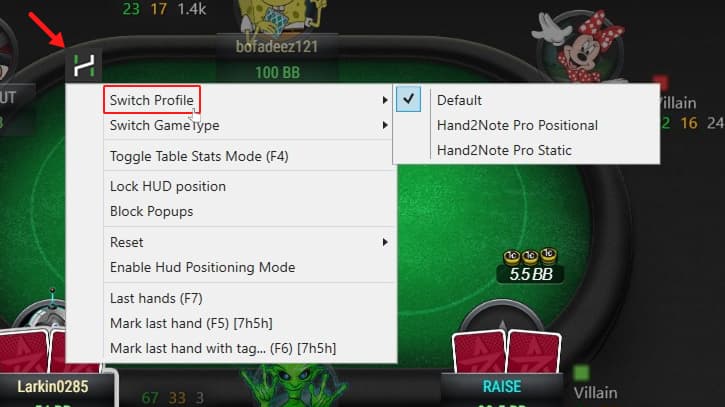
A late-stage 8 BB jam-or-fold spot loads a different stat panel than an early-stage 80 BB cash-like spot. PT4 and HM3 cannot do this without manual mid-tournament toggling.
Tournament players already deal with severe variance in their results, and tightening late-stage decision frequencies is one of the few levers fully under their control.
If you grind MTTs heavily, pair Hand2Note with the MTT strategy fundamentals for strategy and our SharkScope review for the pre-session opponent-scouting layer Hand2Note cannot cover (unknown players in your lobby have no hand-history record yet). Spin and Go and Hyper-Turbo Sit and Go players get a similar advantage.
The format is so push-fold heavy at sub-15 BB depths that having a HUD profile bound to that exact stack range eliminates 90% of the cognitive load.
You read one number (jam frequency by position), make the decision, move to the next table. A note for satellite specialists: ICM stack-depth profiles are even more important when the prize structure is binary.
Hand2Note does not natively compute ICM, but its dynamic stat panels let you see what the population is doing at each stack depth, which is the data ICM solvers themselves rely on.
Who Should (and Shouldn’t) Use Hand2Note
Be honest about your stake level, your volume, and your room mix. Hand2Note rewards specific player profiles and actively punishes others. Buy Hand2Note if you fit any of these:
- Mid-stakes cash grinders (NL100+): The single best HUD on the market for population exploits.
- Multi-card PLO specialists: Native PLO5/PLO6 hand-history parsing is unmatched. PT4 and HM3 still rely on converters.
- High-volume MTT regs: Dynamic HUD by ICM stack depth catches late-stage adjustments that static HUDs miss.
- Asian-app grinders: Pro plan is the only mainstream tracker with first-class support for PPPoker, KKPoker, ClubGG, and UPoker.
- Off-table study addicts: Range Research turns your database into a solver-adjacent study tool.
Skip Hand2Note if you fit any of these:
- Pure microstakes hobbyists: The free Base plan covers your needs. Edge or Pro is overkill until you reach NL50.
- Mac users who refuse to dual-boot: PokerTracker 4 ships a native macOS app. Skip H2N or set up Boot Camp.
- PokerStars-only grinders: The features that justify the subscription (positional HUD, dynamic HUD, badges) are disabled on PokerStars.
Is Hand2Note Worth It in 2026?
Hand2Note 4 is the best poker tracker on the market for grinders who actually need what it does.
Dynamic HUD plus Range Research plus native PLO5/PLO6 is a feature stack that no competitor matches, and the database performance lets you run analytical workflows that PT4 and HM3 simply cannot.
It is also the most punishing choice for the wrong player. If you grind NL10 on PokerStars three times a week, you are paying for capabilities that are either disabled by the room or unused by your sample size.
Our rating: 4.4 out of 5 for the right profile (NL50+ across PLO, MTTs, or Asian apps). Start with the 14-day Pro trial.
If it does not noticeably change how you study off the felt within those two weeks, downgrade to Base or look at the full poker tools roundup for alternatives that better match your style.
Frequently Asked Questions About Hand2Note
Is Hand2Note free?
The Base plan is permanently free at all stake levels and has no time limit. It includes Static HUD, basic reports, hand history storage, and note-taking. Dynamic HUD, Range Research, and Decision Analysis are gated behind Edge ($19.90/mo) or Pro ($49/mo) plans. A 14-day free trial of Pro lets you test the full feature set before committing.
Does Hand2Note work on Mac?
No, Hand2Note does not have a native macOS build. Mac users can run it via Boot Camp (dual-boot Windows) or a virtual machine like Parallels, but both add overhead. If native Mac support is non-negotiable, PokerTracker 4 is the only major tracker with a first-class macOS app.
Is Hand2Note allowed on PokerStars?
Yes, but with major feature restrictions. PokerStars approves Hand2Note as third-party software but disables Dynamic HUD, Positional HUD, Badges, and any context-sensitive stat display while you are at the tables. Static HUD, off-table Range Research, and post-session analysis all work normally.
Is Hand2Note better than PokerTracker 4?
For high-stakes cash, PLO, MTTs, and Asian apps: yes. Hand2Note wins on Dynamic HUD, import speed, database scale, and native PLO5/PLO6. PokerTracker 4 wins on Mac support, full PokerStars compatibility, one-time pricing, and ease of setup. The right answer depends on your stake level and primary room, not on a generic “better.”
Is Hand2Note worth it at micro stakes?
Usually not. The free Base plan gives micro-stakes players everything they actually need to spot fish-vs-reg leaks and run basic reports. Edge or Pro is not worth the cost until you are playing NL50+ with consistent volume of 20,000+ hands per month. Below that threshold, the math does not work.
Can Hand2Note be used for tournaments and MTTs?
Yes, and it is arguably the best tracker for serious MTT regs in 2026. The Dynamic HUD lets you bind different stat profiles to specific effective stack ranges, so you see ICM-relevant frequencies at 12 BB deep versus cash-like stats at 80 BB deep. PT4 and HM3 cannot do this without manual toggling.
Which poker rooms support Hand2Note?
Hand2Note supports most major Western rooms (PokerStars with restrictions, 888poker, Winamax, iPoker network, WPN, Chico, CoinPoker, Champion Poker) and Asian mobile apps (PPPoker, KKPoker, UPoker, PokerBros, ClubGG, X-Poker). GGPoker has banned all HUD use across its network since 2021.
How fast does Hand2Note import hands?
On modern hardware (NVMe SSD, 16+ GB RAM, Ryzen 7 or equivalent), import speed averages 8,000 to 10,000 hands per second. We measured 9,200 hands per second on a 22 million hand database. PT4 and HM3 typically import at 1,200 to 2,500 hands per second on the same hardware.